
TABLE OF CONTENTS
- Check for Existing Active Tickets
- Check For Repeat Failures
- Check Whether the Next Job has Run Successfully
- If the Next Job has not Run Successfully
- Rerunning Failed Jobs
- Important categories of errors
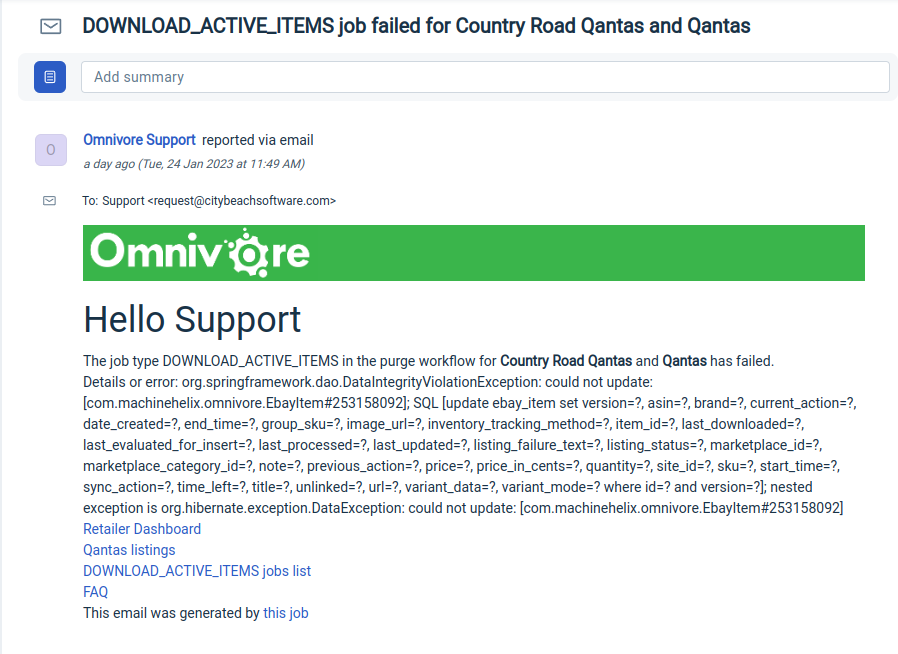
Here's an example ticket with a failure message.
Check for Existing Active Tickets
Before taking action, confirm whether there is already an unresolved DOWNLOAD_ACTIVE_ITEMS ticket for the same retailer.
- If an active ticket exists and is being handled by another agent, delete any duplicate or later tickets.
Check For Repeat Failures
Review earlier closed tickets for the same retailer.
- Look for multiple failures with the same failure reason within a short time period.
- If you see more than a couple of similar failures close together, this is a potential red flag—even if a subsequent job has completed successfully.
Example:
Repeated failures due to an expired eBay token should be investigated. Tokens typically only require renewal approximately every 18 months, so frequent failures for this reason are not expected.
Use common sense when assessing patterns.
- Ask yourself: Does it make sense for this job to be failing repeatedly for the same reason?
- If the pattern seems unusual or inconsistent with expected behaviour, investigate further, regardless of whether the most recent job succeeded.
Check Whether the Next Job has Run Successfully
Use the Download Active Items Job List link in the ticket to go to the list of all the Download Active Items jobs that have run.
Start by checking if the job has run successfully since the failure was reported e.g. for this retailer the next DAI job has been completed successfully.
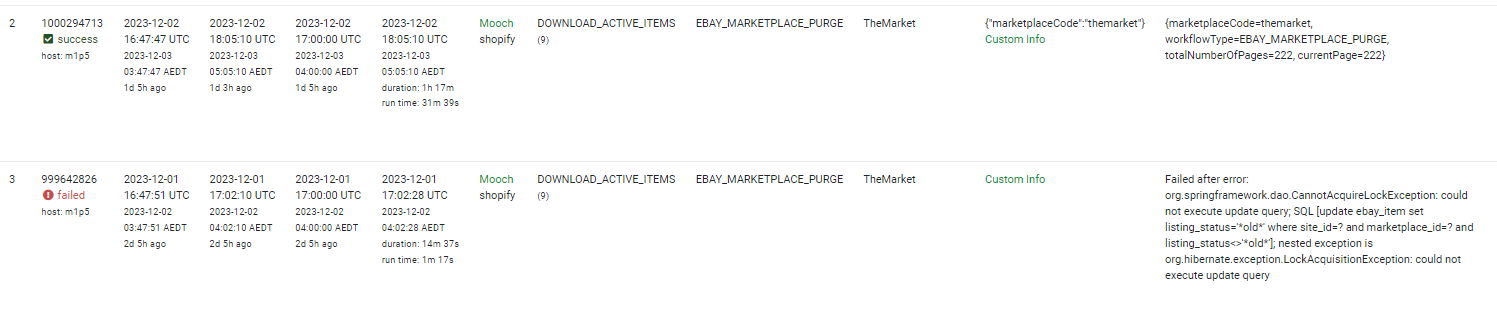
In this scenario, take a screenshot displaying the failed job and subsequent successful execution. Attach the screenshot as a note to the ticket.
Close the ticket with a resolution marked as "Solved by Troubleshooting."
If the Next Job has not Run Successfully
If the next job has not run successfully then you will need to find out why using the list below as a guide.
Rerunning Failed Jobs
If you need to re-run a failed job, you must return to the ticket within 24 hours to check if the job has completed successfully.
It is your job to follow up on the ticket in your queue.
Important categories of errors
If the status code is in the 400 range, then it's likely to be an authorisation issue.
If the status code is in the 500 range, it's an error on the remote server. These are usually transient, i.e. it happens and then it's gone after a while.
A reference for HTTP errors https://developer.mozilla.org/en-US/docs/Web/HTTP/Status
Anything starting with java.lang is most likely an Omnivore bug and will need to be investigated by development.
| Error | Reason | Action |
| Expired IAF token. IAF token supplied is expired. | Authorisation to eBay has expired | Reach out to the retailer to get them to renew the token. Use the canned response Reauthorise Connection to eBay and change the timeframe as needed. |
| Failed after error: com.machinehelix.omnivore.net.RemoteException: statusCode = 504, statusLine = HTTP/1.1 504 Gateway Time-out, message | Time out connection to the marketplace | Click Unfail and monitor progress. If fails again, bring to support meeting or escalate to L2 |
| Failed after error: com.machinehelix.omnivore.mirakl.MiraklException: Unauthorized | Problem with Mirakl account (multiple marketplaces) | Check to see if they are in setup. Check if we have alerted them to the issue with the marketplace. If it has been an issue for over 30 days, then if they meet criteria, pause the integration |
| Failed after error: java.lang.NullPointerException | Bug in Google / OmnCode | Unfail the job and monitor. If it still fails, check to see if there is a ticket in the queue for this retailer, if so add the site URL to it. |
| Failed after error: Assertion failed: assert pageNumber == result.json.PageNumber | | | | | 322 | | | 321 | | [TotalCount:160447, PageSize:500, PageNumber:321, List: | Connection to TradeMe | Check to see if any others have run successfully since, if they have, close the ticket adding a note. If not then Unfail the job and monitor. See point **2 below. |
| Failed after error: org.springframework.dao.CannotAcquireLockException: could not execute update query; SQL...... | Omnivore SQL issue | Check to see if any others have run successfully since, if they have, close the ticket adding a note. If not then Unfail the job and monitor. See point **2 below. |
| Failed after error: com.machinehelix.omnivore.net.RemoteException: statusCode = 401, statusLine = HTTP/1.1 401 Unauthorized, message = {"AppCode":"MSG_ERR_USER_UNAUTHORIZED","ErrorTypeCode":"EUPF"} | Connection to the market issue | Check if they are/were live at the time the job fails. If yes, then re-run. If not, then ask The Market about the status. You can also ensure they are pointing to Prod. |
| Kogan Marketplace. Failed after error: com.machinehelix.omnivore.net.RemoteException: statusCode = 400, statusLine = null, message = Error code 400 | Upload to Marketplace Failed to complete. | Read this ticket, it could be Kogan not accepting a value of some kind, in this case it was shipping of 1500 when the max they accept is 999. |
| Failed after error: com.machinehelix.omnivore.net.RemoteException: statusCode = 500, statusLine = null, message = Sequence contains no matching element Failed after error: com.machinehelix.omnivore.net.RemoteException: statusCode = 500, statusLine = null, message = Error code 500 | Issue at the marketplace | Re-run once, if it fails then escalate to the marketplace If Trade Me this is normally due to them connecting to the wrong Trade Me ID. Verify if they are connected to the correct ID. Get them to re-authorise if necessary. |
Failed after error: java.lang.NullPointerException: Cannot get property 'Head' on null object | TBA | TBA |
Happened for Myer Details or error: java.lang.NullPointerException: Cannot get property 'statusCode' on null object | Issue is connection to Myer, See FAQ | |
Failed after error: com.machinehelix.omnivore.net.RemoteException: statusCode = 503, statusLine = null, message = | Issue with connection to market | TBA |
Details or error: Maximum retries reached, inspect job for more information | TBA | TBA |
| Details or error: org.springframework.dao.CannotAcquireLockException: could not execute update query; SQL [update ebay_item set listing_status='*old*' where site_id=? and marketplace_id=? and listing_status<>'*old*']; nested exception is org.hibernate.exception.LockAcquisitionException: could not execute update query | Omnivore issue | Unfail the job and monitor, if it fails bring to support meeting or escalate to L2. |
Google Product Feed has failed. Details or error: com.google.api.client.googleapis.json.GoogleJsonResponseException: 401 Unauthorized GET https://shoppingcontent.googleapis.com/content/v2.1/0/products?maxResults=100 { "code" : 401, "errors" : [ { "domain" : "content.ContentErrorDomain", "message" : "User cannot access account 0", "reason" : "auth/account_access_denied" } ], "message" : "User cannot access account 0" } | Connection to the market issue | Check the connection to Google GMC |
Failed after error: java.lang.RuntimeException: The requested data is currently not available | Data Issue. | Click Unfail and monitor progress. If fails again, bring to support meeting or escalate to L2 |
| Details or error: javax.net.ssl.SSLHandshakeException: Remote host closed connection during handshake | Connection issue | Click Unfail and monitor progress. If fails again then force a purge as per the How to Deal With Failed Purge Jobs FAQ. |
| org.springframework.dao.DataIntegrityViolationException: could not update: [com.machinehelix.omnivore.EbayItem#.........]; SQL [update ebay_item set version=?, asin=?, brand=?, current_action=?, date_created=?, end_time=?, group_sku=?, image_url=?, inventory_tracking_method=?, item_id=?, last_downloaded=?, last_evaluated_for_insert=?, last_processed=?, last_updated=?, listing_failure_text=?, listing_status=?, marketplace_id=?, marketplace_category_id=?, note=?, previous_action=?, price=?, price_in_cents=?, quantity=?, site_id=?, sku=?, start_time=?, sync_action=?, time_left=?, title=?, unlinked=?, url=?, variant_data=?, variant_mode=? where id=? and version=?]; nested exception is org.hibernate.exception.DataException: could not update: | Likely an Omnivore bug surfaced by retailer data | Assign to L2 for investigation by dev. |
| java.lang.IllegalArgumentExceptioncom.machinehelix.omnivore.net. RemoteException | Issue on the remote side, i.e. marketplace server or eCommerce system | Click Unfail and monitor progress. If fails again, bring to support meeting or escalate to L2 |
| org.springframework.dao.InvalidDataAccessResourceUsageException: could not load an entity | Transient database error | Click Unfail and monitor progress. If fails again, bring to support meeting or escalate to L2. |
org.hibernate.AssertionFailure: collection [com.machinehelix.omnivore.SomethingSomething] was not processed by flush() | Can be either transient or a bug in Omnivore | Click Unfail and monitor progress. If fails again, bring to support meeting or escalate to L2. |
| com.hazelcast.core.HazelcastInstanceNotActiveException: Hazelcast instance is not active! | Transient error. Can occur when the servers are restarted | Click Unfail and monitor progress. If fails again, bring to support meeting or escalate to L2. |
- *To turn off alerts, navigate to Settings->Administration->Advanced ->Tick box "Don't send email alerts for failed purge jobs" and update.
- **When there is a temporary loss of connection, say a few days, turn off alerts as per (1), set the ticket to pending and check back in a few days to ensure the retailer has re-auth'd, then close.
- When closing the ticket please add notes that outline what you did, how you fixed it, and why you are closing it.
- If you did resolve it be sure to turn the alerts back on.
From Radu June 2022.
There currently is a scenario that will create the job when it shouldn't, ie during rego or adding a new marketplace (edited)
How can you tell?
The job was created by a user, and there's only one job in the list and the workflow name is EBAY_MARKETPLACE_INSPECT instead of the usual EBAY_MARKETPLACE_PURGE
eg: https://support.omnivore.com.au/a/tickets/85626
A code change would be to check that there is no linked account yet and do not create the job (trello created for this change).