
TABLE OF CONTENTS
- Process
- Important Product jobs:
- Important Order Jobs
- Following up with Retailers
- Types of Jobs - Explanation
- AUTOMATIONS
Process
Daily jobs monitoring is currently shared between Bill and Jo.
- Go to Dev admin - Jobs - Activity tab on each cluster e.g.
- https://m1.omnivore.com.au/job/activity?siteId=&minutes=1440&orderBy=importance
- https://m2.omnivore.com.au/job/activity?siteId=&minutes=1440&orderBy=importance
- https://m5.omnivore.com.au/job/activity?siteId=&minutes=1440&orderBy=importance
- https://ebaylink.omnivore.com.au/job/activity?siteId=&minutes=1440&orderBy=importance
- https://traderunner.omnivore.com.au/job/activity?siteId=&minutes=1440&orderBy=importance
- https://catchfeeder.omnivore.com.au/job/activity?siteId=&minutes=1440&orderBy=importance
- https://m8.omnivore.com.au/job/activity?siteId=&minutes=1440&orderBy=importance
- Show 2 days if Monday, otherwise 1 day if it is a Tuesday to Friday
- First Focus on failed jobs and look for a high number of jobs failing, also consider % of jobs failing e.g. 100k of order jobs about only 100 failing is ok.
- Review the Continuing jobs, what we are seeing are jobs running over normal time. Use the + to see which retailers are impacted and check those that are failing.
- Review the retailer; determine why is it failing, if don’t need it suspend the account.
Important Product jobs:
- GET_ATTRIBUTES is the first step in product
- GET_PRODUCT_FEED - usually a custom job so could impact enterprise retailers
- RETRIEVE_PRODUCTS_VIA_API Woo, Magento and some Shopify
- QUEUED_PRODUCTS_BATCH_IMPORT if have a consistent failure, that retailer will not have products updated which impacts out of stock orders, price changes etc. Used by Bigcommerce, Shopify and Woo.
- SINGLE_PRODUCT_UPLOAD - only applies to eBay; if failing could result in oversells, products out of date etc
- SINGLE_PRODUCT_ZERO - eBay only, sets inventory to 0, if failing, could result in oversells
- "4 Inventory" Job
Important Order Jobs
- ORDER POLL: IMPORTANT: as a % low; look at retailers that are failing; small number of failures e.g ignore. Focus on large number compared to total number at retailer level
- UPLOAD_SHIPPED_ORDERS_TO_AMAZON - orders won't be marked as shipped in Amazon; retailer won't get paid for the order if after 30 days.
Information about:
- MAGENTO 2 STATUS_CHECK - If this fails the connection to Magento 2 is broken. BUT no email is generated so the seller does not know. The dev code states that: // wait at least 12 hours after the connection check failed, same as saying skip at least one time failure.
- So if it continues to fail repeatedly there is an issue that needs to be looked at.
Following up with DF Retailers
Create the ticket in Freshdesk
- Check to see if there is an existing ticket, using the 'Open Monitoring Tickets' filter: https://citybeachsoftware.freshdesk.com/a/tickets/filters/17000168325 - search based on retailer name
- If a ticket doesn't exist for the issue, create a ticket from here; https://citybeachsoftware.freshdesk.com/a/tickets/new use the Feeds/Jobs failing template i.e
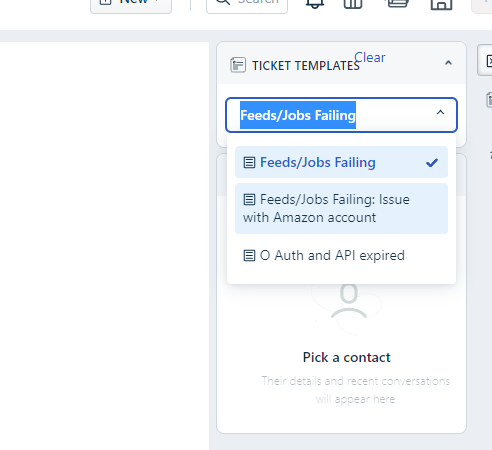
- You will need to add a contact - I find it best to add yourself at this point and take the ticket as if it goes to DF, you can address it. If you see an issue across multiple retailers set it to waiting on DF, there is no need to put in to L2.
- it isIf it's an enterprise retailer, assign the ticket to Krystal with notes, but if its an issue on Omnivore side don't assign it to the retailer, they will get an alert and start asking questions.
Types of Jobs - Explanation
NOTE: this should be documented somewhere else, I'd say within the app. TBD.
| Job Type | Explanation | Workflow | Importance |
| 0 set up site | e.g product import, omnivore processing, marketplace update | HIgh Med Low | |
| 1 order batch | |||
| 1 order change poll | |||
| 1 order check | |||
| 1 order pending shipped check | Don't bother unless very high. | ||
| 3 map products | |||
| 3 product full | |||
| 4 inventory | |||
| 9 inventory upload | |||
| 9 product full upload | |||
| AFTER_PRODUCTS_IMPORT | |||
| ASYNC_PRODUCT_ACTION | Often false positive - ignore. | ||
| AUGMENT_PRODUCT_DATA | |||
| DISCOVER_PRODUCTS | |||
| DOWNLOAD_ACTIVE_ITEMS | |||
| GET_ATTRIBUTES | |||
| GET_CATEGORIES | |||
| GET_PRODUCT_FEED | |||
| GROOM_RETAILER_CATEGORIES | |||
| INSERT_PURGE_JOBS | |||
| inventory generate | |||
| MAP_PRODUCTS_TO_MARKETPLACE_CATEGORIES | |||
| marketplace categories | |||
| METADATA_TO_MULTI_VARIANT_PRODUCT | |||
| METADATA_TO_PRODUCT | |||
| MONITOR_PRODUCT_UPLOAD_TO_CATCH | |||
| MONITOR_PRODUCT_UPLOAD_TO_MIRAKL | |||
| MONITOR_PRODUCT_UPLOAD_TO_TRADESQUARE | |||
| order poll | |||
| PARALLEL_PROCESS_ACTIVE_ITEMS | |||
| PARALLEL_PROCESS_PRODUCTS | |||
| PARALLEL_VALIDATE_INVENTORY | |||
| PARALLEL_VALIDATE_PRODUCTS | |||
| PROCESS_ACTIVE_ITEMS | |||
| PROCESS_INVENTORY_FEED | |||
| PROCESS_QUEUED_PRODUCTS | |||
| product bundle | |||
| product process | |||
| PURGE_PRODUCTS_FROM_AMAZON | |||
| PURGE_PRODUCTS_FROM_CATCH | |||
| PURGE_PRODUCTS_FROM_TRADESQUARE | |||
| QUEUED_PRODUCTS_BATCH_IMPORT | Importing webhooks | ||
| QUEUED_PRODUCTS_BATCH_UPLOAD | Uploading Deltas | ||
| RETRIEVE_PRODUCTS_VIA_API | First job as part of full product import | ||
| revalidate all products | |||
| single inventory upload | Ignore | ||
| single product kill | |||
| SINGLE_PRODUCT_IMPORT | |||
| SINGLE_PRODUCT_UPLOAD | |||
| SINGLE_PRODUCT_ZERO | |||
| SLICE_PRODUCT_FEED | |||
| STATUS_CHECK | checks all connections | ||
| store inventory delta import | |||
| store inventory upload | |||
| SUSPEND_SITE | |||
| TERMINATE_INTEGRATION | |||
| UPLOAD_CANCELLED_ORDERS_TO_AMAZON | |||
| UPLOAD_ORDERS_TO_PEG | |||
| UPLOAD_PRODUCTS_TO_AMAZON | |||
| UPLOAD_PRODUCTS_TO_CATCH | Check anything running more than 4 hours. | ||
| UPLOAD_PRODUCTS_TO_MARKETPLACE | |||
| UPLOAD_PRODUCTS_TO_TRADEME | |||
| UPLOAD_PRODUCTS_TO_TRADESQUARE | |||
| UPLOAD_PRODUCTS_TO_WESTFIELDDIRECT | |||
| UPLOAD_SHIPPED_ORDERS_TO_AMAZON | |||
| UPLOAD_SITES_TO_PEG | |||
| validate inventory | |||
| validate products | |||
| validate products incremental | |||
AUTOMATIONS
Bill wants to do some type of automations on these ones:
https://citybeachsoftware.freshdesk.com/a/tickets/113567 - single product zero
https://citybeachsoftware.freshdesk.com/a/tickets/127082 - upload to Amazon