
We will be migrating the top 40 sellers from the Omnivore Shopify App to an app created by the Retailer in the Shopify Dev Dashboard.
Key points for the Seller
- In September Shopify released the new Dev Dashboard - a central hub for creating and managing Shopify apps.
- This enables sellers to connect to Omnivore outside of the Shopify App store
- Retailers will be able to login directly to Omnivore without going via Shopify. They will be able to have multiple logins.
- As a result, we can extend alternative enterprise pricing plans, bill in USD and offer invoice and credit card payment intsead of via the Shopify App Store.
- Shopify have also recently changed their agreement with Omnivore and we will be required to pay 15% to Shopify of all monthly Omnivore charges - this charge is unsustainable in the long term so instead we would like to offer a better rate to our retailers instead of increasing our fees in line with Shopify.
- NB: NOTHING else changes, its simply how Omnivore is authorised and connected to Shopify. All product, inventory and order updates will continue to sync as they do now.
TOP RETAILERS:
Shpoify High Value Custom APp.xlsx
Updated list as at 19 Jan based on December: https://citybeachsoftware.sharepoint.com/:x:/s/CBSInternal/IQDQLk5RadYAQI4QdW8oXzzgAZFgGzW9vmBtu8OI1jcwYws?e=48qK15
Steps to go from Public app to Private app
Prerequisites:
The Omnivore or eBay LINK Shopify app is already installed and the retailer can login to Omnivore and navigate the app, ie there is no "billing blocking" happening.
NB: Billing: Make sure there are no outstanding/unpaid shopify invoices. If they have unpaid invoices and they can be paid, process them. If they want to be invoiced via xero - need to know how to set that up. KRYSTAL to follow up.
| Step | Omnivore Admin | Retailer |
| 1 | Create a new direct login for Retailer. Can not be the same as existing, can be changed later. | |
| 2 | Verify that direct login works | |
| 3 | Go to Settings and Make sure the RELEVANT Product Import options for the retailer are ticked.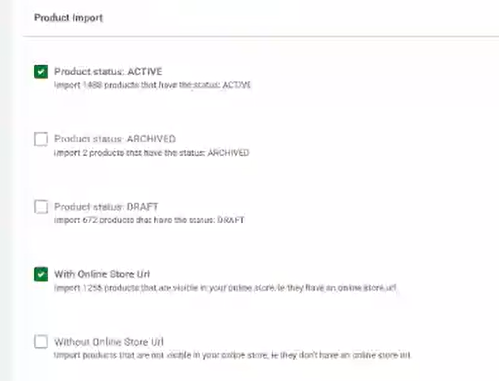 | |
| 4 | In the Shopify feed config page, enable transition to private app. The Private app credentials empty fields should be then visible. At this point, the app is still connecting via the existing integration until both credentials are entered. | |
| 5 | Create private app as per screenshots below | |
| 6 | Enter the private app credentials into the Omnivore Shopify config screens and verify that the connection works. Notify Omnivore Support. | |
| 7 | Logout from Omnivore | |
| 8 | Change the plan to one that does not have SHOPIFY as a payment method. If the new plan has CREDIT_CARD as the only payment method, the retailer may be required to enter the credit card details next time when they login to Omnivore. Remove the Shopify Billing that is set up in Omnivore under Payment Method - click red button DELETE LOCAL SHOPIFY CHARGE | |
| 9 | Uninstall the Omnivore app. | |
| 10 | Login to Omnivore using the direct login. If prompted, enter credit card details. Verify again that the connection works. | |
| 11 |
Doing the above activities in a different order or missing a step might lead to:
- Problems with the connection
- Problems with the "billing blocking"
- Problems with the actual invoicing and payment
Check Shopify Product Import Permissions
Steps to go from Private app to Public app
Prerequisites:
None
| Step | Omnivore Admin | Retailer |
| 1 | Install the Omnivore app from the Shopify app store. This action will clear all private app settings in Omnivore and the integration will start using the public app access token. | |
| 2 | Change the plan to one that has SHOPIFY as a payment method. (optional, though not tested, I expect billing will work with non-Shopify plans, except obviously we won't charge them via Shopify charge) |
To Migrate a Seller:
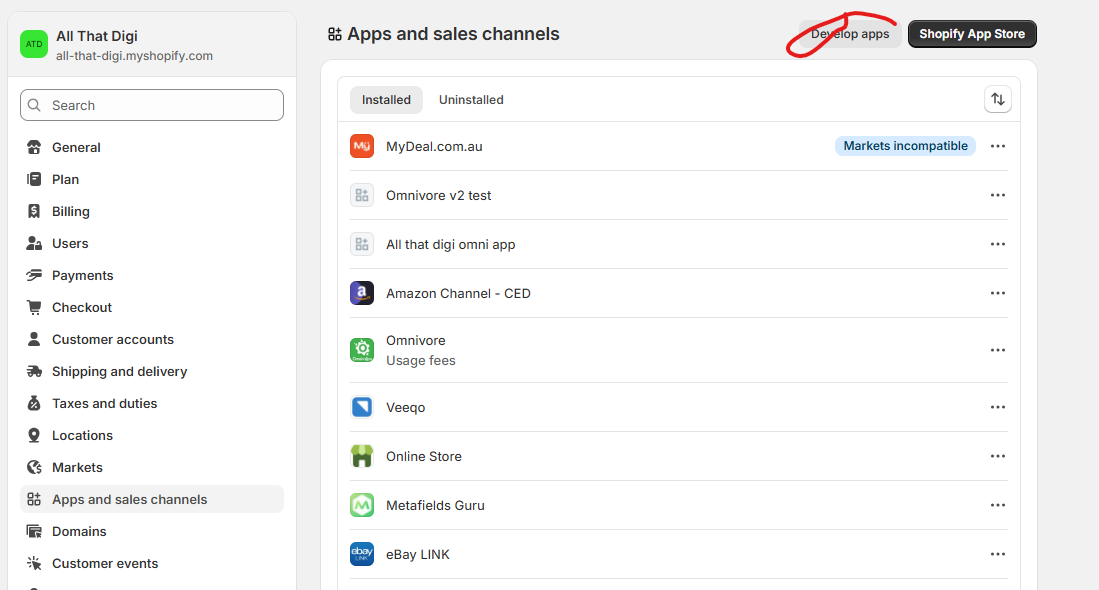
- RETAILER: Login to Shopify and go to Settings - Apps and Sales channels - click Develop Apps
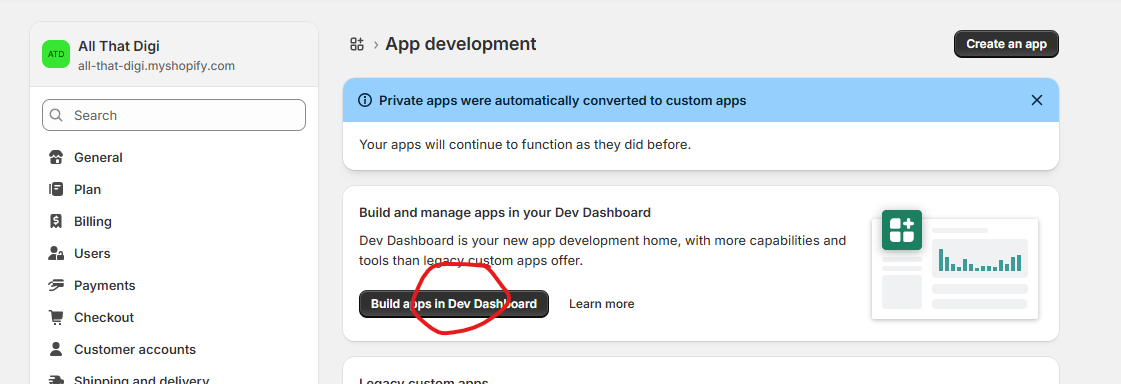
- RETAILER: Click Build apps in Dev Dashboard
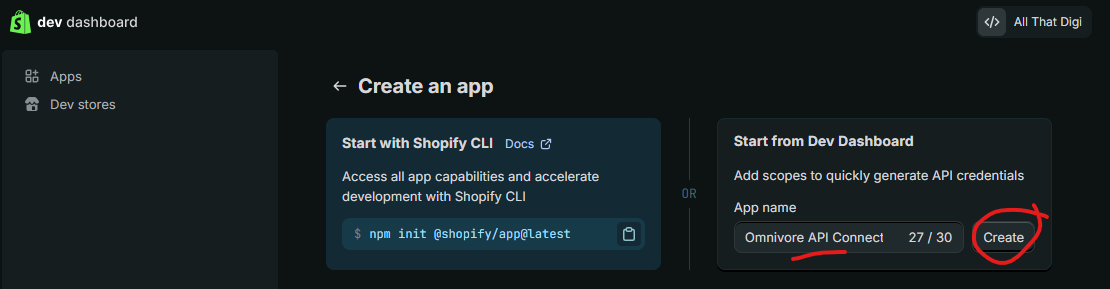
- RETAILER: Click Create app
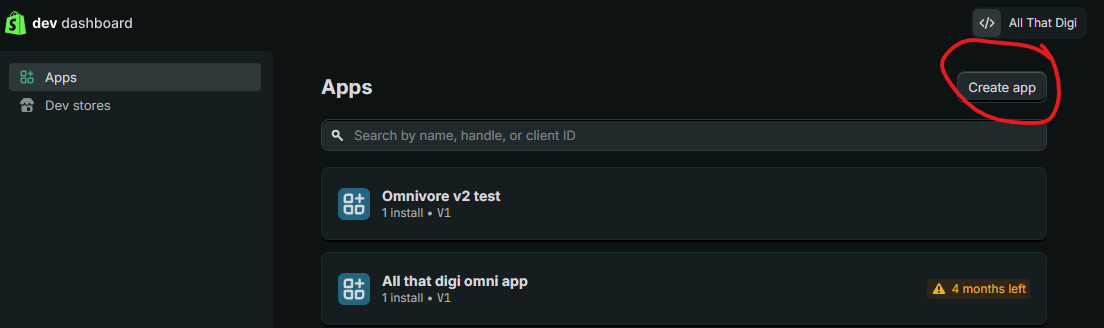
- RETAILER: Under Start from Dev Dashboard enter App name Omnivore API Connection App and click Create
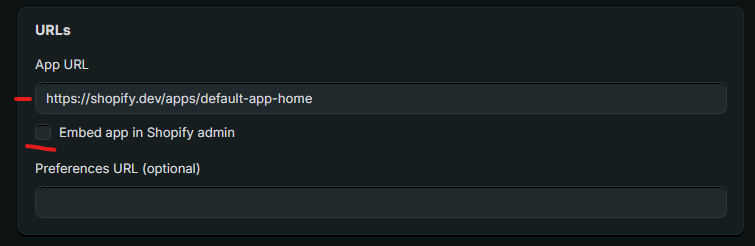
- RETAILER: Enter https://shopify.dev/apps/default-app-home in the field App URL
- RETAILER: Uncheck the box Embed app in Shopify admin - THIS DOES NOT NEED TO BE TICKED
- RETAILER: Webhooks API Version should be the latest i.e 2025-10
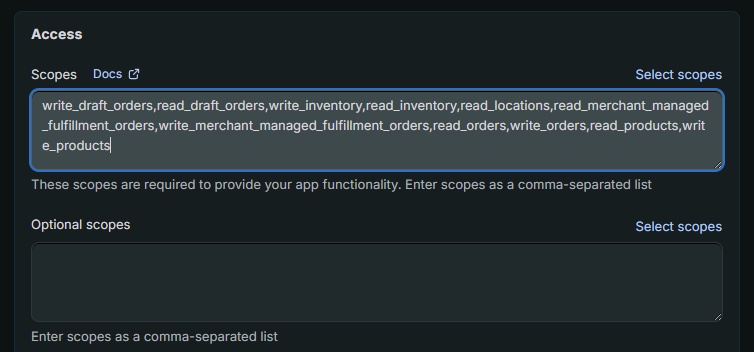
- RETAILER: Paste the following scopes into the text box write_draft_orders,read_draft_orders,write_inventory,read_inventory,read_locations,read_merchant_managed_fulfillment_orders,write_merchant_managed_fulfillment_orders,read_orders,write_orders,read_products,write_products
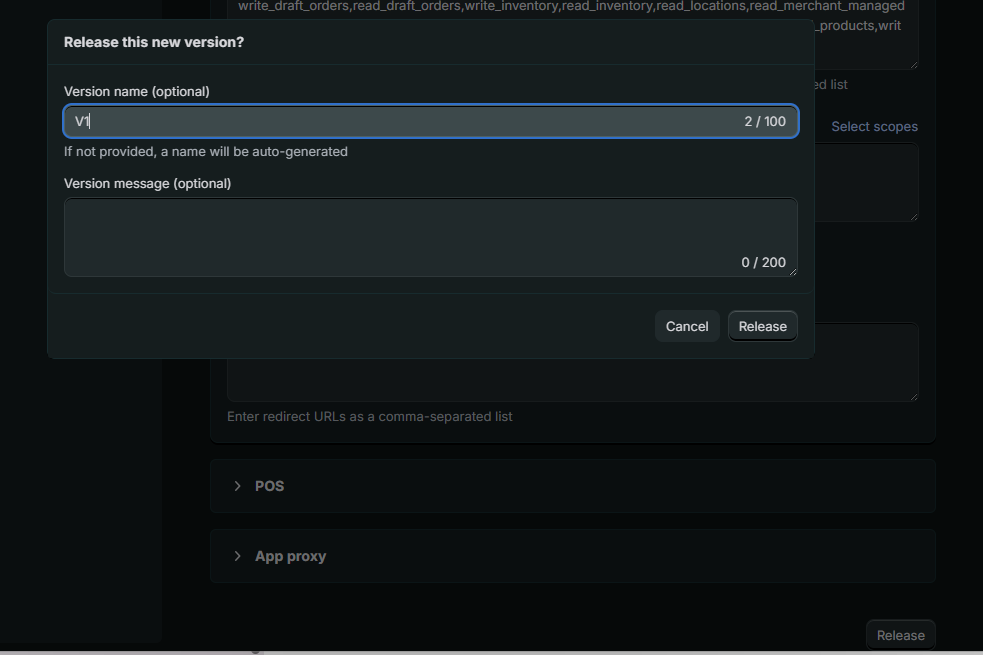
- RETAILER: Click Release and enter Version name V1 and click Release again.
- RETAILER: In the left hand nav, click Home the Install app
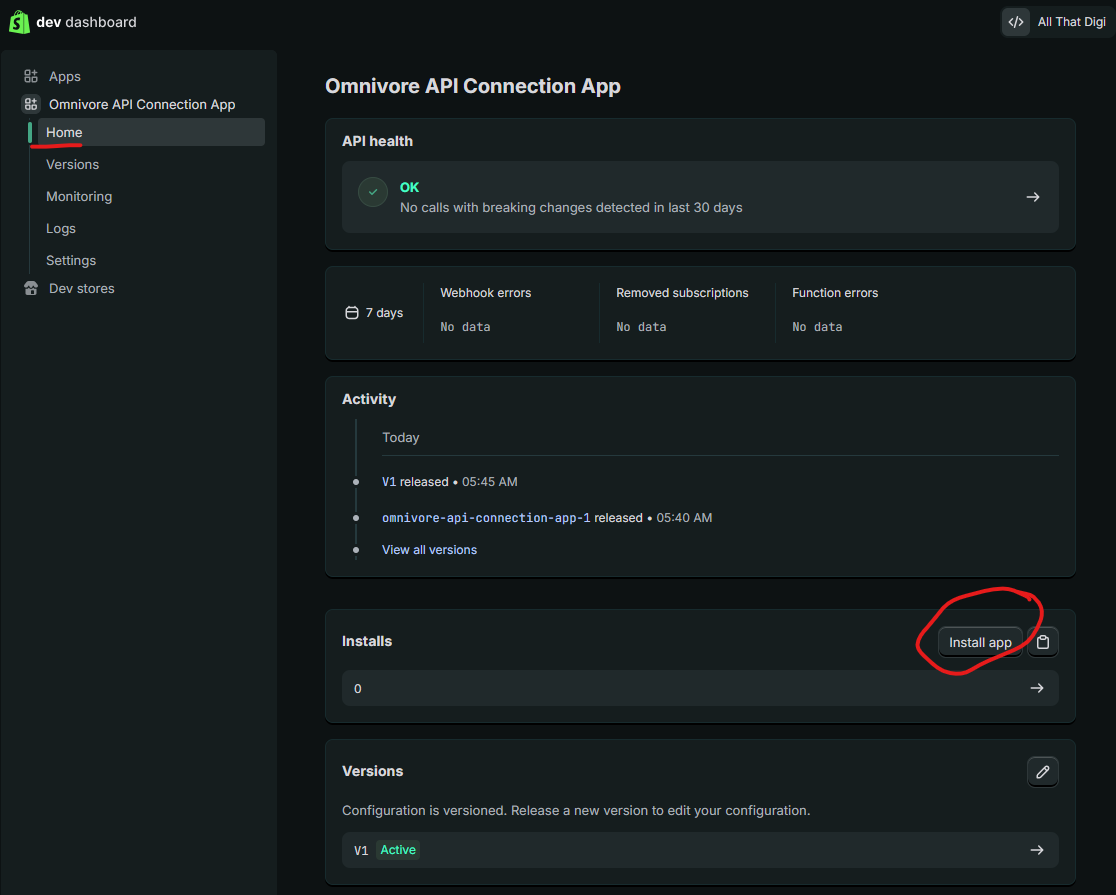
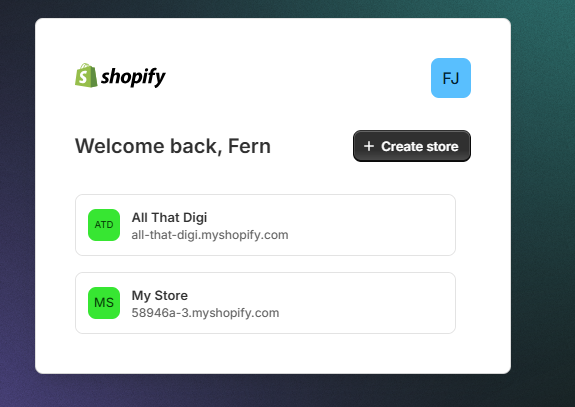
- RETAILER: Follow the prompts - they may be asked to choose a store:
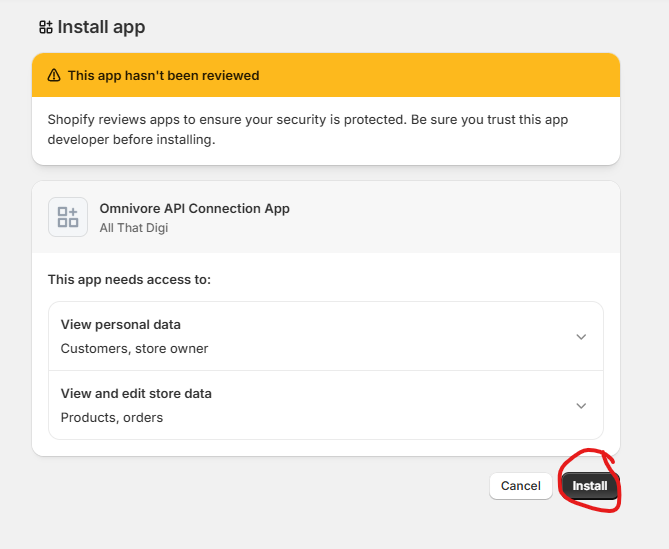
- RETAILER: Click Install
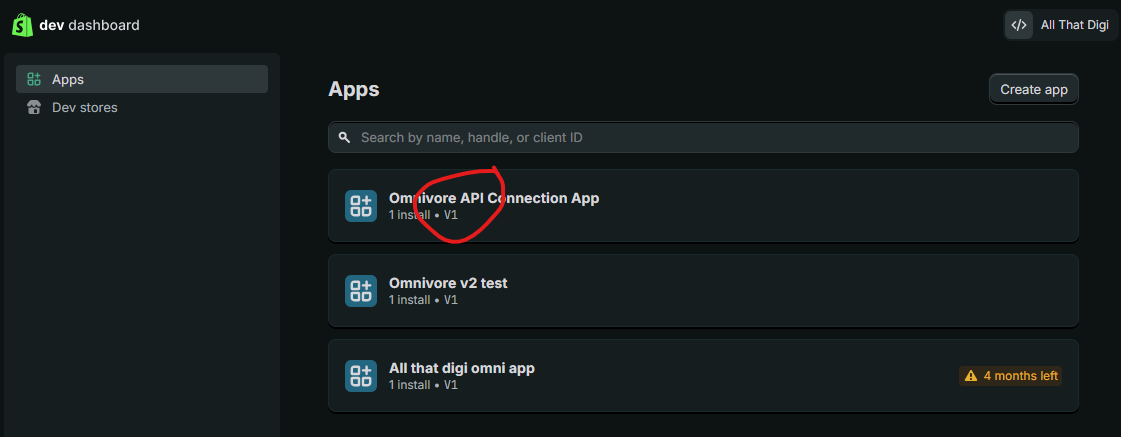
- RETAILER: Return to the Dev Dashboard (see above steps 1-3), click on the app Name:
- RETAILER: Go to Settings and copy the Client ID and Secret and enter i Omnivore.
- RETAILER: :Go to Omnivore account in Settings - Shopify Feed - General - Paste App Client ID and Secret (update screenshot)
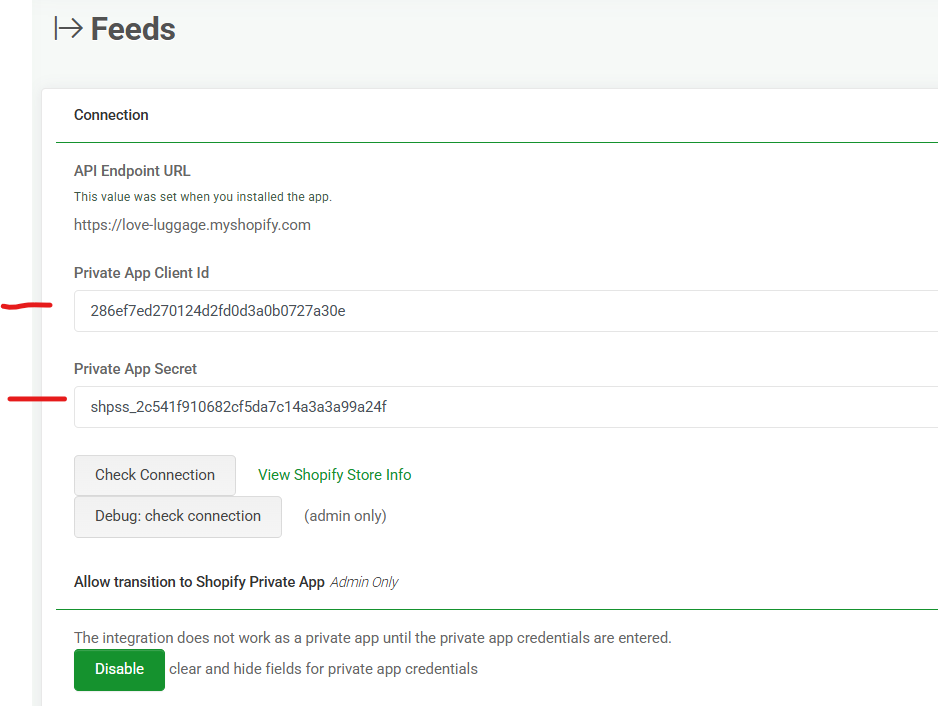
- RETAILER: Check Connection
Comms for the Seller
Subject: Important update: Improve your Omnivore–Shopify connection (action needed by 31 January)
Hi <Name>,
Shopify recently released a major update — the new Dev Dashboard. This gives retailers a central hub for creating and managing custom apps inside Shopify.
With this new feature, you can now create your own app in Shopify and connect directly to Omnivore using a secure Client ID and Secret. This replaces the need to use the Omnivore public app in the Shopify App Store.
We’re now moving our largest retailers over to this new, more flexible setup.
Why we’re making this change
Creating your own Shopify app and connecting via the Dev Dashboard gives you:
- Better control and stronger performance
- Greater security and control over your API permissions
- Higher stability and throughput for product, inventory and order sync
- More flexibility for advanced workflows now or in the future
- Cleaner long-term maintenance, especially if you manage multiple Shopify stores
- Zero impact to your listings or orders — we run both connections in parallel until everything is validated
Better pricing and billing options for you
Moving to your own Shopify app also allows us to improve how billing works:
✔ Direct billing in AUD - No more USD payments or currency fluctuations.
✔ Access to enterprise volume pricing - We can offer larger plans and more competitive rates.
✔ Flexible payment options - Pay by Visa, Mastercard, AMEX, or invoice.
✔ Avoid upcoming Shopify fees - Shopify has changed their agreement with Omnivore and will begin charging 15% of all monthly Omnivore fees processed through the App Store. This is not sustainable long-term, and instead of raising prices, we’d prefer to give our retailers better rates — but that requires moving billing outside of Shopify.
Because of this, we need to complete your transition before 31 January.
What you need to do
To make this seamless, we’d like to walk you through the 5–10 minute setup via a screenshare.
? Book your session here: <insert link>
A member of our team will guide you through creating the app in the Shopify Dev Dashboard and connecting it to Omnivore. We’ll also test both connections in parallel to ensure zero disruption.
The sooner you switch, the more you save on your Omnivore bill.
If you have any questions or would like to understand the change in more detail, just reply to this email — we’re here to help.
Thanks,
<Your Name>
<Title>
Omnivore
