
Internal only.
Error example:
| Failed after error: com.machinehelix.omnivore.net.RemoteException: statusCode = 200, statusLine = HTTP/1.1 200 OK, message = {"errors":[{"message":"Internal error. Looks like something went wrong on our end.\nRequest ID: 430bdaea-24c3-45dc-9147-21e2fd140537-1723680493 (include this in support requests).","extensions":{"code":"INTERNAL_SERVER_ERROR","requestId":"430bdaea-24c3-45dc-9147-21e2fd140537-1723680493"}}]} |
Original ticket for extra information:
https://citybeachsoftware.freshdesk.com/a/tickets/143354
Issue:
In this case the job failed due to one product. Dev can pull the information for you to show which product is the problem one causing the issue.
When they do this and give you the product you can go here: https://m1.omnivore.com.au/queuedProduct/list?retailerCode=simply-wholesale-2&productId=4399798059059&sku=&productName=&type=&processed=&ignored=&failCount=&error=&max=100&_action_list=Search
Search on the problem product and click ignore to remove that product from the job so it will run.
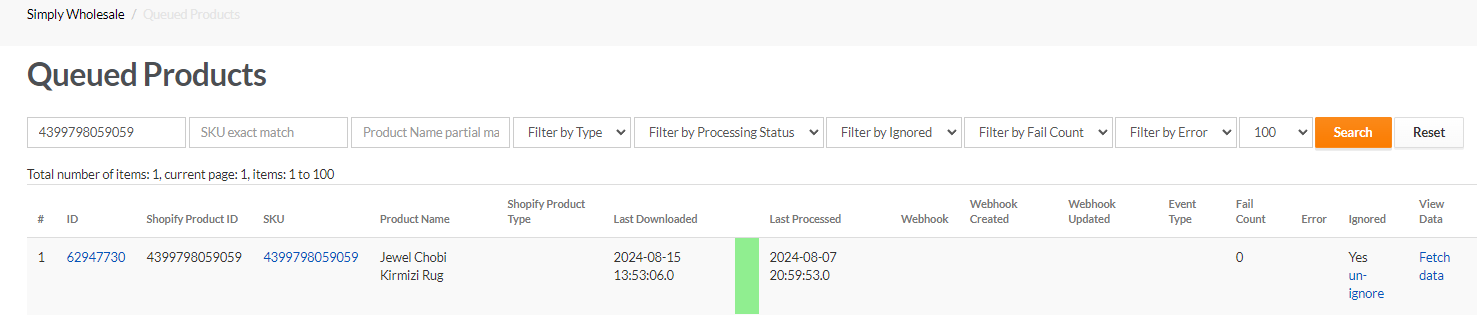
Let the job run again, keep the product ignored.
If this issue is not fixed the queued product batch import job would continue to fail which would result in products not being updated.