
Internal.
TABLE OF CONTENTS
Pre-Reading
Originated from here: https://support.omnivore.com.au/a/tickets/109956
Example account - https://m2.omnivore.com.au/dashboard/no-frills-electronics
This FAQ will provide an overview of jobs that run when:
- We have to take a listing down because it is OOS
- We have to take a listing down when it is Inactive
- Jobs that must run including the order
- What to look for when checking these types of jobs.
Details for Troubleshooting
Job Flow
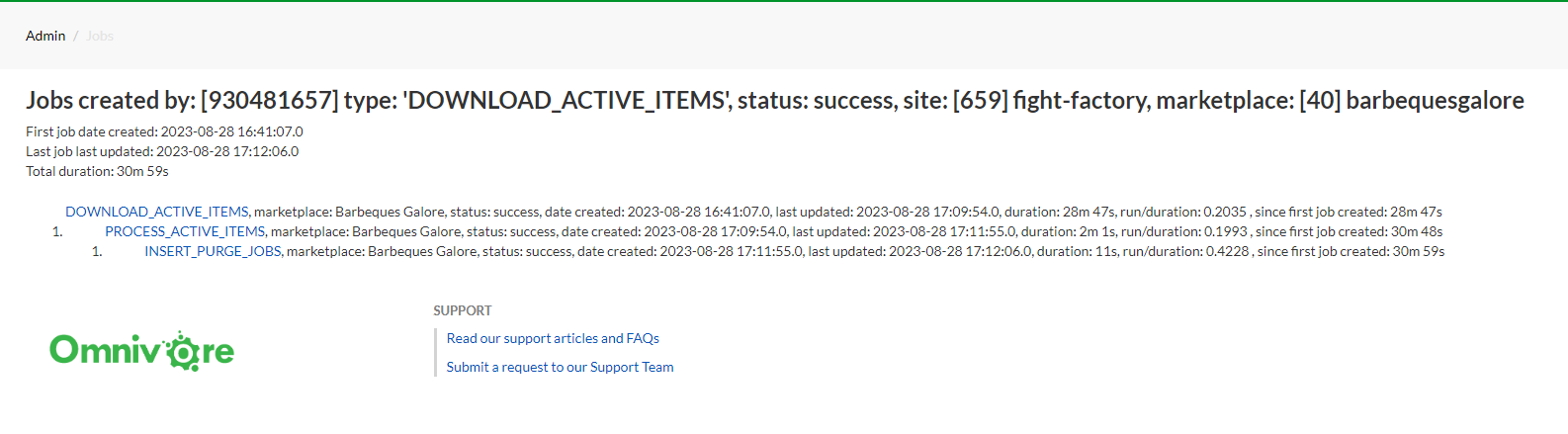
- First look for a (Download Active Items) DLAI job.
- After that runs there is a Process Active Items job
- Then the Insert Purge Job
** This is the basic flow for all markets (there may be variations, especially if they have parallel processing threads, more jobs may show in this basic work flow)
If these 3 jobs have not run or have failed to run this is usually the reason a product has not been delisted.
The image below shows a successful job list, to get to this screen you navigate to the Download Active Item Jobs - click List Children as Tree.
In this example all jobs ran successfully so you would assume the listing should have been taken down.
If any of these have not run or failed find out why.
Refer back to the DLAI and Insert Purge Job FAQ's.
Other things to look for:
- Delays, look to see if they are still active and stalled.
- Look to see if they are taking longer than normal.
- Look for any other failed jobs in the overall workflow. E.g. if a full product import failed then the above child workflow is not going to get created.
If your findings are still not obvious as to the fail point that has caused a product to not be taken down include your findings and escalate to Level 2.