
This is not published as not directly required now.
However some processes in this may pertain to the Omnivore Account duplication process for reference and updates on this duplication method that I need to complete. See here:
TABLE OF CONTENTS
- Check List Before Shazam
- Check List After Shazam
- Check List Completion
- Check List when Adding Marketplace ONLY (acct already on M1)
- Additional Reading
- Attention:
Check List Before Shazam
- Check Dashboards, check M1 has the markets added.
- Check - groups, actions, promotions, shipping are all on the M1 account
- Check change log ensure transfer complete
- After the M1 import has run and the products have been imported check the product number match up. Check category mappings. Use the View All Mappings Page.
- Check jobs, no fails.
- If something feels odd, get a 2nd opinion.
- Use the ticket execution task to setup the ticket - it is called TR Omnivore migration
- Use Shazam to complete the migration.
Check List After Shazam
- Check the TR account first:
- Trigger red import on M1 acct.
- Check M1 acct that the import order date has been added correctly, check webhooks are enabled.
- The account may be in the status 'Not In Production', so once Shazam has been run you will need to change the site to be In Production.
- Update ticket
- Check jobs again.
- Monitor.
Check List Completion
- Change ticket contact to retailer. Use canned response to contact seller.
- Update FD contact with new URL.
- Close ticket.
- M6 remains active, all accts will be suspended after migration.
Check List when Adding Marketplace ONLY (acct already on M1)
- Any problems as you go through this, check firstly with Radu, there could be a fix in this article but errors, ooops or inaction is mostly an FYI to Radu.
- From the M1 Acct add the M6 Marketplace Config to the M1 Account, go to Retailer Admin - New Dashboard - Add Marketplace (trade me). This copies the TM config from M6 to M1.

- Check it added correctly. If it happened very quickly, there could be an issue.
- Check the change log if you are unsure.
- See M6 account to check general settings and config including groups, actions and shipping. Shipping policies and product groups/actions on M1 will have Trade Runner prefixed to the name.
- Check for exclusions and other general settings.
- Visual check of product numbers (eg block and needs mapping)
- Bundles are being added manually,
- Check Currency Conversions, add manually if needed, use current date when adding the new custom currency on M1.
- Check View ALL Mappings on M6 and M1 they must and should match exactly. (Also see known issues section below)

- Orders - check the last order time stamp on M6, you can also check on M1 behind the show me the magic button screen - put date in the do not import orders field on M1. See screen capture ble
- Hit Update and double check time/date has remained.
- Make product cron on M6 to be be 0 0 1 1 1 ? (check for leading spaces when you paste).
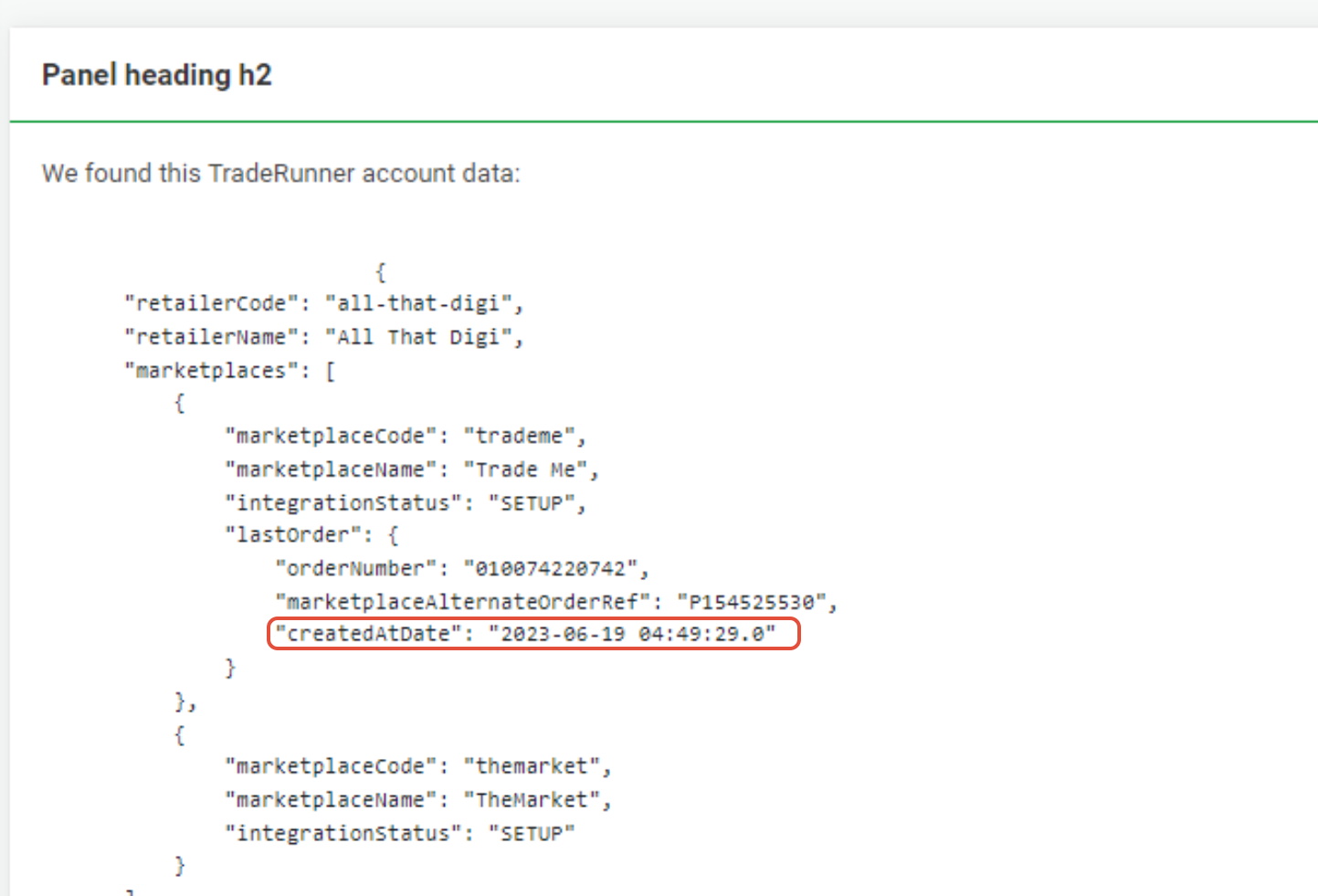
- For a low order retailer (one order a week) just use the date not time. You only need need the full time stamp if they have many orders a day.
- Make the M6 import order date a day/month in 2038 or future, eg 19 Jan 2038.
- Look for unshipped orders on M6, if all shipped and no orders are in flight, then you can pause M6 TM market (or suspend account if only trade me).
- Make M1 Trade Me Integration status to Active (do not need to hit Start Selling)
- Check Account Summary to make sure they may or may not need a plan change. If unsure ask Fern.
- Run an import on M1. (RED)
- If there are lots of products keep an eye on the import job, especially if you think it could take more than a day.
- As of today (3/8/23) Bundles and Custom Currencies are manually added by Support Team.
Additional Reading
The Omnivore change log will tell you when the migration/setup is complete. The bigger the account, the longer it will take to be complete and therefore appear in the change log.

An email will trigger when the Transfer Starts and the Transfer Completes
If after a long time the transfer has not completed it may need investigation, if the account is blank with no marketplaces added you may need to manually add the marketplaces to the account. GET A 2ND OPINION BEFORE PROCEEDING.
Attention:
The "transfer" is only copying site and marketplace settings, it is not copying the actual products. These have to be imported via the usual jobs. This is why one of us must manually ensure the products are in the m1 account before hitting the magic button, see below.
Check the m1 Omnivore account, the order import date will be populated to show as a date, but it has a time stamp attached to it that we cannot see. DO NOT EDIT IT AND DO NOT HIT UPDATE ON THAT PAGE. For about a day, that order import date has to remain as is. It is the date that was generated when the account was migrated.
Orders
The key thing to check is the 'do not import orders before this date' field, after the magic button has been clicked these fields will be populated to manage the orders so they are imported into Omnivore not Trade Runner based on the date and timestamp.
Known Issues (changing daily)
Failed Migration/Manual Fix: see below section Repair Steps For A Failed Migration. Radu has developed a step by step process to manually fix a broken migration. Run this process before you click Shazam.
Category mappings - If mappings don't match, check all mappings look the same on both clusters using the View All Mappings page. Check inventory levels they may be zero or inactive in which case if we have imported a No Inventory product it won't be mapped to a category as it has no inventory (it would have been mapped in TR as it had stock at some stage). Also as the products come back in to stock level greater than 0 they should get the category re-assigned.
No Markets Added: New Retailer Dashboard page, try this: (definitely check with Radu on when not to use this). This cannot be used if the migration has failed.

Bundles: are not transferring because we cannot create bundles as skus (the products) are not there and bundles cannot be created without a SKU. Also the new product sku the bundle creates eg BUNDLE-1403 from M6 may already be on M1
Radu is determining the amount of TR Shopify Sellers with bundles to understand if dev or a manual fix is best.
Escalation process - when we see an issue let Radu know in General with @Radu Vissarion, set ticket to Waiting on Dev.
Blocklisted - if an m6 account has block all new products by default ticked; new products on m1 will be blocked including products that are unblocked. Support will need to manually align what is blocked/unblocked between M6 and M1.
Double click transfer - see below section (repair steps for failed migration) and go through the manual fix.
Ignored Retailer Categories - known issue, affects mapping products. Radu is investigating a dev fix.
Repair Steps For A Failed Migration
Scenario for error - Seller double clicked which starting Migration twice. If you check the change log and you can see transfer started twice it means this fix may be needed.
- M1 - check Shopify connectivity
- Check Shop API connection by going to Retailer admin >> New Dashboard >> RESTAPI>SHOPAPI, if the page opens, its connected. Click back to the previous page.
- Get and copy access token in M1 make sure you include the shpat_ when you copy the token, put into notepad + M1 dashboard URL. You will need this after you copy the acct.
- Go to sites find the site.
- Select the site, Go to Actions and Delete entire retailer
- On the next screen delete site use the lower button "delete the site only" (keeps user) wait for delete job to complete, confirm job finished and site deleted.
- After the delete job has completed successfully do a search check on the sites page to ensure the account has been deleted.
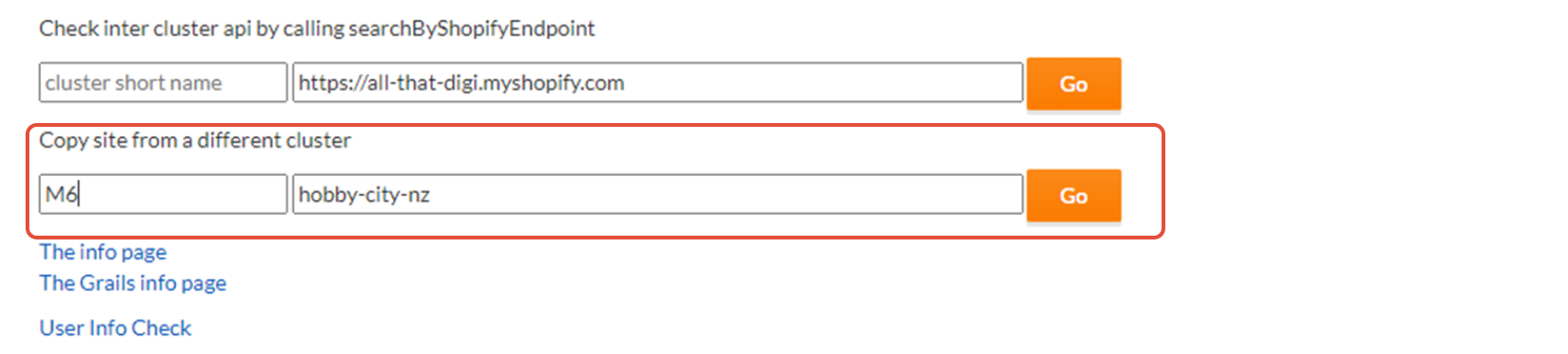
- On M1 Go to Dev admin >> mixed stuff - do the copy process from m6 to create m1 acct, see below image. Do not click any links on that page if you don't know what they do. Please.
- After you hit GO it could take a few minutes, but the page will eventually refresh to the new account Dashboard.
- If it times-out you can try and search for the new account.
- Go to Retailer Admin - New Dashboard and paste in/over ride the Access Token you copied into the new M1 account. The access token you are replacing will match what is on M6. You have to include the shpat_ before the number.

- Verify the Shopify connection by clicking Shop API
- An import job may be running at this point, if not click Import from Shopify.
- This does not put a notice on the M1 or M6 account Dashboard.
- If Import fails - check the token is correct.
- The site may be not be 'In Production' so tick 'In Production on Administration - Advanced' if you need to.
- Now you are good to start the entire process from above.
- Could be good to check the change log at this point.
Connections + Questions
Question from Leone after the session with Fern and Radu.
- At what point does the TR account get disconnected from Trade Me and the Omnivore Account get connected to Trade Me, does the magic button do that?
The m6 account must be managed manually. When all orders are shipped or past the due date, then the m6 account can be suspended and/or the app uninstalled in Shopify. - When a migration is fully completed, with nothing left to do by Support or the Seller, will both accounts show a definitive setting or message or flag/note of some kind so it is evident the migration is fully complete?
The m6 account will show a notice starting with: We've migrated your Trade Runner account to Omnivore. - What is the internal escalation path if something goes haywire?
At the beginning, ask Radu. Please also see the update below regarding this point. - Does support need to inform trade me for each ticket that is migration related?
Ask Fern.