
Internal only.
TABLE OF CONTENTS
- Overview
- Scenarios
- When to make this change ...
- SKU Strategy On New Installs.
- Marketplaces using SKU Strategy
Overview
Additional Recommended Reading including Marketplaces where we can apply the SKU Strategy Function. See this article:
https://citybeachsoftware.freshdesk.com/a/solutions/articles/17000122288?portalId=17000029510
Also see this trello from July 2025 https://trello.com/c/0LoZeaNi
Go to Settings - Marketplace Name - General - scroll down - Admin Only Settings
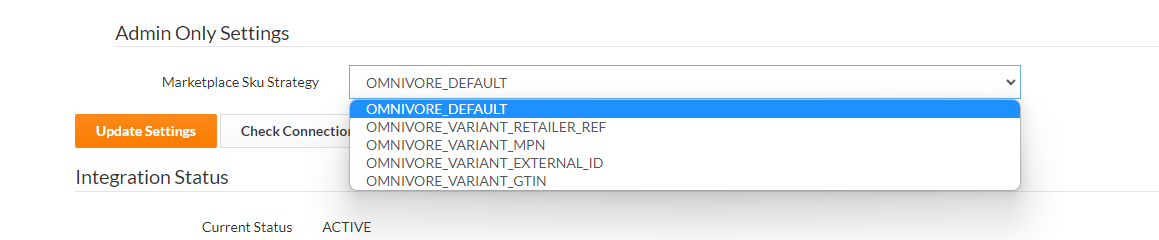
This internal FAQ covers how to use the following Omnivore feature to link and map Store Products to Existing Marketplace Listings (in some but NOT all cases).
Using this function changes the product SKU that we send to the marketplace, so use wisely as it could do damage.
Scenarios
- If a seller is re-platforming and changing eCommerce Systems which means they will have different SKU's
- If a seller is onboarding and has existing listings on a marketplace
- When the marketplace is compatible with accepting this setting
- When the integration team have completed an analysis of the data to check the likelihood of success
- When the retailer agrees to use this strategy and is aware it is not always 100% effective
When to make this change ...
(Assuming the seller has a newish Omnivore install)
- After the initial product import while they are in setup mode.
- After you have assessed and tested the change using a single product
- After you have assessed and tested any fall out that may affect other marketplaces (when they are multi marketplace)
- After you have sought a second opinion, particularly if it is not straight forward.
- After they have category mapped their products in Omnivore
- ...
- ...
If unsure at any stage bring to scrum or your team meeting for a second opinion.
SKU Strategy On New Installs.
As of June/July 2025 for BC and Shopify sellers who are new AND with new products, by default the SKU applied in Omnivore will be the SKU in the eCommerce Store (not the product ID). So the Omnivore SKU Strategy will be set to OMNIVORE_VARIANT_MPN.
More to note here: Please read the trello above in this FAQ. From Trello:
From a troubleshooting perspective you may see issues with new sellers who have just installed the app and their products won't import or create properly because they don't have SKU's in their eComm Store. Assess the note above and if needed swap the SKU Strategy back to OMNIVORE_DEFAULT. Again, get a second opinion on how to proceed.
Marketplaces using SKU Strategy
|
Note this trello also: