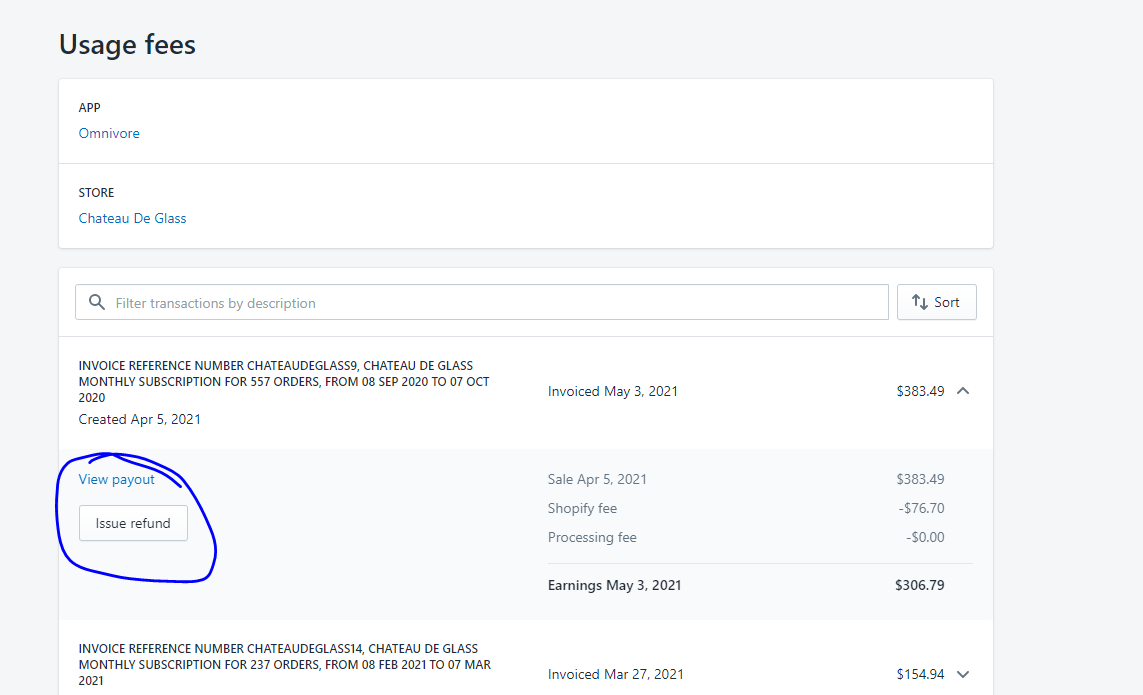
If a Shopify retailer requires a refund, we can refund the Retailer via the Shopify Partners Portal https://partners.shopify.com/
The transaction can only be refunded after we have received the payout from Shopify. This can take up to 2 weeks from when the charge was made.
eBay Link
request@citybeachsoftware.com
https://partners.shopify.com/282341
Omnivore
rvissarion@citybeachsoftware.com
https://partners.shopify.com/398188/
Woolworths MarketPlus
request@omnivore.co
https://partners.shopify.com/764146
Refunds need to be approved by either Fern or Ivan.
Instructions on how to do a refund via shopify are here:
https://shopify.dev/apps/billing/refunds
- Log in to your Partner Dashboard.https://partners.shopify.com/
- In the Partner Dashboard search bar, enter the name of the store with the app charges that you want to check.
- In the search results, click the name of the store.
- Next to the app charge that you want to check, click the link in the Details column.
- Click the arrow to open the charge, and then click Issue refund.
- In the Refund amount field, enter the amount that you want to refund. You can refund the full amount, or a partial amount.
- Click Refund.