
TABLE OF CONTENTS
What This Guide Covers
This guide explains how to block buyers from selected regions if you don’t want to ship to certain areas — either inside Australia or internationally. Exclusions must be set up using your eBay business postage policy.
What Are Postage Exclusions?
- Postage exclusions enable you to specify regions you do not wish to ship to. Within postage exclusions, you can choose to exclude based on domestic, international as well as PO Boxes.
- Domestic postage exclusions are segmented into 15 exclusion zones, with the majority of States split based on metro and regional zones.
- International postage exclusions are segmented into continents and countries. You may wish to exclude an entire continent or specify specific countries you wish to exclude.
- PO Box exclusion means that if your postage carrier cannot deliver to PO Boxes, then enabling this exclusion will mean that buyers using PO Box addresses at checkout would be blocked.
How to Set Up Shipping Exclusions
Log into your eBay account.
- Go to Account Settings → Business Policies, which can be found under the Selling section https://accountsettings.ebay.com.au/uas
Find the postage policy you want to modify, and click Edit.
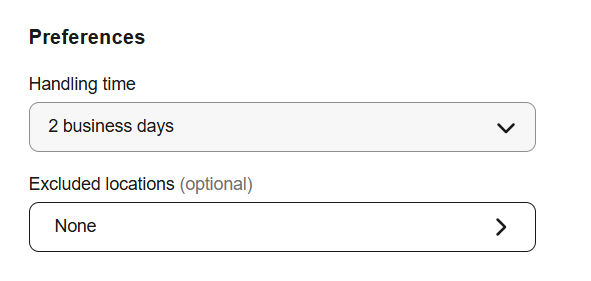
Scroll to the Excluded locations section at the bottom of the screen and click on the >.
Select the region(s) you want to exclude (e.g. certain States or territories in Australia, countries or PO Boxes). Note: eBay uses its predefined domestic region groups.
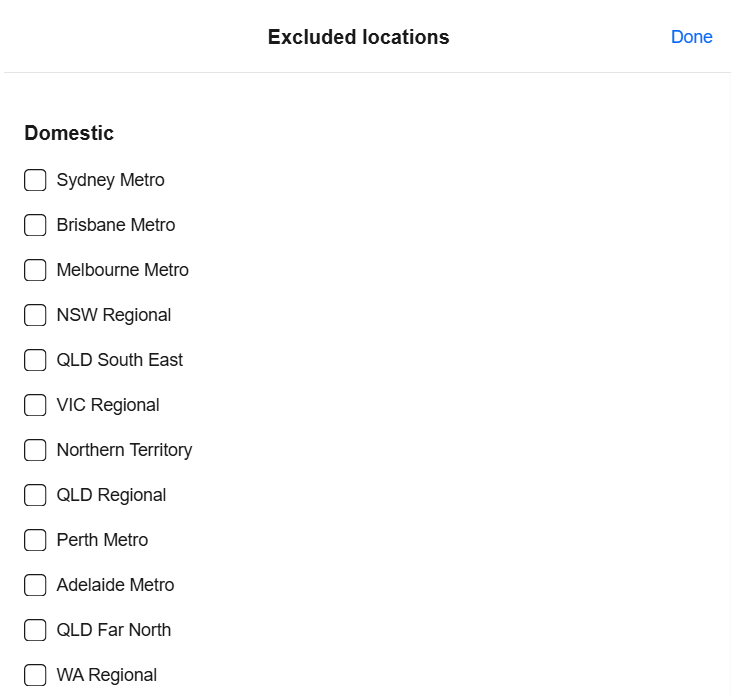
6. This policy now excludes the selected regions from shipping.
7. Click Done at the top of the screen.
8. Finally, click the Save button to finish and apply the exclusions to your listings.