
NOTE:
There are 2 scenarios: Duplication where the Account Plan Type is the same for each account (Combined). Duplication where the second duplicated account will be on a different account plan (Not Combined e.g. used when splitting themarket / onceit)
Step 1. Duplicate the Omnivore Instance
Log into the Omnivore account you would like to duplicate
- Go to Retailer Admin then New Dashboard
- Click on site as JSON
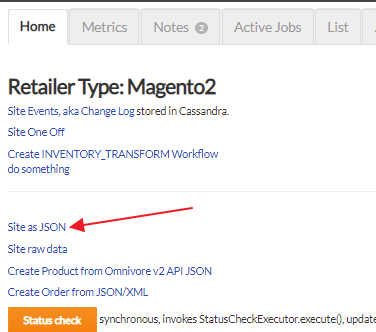
- Keep that tab open, open a new tab and go to the Omnivore Cluster where you will now create your second instance, it may be the same cluster. In this step you are gong to follow a manual process to create a site from a JSON.
- To create your new site click on Dev Admin in the left navigation
- Click Mixed Stuff then Create Site from JSON
- Copy and Paste the JSON data in your previous tab into this page
- You must change the retailer code and retailer name at this point so they are unique on the cluster. Hint, add the marketplace name to the end of the code and name (no spaces allowed in the retailerCode)

- Hit Submit
- Now go to the new Omnivore site that you have just created
- Remove the marketplace that you no longer need (this will have copied from the old Omnivore site) and add the required new marketplace/s.
- See Webhook Section below now.
Step 2. Account Billing
Combined Billing (all accounts have the same account billing plan)
COMBINE BILLING must be done after completing the above step. See https://support.omnivore.com.au/combine-multiple-accounts-onto-a-one-plan-using-master-and-sub-accounts
OR
Not Combined (both accounts can have different account billing plans)
There are exceptions where you do NOT need to combine billing. e.g. If a retailer is on the Market free plan and we create a new Omnivore instance for a paid marketplace, the Market Omnivore instance stays on the free Market plan and the new Omnivore instance would become the standard paid Omnivore plan, depending on their eCommerce type. See the following article if you are not sure which plan to add https://support.omnivore.com.au/omnivore-pricing-and-plans
Setup Payment Method
If you followed the Not Combined method the new Account on the paid plan will need to have a payment method added by the seller.
For Woocommerce, Bigcommerce and Magento they can 'Add Credit Card' in Omnivore via the Account Summary - Payment Method Tab.
For Shopify the billing needs to be setup, there may be a red Setup Button on the Account Summary, Payment Methods page. Reach out to Fern to confirm the best way to do this.
Additional Plan/Pricing Info & Customer Wording
Please use this article here regarding Onceit / Omnivore Plan Options.
https://support.omnivore.com.au/onceit-pricing-and-plan-options
Webhooks for Duplicated Accounts (update April 2024)
Following oversells on duplicated accounts, a bug fix was applied to how Webhooks work for accounts that are duplicated.
Webhook settings on duplicated accounts on the one server were negating the webhooks being triggered. Here is change/fix when you do a duplication:
- Have the New Dashboard screen open on both accounts.
- Click List Webhooks on both to view both pages - https://m1.omnivore.com.au/shopify/listHooks?retailerCode=active-truth
- Note the Update and Created buttons at the bottom.
- Go to settings Shopify Feed - General and turn off the 2nd webhook update setting, it will be ticked by default.
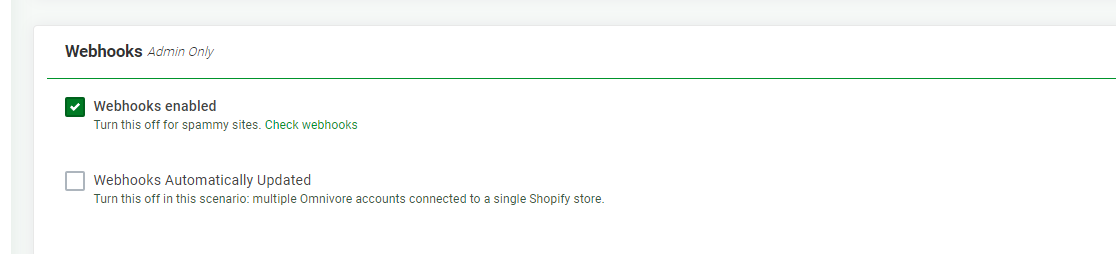
- You only want Webhooks Enabled. This avoids over writing.
- Use these buttons accordingly (on the WH listing page) based on the instructions for each button.

- These are likely needed for troubleshooting not if you change this setting when you duplicate.
- Check change logs for webhook activity, this will also help with diagnosing webhooks problems.
- If unsure check with L2 or Dev.