- Shop explained
- How to add one extra shop value to a retailer's products
- How to add more than one extra shop value to a retailer's products
Shop explained
The Iconic has a number of "Shops". These "shops" will affect where a retailer's products will show on the Iconic. All retailers products will show in "shop" but the other shops are specialised, the most common being sports
Other available "shops" include:
sports
surfskate
curvy
kids
designer
Petite
testshop
iconicexclusives
zalorashop
spurrshop
adidasshop
hugobossshop
calvinkleinshop
kurtgeigershop
outlet
denim
maternity
workwear
wedding
beautyshop
plussize
sneakerhub
sportluxe
If a retailer wants their products to show in more than one Iconic "shop" view we can only add one more option to Omnivore (at this time). The most common one to be used alongside "shop" is "sports"
How to add one extra shop value to a retailer's products
Adding an extra value is done at a product level via marketplace attributes.
Things to remember:
- The default value shop is sent by default for all products and will not be overridden when you add the extra value
- You can only choose one additional shop value
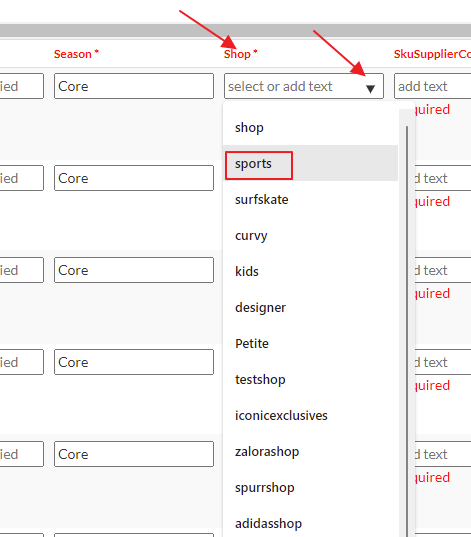
Go to Products->On the Iconic and click the Marketplace attributes tab.
If you want to add these one by one scroll over til you see the Shop column
Choose relevant shop value you want to add
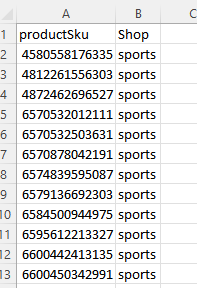
If retailer has a lot of products, this can be done by bulk using a csv with the following headings
productSku
Shop
How to add more than one extra shop value to a retailer's products
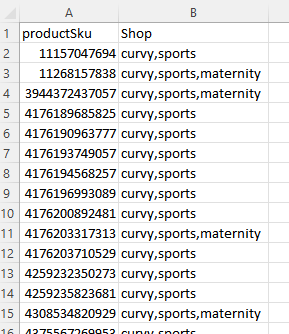
The csv option will accept multiple values separated by a comma and no spaces (note you do not need to add "shop")