
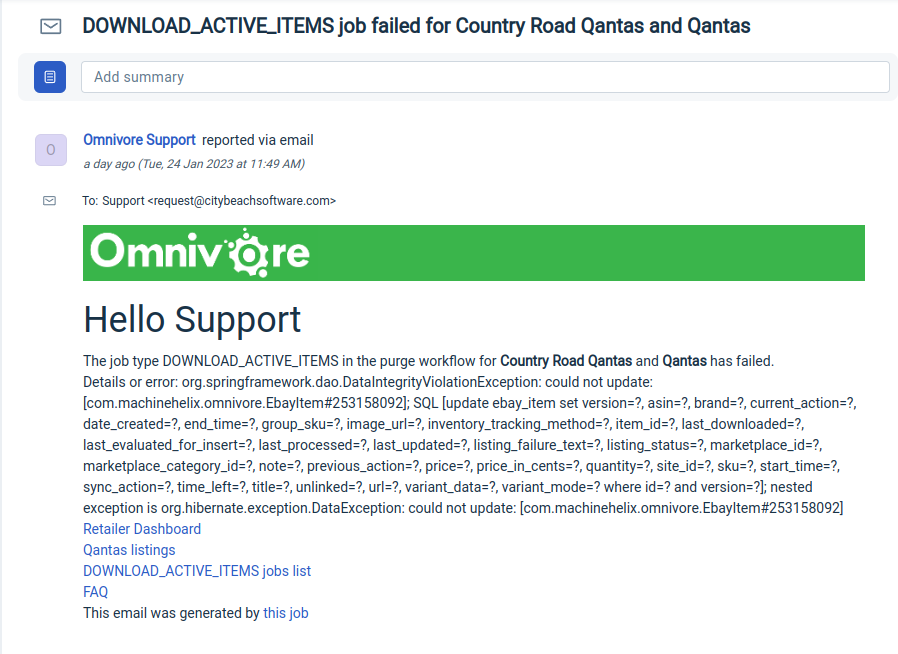
Here's an example ticket with a failure message.
Check for Existing Active Tickets
Before taking action, confirm whether there is already an unresolved DOWNLOAD_ACTIVE_ITEMS ticket for the same retailer.
- If an active ticket exists and is being handled by another agent, delete any duplicate or later tickets.
Check For Repeat Failures
Review earlier closed tickets for the same retailer.
- Look for multiple failures with the same failure reason within a short time period.
- If you see more than a couple of similar failures close together, this is a potential red flag—even if a subsequent job has completed successfully.
Example:
Repeated failures due to an expired eBay token should be investigated. Tokens typically only require renewal approximately every 18 months, so frequent failures for this reason are not expected.
Use common sense when assessing patterns.
- Ask yourself: Does it make sense for this job to be failing repeatedly for the same reason?
- If the pattern seems unusual or inconsistent with expected behaviour, investigate further, regardless of whether the most recent job succeeded.
Check Whether the Next Job has Run Successfully
Use the Download Active Items Job List link in the ticket to go to the list of all the Download Active Items jobs that have run.
Start by checking if the job has run successfully since the failure was reported e.g. for this retailer the next DAI job has been completed successfully.
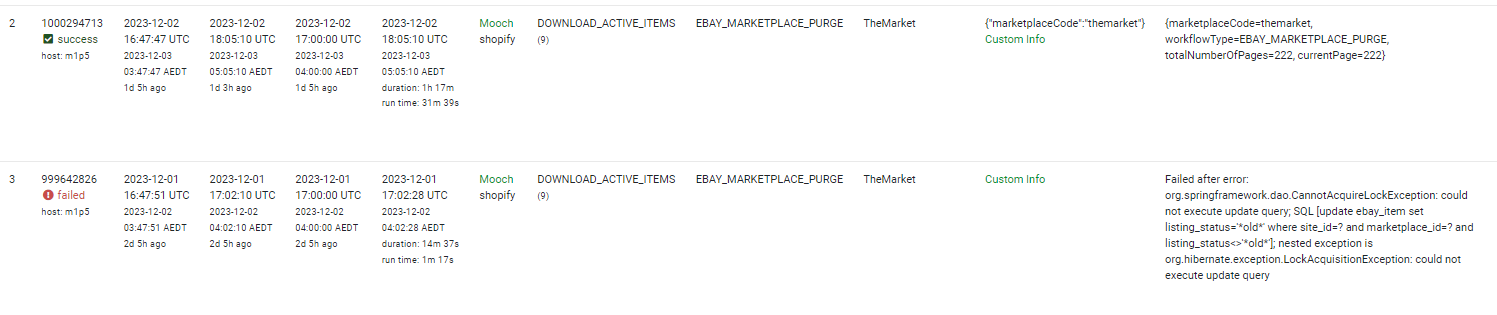
In this scenario, take a screenshot displaying the failed job and subsequent successful execution. Attach the screenshot as a note to the ticket.
Close the ticket with a resolution marked as "Solved by Troubleshooting."
If the Next Job has not Run Successfully
If the next job has not run successfully then you will need to find out why using the list below as a guide.
Rerunning Failed Jobs
If you need to re-run a failed job, you must return to the ticket within 24 hours to check if the job has completed successfully.
It is your job to follow up on the ticket in your queue.
Important categories of errors
If the status code is in the 400 range, then it's likely to be an authorisation issue.
If the status code is in the 500 range, it's an error on the remote server. These are usually transient, i.e. it happens and then it's gone after a while.
A reference for HTTP errors https://developer.mozilla.org/en-US/docs/Web/HTTP/Status
Anything starting with java.lang is most likely an Omnivore bug and will need to be investigated by development.
Tables can't be imported directly. Please insert an image of your table which can be found here.
Details or error: Maximum retries reached,
inspect job for more information
Google Product Feed has failed. Details or error: com.google.api.client.googleapis.json.GoogleJsonResponseException: 401 Unauthorized GET https://shoppingcontent.googleapis.com/content/v2.1/0/products?maxResults=100 { "code" : 401, "errors" : [ { "domain" : "content.ContentErrorDomain", "message" : "User cannot access account 0", "reason" : "auth/account_access_denied" } ], "message" : "User cannot access account 0" }
org.hibernate.AssertionFailure: collection [com.machinehelix.omnivore.SomethingSomething] was not processed by flush()
- *To turn off alerts, navigate to Settings->Administration->Advanced ->Tick box "Don't send email alerts for failed purge jobs" and update.
- **When there is a temporary loss of connection, say a few days, turn off alerts as per (1), set the ticket to pending and check back in a few days to ensure the retailer has re-auth'd, then close.
- When closing the ticket please add notes that outline what you did, how you fixed it, and why you are closing it.
- If you did resolve it be sure to turn the alerts back on.
From Radu June 2022.
There currently is a scenario that will create the job when it shouldn't, ie during rego or adding a new marketplace (edited)How can you tell?The job was created by a user, and there's only one job in the list and the workflow name is EBAY_MARKETPLACE_INSPECT instead of the usual EBAY_MARKETPLACE_PURGE
eg: https://support.omnivore.com.au/a/tickets/85626A code change would be to check that there is no linked account yet and do not create the job (trello created for this change).