
Internal only
Overview & Order Lifecycle
So begins the journey of troubleshooting Coles Liquor. This article will include tickets with previous issues. If you see any errors not in this article pls tag FAQ Needs Updating and flag with Leone/L2.
https://m8.omnivore.com.au/retailer/vintage-cellars
https://m8.omnivore.com.au/retailer/liquorland
https://m8.omnivore.com.au/retailer/first-choice
The integration uses webhooks from Coles' RAFE API to update us with product, store inventory and store data. Technically, these come into our Webhook API endpoint and are dealt with by the ColesLiquorAdapterService. Basically, a product webhook works for Coles is the same way as a webhook works for Shopify, triggering us to make a call to retrieve product data, and then another call to get all store stock levels. These are bundled (again, like Shopify) into an UPLOAD_PRODUCTS_TO_MARKETPLACE job for all connected marketplaces, which triggers off an Availability feed upload via SFTP to DoorDash and UberEats.
Orders come in from those marketplaces via webhooks too. We make a get order call on the UberEats API (but not for DoorDash since the webhook already contains all information). The order lifecycle is then as follows:
- Receive order create webhook from marketplace
- Send order create API call to Coles RAFE
- If success response, send a "ready" API call to marketplace, or else a cancel
- Receive order picked webhook from Coles RAFE to signify that the order is ready to collect in store
- Send notification to marketplace (however, marketplaces are already likely to have scheduled a pick up driver since they're trying to reduce wait times)
- Receive a driver details webhook from marketplace, containing driver and vehicle info
- Receive an arrived-at-store webhook from marketplace
- Receive a picked-up-from-store webhook from marketplace
- Receive an arrived-at-customer webhook from marketplace
- Receive an order completed (or cancelled) webhook from marketplace
Orders that are not accepted (step 3) within 11 minutes are automatically cancelled by the marketplace.
(more info for support on how to diagnose and handle order cancellations)
Order substitutions only apply for Uber Eats. Orders are received by the above mechanism but where a substitution is required , substitutions are made via the Uber tablet in store and then updated in ROVER (POS). This triggers an update web hook to RAFE and then Omnivore to repull the order from Uber Eats.
Errors so far
Tables can't be imported directly. Please insert an image of your table which can be found here.
Issue More details & Next stepsProduct Issues
INACTIVE:
- Product says inactive in Omnivore, coles may think the product is okay because they can see it has stock. They can use Store Inventory:

- There is most likely a secondary error on Coles Liquor products that says 'ínactive'. To find that use the Fetch from Retailer button at the bottom of the page. This does a call to RAFE to pull back information about the product.
- Note the error and add to the ticket. Check the error table above.
- If the error suggests that we cannot retrieve the data from RAFE, you can go back to the Coles and ask them to send you some product information from RAFE so that you can diagnose further and escalate if needed.
This section is being written and added to in an effort to help troubleshooting knowledge.
Coles Liquor Orders
Orders may be cancelled from lack of attention by store staff, driver availability (marketplace side)or shopper cancellations due to overlong wait times.
Each scenario is visible in the Order History on the order page. A typical order lifecycle (for UberEats) would look like this:
Tables can't be imported directly. Please insert an image of your table which can be found here.
It shows (from bottom to top) the order getting created, being accepted by Coles Liquor, being marked as packed, then as ready for pick up. Then, the driver's details are sent to us to pass on to the Coles store team. Because this was a "good" order, we see it collected (which in UberEats parlance means accepted by the customer. Finally, there's a driver details call to share the driver's details.
Journey of an order - from buyer to delivery
Include when the webhooks trigger.
Top 4-5 Order Issues
- Cancellations:
order is cancelled by customer
order is cancelled by store as stick may have sold out by the time order is recieved
order is cancelled by marketplace due to order accept timeout
order is cancelled if driver cannot be allocated
order is cancelled by driver if cannot be delivered (wrong address, customer not home, intoxicated) - Order not in Rover/RAFE
order not in ROVER if it has failed in Omnivore due to 400 error
order not in ROVER if order has been rejected due to out of stock - Incorrect product
Incorrect product on order if substitution update not applied in ROVER
Incorrect product in order if error in marketplace catalogue - Order not complete
order not marked as complete if substitution update not applied in ROVER
order not complete if order not marked as collected in ROVER
order not complete if order not marked as cancelled in ROVER
order not complete if cancellation web hook not applied
order not complete is connection error occurred between Coles and Omnivore
(when this section is complete we will have 'how to troubleshoot' sequence for each issue)
Order Adjustments
Order substitutions only apply for Uber Eats. Orders are received by the above mechanism but where a substitution is required , substitutions are made via the Uber tablet in store and then updated in ROVER (POS). This triggers an update web hook to RAFE and then Omnivore to repull the order from Uber Eats.
Order Systems (how they work)
Orders flow as per the below process.
MARKETPLACE ORDER => OMNIVORE => RAFE
If available inventory RAFE sends web hook to Omnivore and Omnivore accept order
If no available inventory RAFE sends web hook to Omnivore and Omnivore rejects the order
ACCEPTED ORDER - OMNIVORE => RAFE => ROVER
REJECTED ORDER - OMNIVORE => MARKETPLACE
FULFILLED ORDER - ROVER => RAFE=> OMNIVORE => MARKETPLACE
CANCELLED ORDER - ROVER => RAFE => OMNIVORE => MARKETPLACE
SUBSTITUTED ORDER - UPDATE TABLET = > UPDATE ROVER => RAFE => OMNIVORE => MARKETPLACE => OMNIVORE => RAFE => ROVER
Uploading A New Price File (when the change does not work
- This info came from this ticket where they unblock products then change the price via a CSV upload in Omnivore - https://citybeachsoftware.freshdesk.com/a/tickets/173240
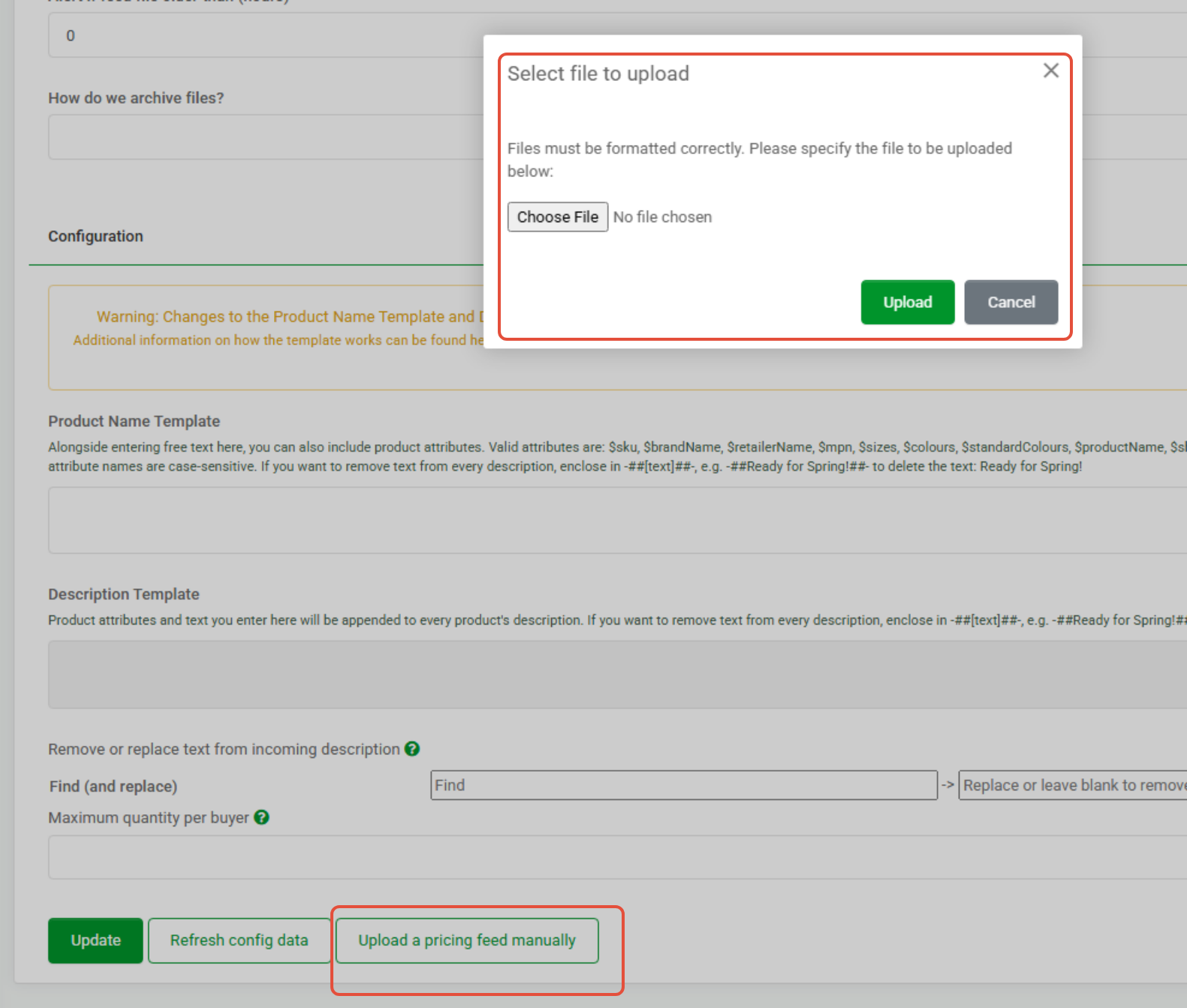
- They were using a CSV see here under Settings - CustomFeed - scroll down the bottom:
- For this to work the CSV has to look like this, no headers just SKU and PRICE
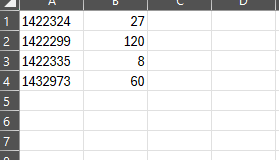
- The issue (that they found it in the end) was that there were spaces after the data in the CSV.
- The outcome was the price did not change and it went to 0, no error when doing upload.
- The fix was the CSV data, note no headers in the CSV.
Integration Customisation
- Daily File - at what time?
- Inventory File - every 15min via web hook
- How does a product get updated? - via a daily product file
- What product data is being updated? - product image, title, description, attributes
- How is pricing updated? - pricing is manually updated via a csv file directly into Omnivore
- Relevant Omnivore Jobs
Supporting the Support Team
Coles Liquor Team have a dedicated support team so we want to document some information on what the teams can provide to each other and how information can be shared.
Contact email address:
CXT Liquor Rover Prod Support