
Internal.
Covered - Methods for Attribute Mapping
- How to bulk map attributes using the Product - Marketplace Attributes Tab at the Product and Categories level
- Item specifics for eBay - Products - eBay Australia - Item Specifics - Categories - Bulk Map.
- Add attributes at the marketplace category level - currently used on the iconic, marketplacer and amazon. explained in this article. Available on most marketplaces now but not widely used as the primary way to add attributes.
- Add attributes that are Metafields (Shopify), on the Product Page. Doing this for one product applies it to all products in that category.
Method 1
Included in the articles in the table below, most common method used.
Method 2
See the eBay FAQ below.
Method 3
See article already mentioned above, this article is written for Woolworths but the screens and process can be applied to some other markets as mentioned.
Method 4
This is explained in this FAQ, the one for eBay Australia. It is in the section called Add Custom Item Specifics using your store attributes. It is now covered in this generic FAQ for all markets.
Attribute Mapping (includes eBay Item Specifics)
This section covers the Products - On Marketplace Name - Marketplace Attribute Tab sections.
Relevant ''how to'' articles are below:
Tables can't be imported directly. Please insert an image of your table which can be found here.
Market ArticleMarketplace Category Attributes Mappings
This section covers this function here in Omnivore, it does not apply to all marketplaces. As of the beginning of 2023 this is a newly developed method to map variants and attributes to marketplaces with complex mapping structures. As of April 2023 these screens are admin only. So this info is not in the retailer FAQ's and needs to be done by Support/Integrations.
Here are some example entries for Amazon and Catch.
Amazon Example Using ShirtSize and Shoe Size
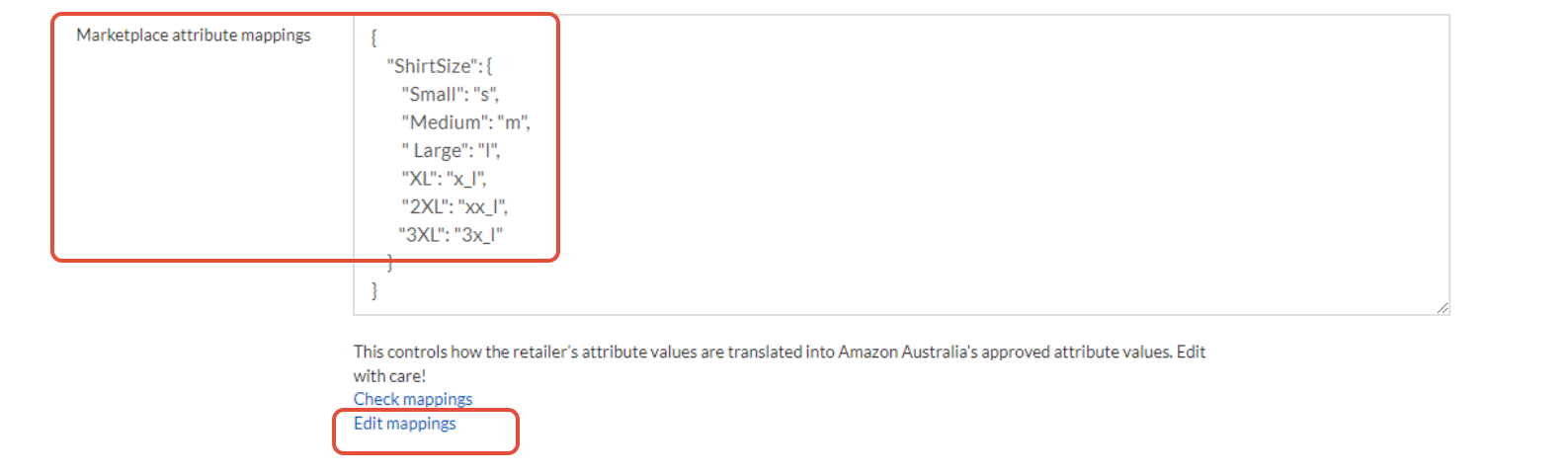
Page view when you click Edit Mappings. These two screens update each other.

Shoe Size mapping for Amazon is very specific.
It is best and preferred to use JSON mapping over CSV Overlay when mapping shoe size for Amazon. Shoe sizing is USA only for Amazon AU.
The Json mapping option may be problematic if they sell different gender and/or a mix of adult and children's sizes.
This seller has a good working example of JSON mapping for shoe size.
https://m1.omnivore.com.au/configuration/amazonMarketplace/wmr-shoehq?marketplaceCode=amazonau

Avoid having the seller change sizing in their eComm store, the best method is JSON mapping in Omnivore.
Seek assistance if you are not sure.
Note this other FAQ for Amazon CSV mapping- https://support.omnivore.com.au/importing-amazon-attributes-at-variant-level
Catch Example using Gender
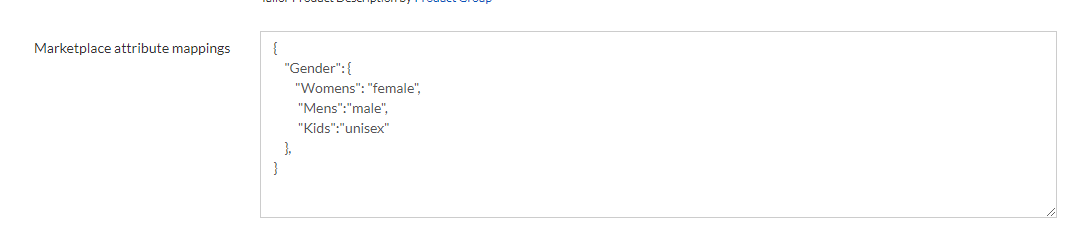 Example of Catch Marketplace Attributes for jewelry: https://m1.omnivore.com.au/marketplaceCategoryAttribute/listForCategory?marketplaceCode=catch&categoryId=315283
Values:

Product Page
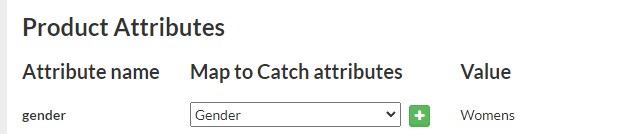
In the feed:

Relevant ''how to'' articles
Tables can't be imported directly. Please insert an image of your table which can be found here.
Market ArticleNOTE TO SUPPORT:
The above articles even though external can be used by Support when you need to help a seller in this scenario. Sellers cannot see these screens yet. The principal with this method is the same and is based on the original iconic attribute mapping json method, now morphed into something that will eventually be customer facing and easier to use based on drop downs.
Other Relevant Reading and Links
TBA
Unanswered Questions
- When using process 1 can you apply an attribute to one product in a category if that product is part of bulk mapping attribute category rule?
- If a product has an attribute and you bulk map at the category level to apply attributes will the bulk map over ride any other single product attribute rules?
- Does the bulk map of attributes using an entire category over ride any product level attributes that have been applied?
- Can you bulk delete any attributes that were added in bulk?