
Internal only.
Required Pre-reading
Please suggest FAQ edits when applying the setup scenarios below. This is a new function that is still being fully tested.
Use the update FAQ process to suggest changes and edits if you think something is not quite right.
Shopify inventory by location does not work with graph ql. As at 21/11/24
Before you proceed get the exact requirement from the seller so you can apply the scenario/s below, ie:
- What Shopify store/s do you want inventory updates from. The seller would have read this FAQ so ensure you know which scenario is correct for them.
- What Shopify store to you want orders sent to. Omnivore can send orders to one store.
- Take a screen capture of the amount of products that are No Inventory. If this increases drastically after the change you will know there is an issue.
- When to use By Region or Add All Region: only if the seller has a fully customized regional shipping setup for eBay Australia. If this option is used for any other seller it can remove eBay listings.
- Brandster and unique setup: see here, they have it successfully setup using regional and imported shipping policies. The settings on this account work with accuracy for this seller, they are using scenario 2, so this is a good example to use. https://m1.omnivore.com.au/configuration/ebayShipping/thebrandster-au?marketplaceCode=ebay
- Don't use ADD_ALL or ADD ALL REGIONS (at present, unless you know what you are doing it for)
- Get a second opinion, this FAQ and function is subject to change.
Important: If the retailer wants the quantity in Omnivore to be the sum of quantities for all the stores in Shopify, you do not need to set up location-based inventory because the value received from Shopify as the quantity ("inventoryQuantity" for GraphQL, "inventory_quantity" for REST Api) is already the sum of all stores quantities. Pertains to scenario 2.
Scenario 1: I want Omnivore to import inventory from 1 single Shopify Store/Location. For example, I have stores in Sydney, Brisbane and Cairns and I want Omnivore to import inventory from the Brisbane store only.
Setup
New account example (see note below and difference on having other stores enabled or disabled)
- Go to Settings / Shopify Feeds / General and enable Location-based Inventory.

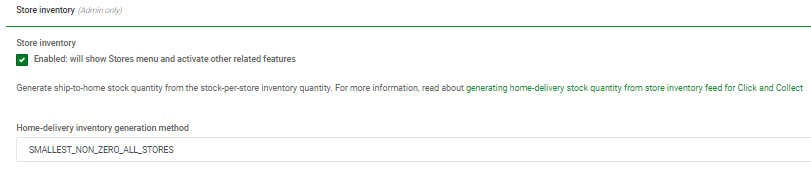
- Go To Administration / Store Inventory and enable the Store Inventory option. Once this is enabled you will then see the Home delivery field. Set the Home-delivery inventory generation method to SMALLEST_NON_ZERO_ALL STORES.
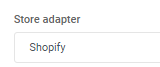
- Scroll down to the Implementation section and set the Store Adapter to Shopify.
- Save the changes. You should now see the Stores option showing in the left-hand menu.
- Import the Stores into Omnivore from the new Stores Page - use the Import from API button.

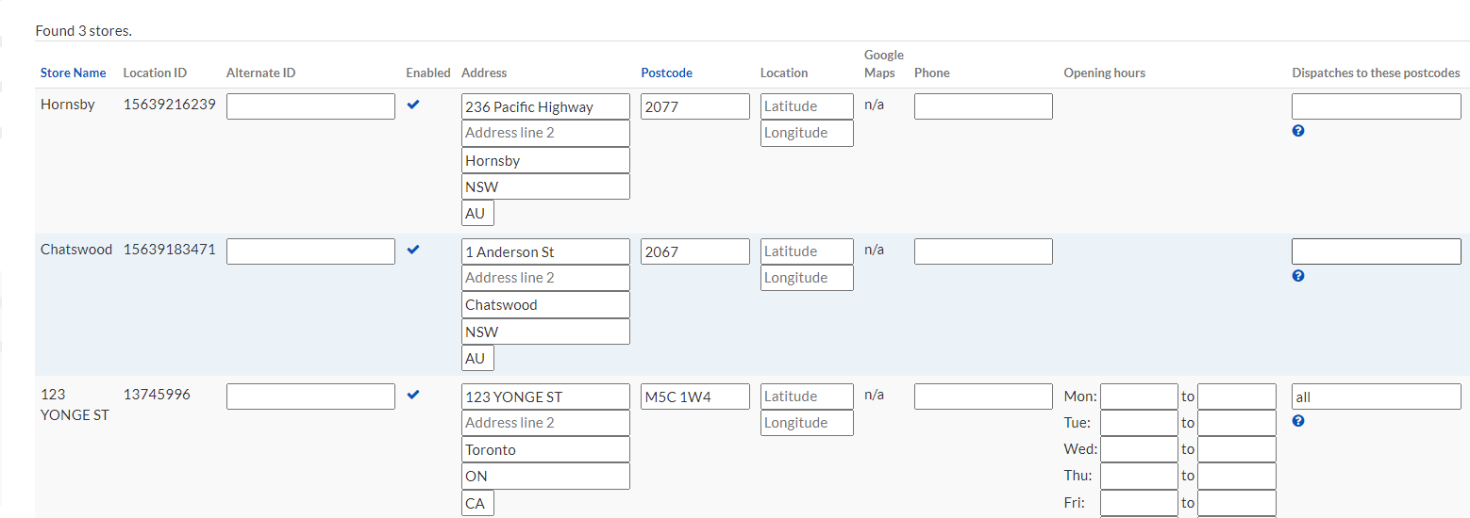
- On the new Stores page add 'all' in the Dispatches to these Postcodes column against the store/location the seller wants to import inventory from, click update. Disable the 'other' enabled stores by clicking ticket to make it a X. NOTE HERE. There are examples with sellers using this scenario where the other stores remain enabled and it seems to also work. It was suggested that disabling stores not in use does not matter, but the most recent new account example did not work unless the other stores were disabled. Double check, it is most likely best to disable the others stores although the screen capture does not ref
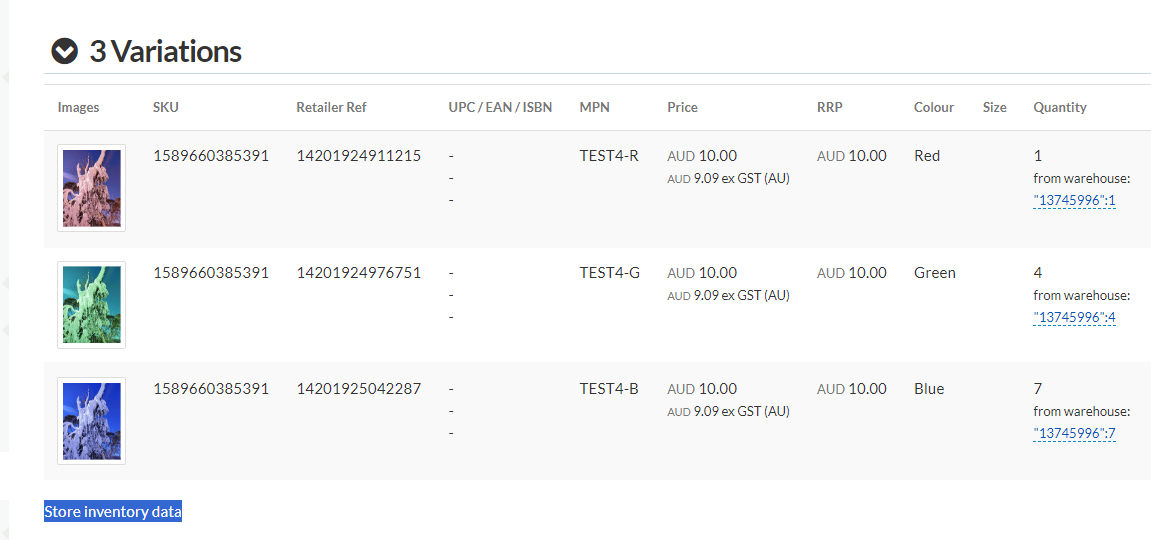
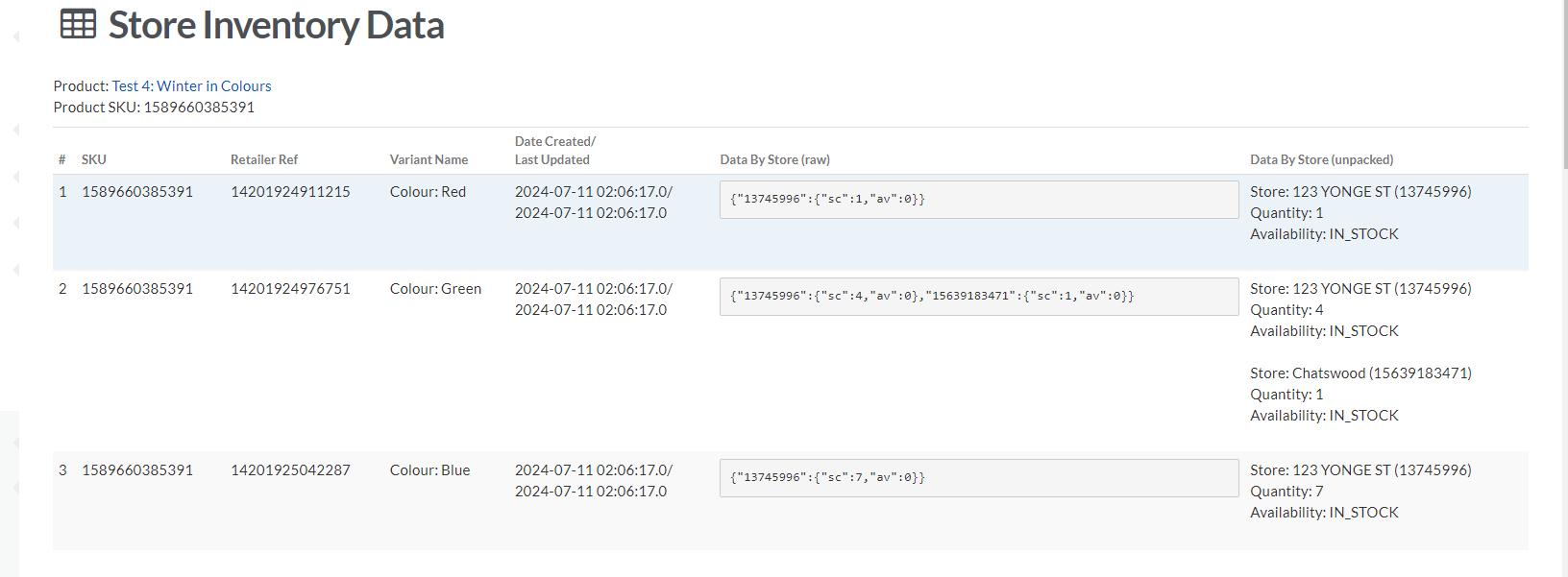
- Test a product by updating from Shopify, it should now show the store inventory data. In this example 123 Yonge Street is the location we are pulling from. If a single product update does not reflect a change, delete your example test product and reimport it. A full red import should update the changes, testing on one product is best. See screen captures as a guide.
Scenario 2: I want Omnivore to import the total sum inventory from 2 or more Shopify Store/Locations but not all. For example, I have stores in Sydney, Brisbane, Cairns and Adelaide and I want Omnivore to import inventory from Sydney and Brisbane OR Sydney, Brisbane and Cairns, but not ALL stores.
Setup
Bikefit - Account example to work with
Minimax - Second account example using a similar setup
Brandster - Third account example
Note: brandster is using the suggested setting of SMALLEST_NON_ZERO_ALL_STORES while bikefit and minimax are using SMALLEST_NON_ZERO_ALL_HUBS. Both seem to work, the difference is brandster have regional shipping setup for eBay AU.
And, only Branster also have this ticked under settings - shopify feed - product import.

- Make sure Location based Inventory on Shopify Feed - General is not ticked.

- Enable Stores and set Home-delivery inventory generation method to SMALLEST_NON_ZERO_ALL_STORES in Administration - Store Inventory. This has worked on this scenario also, SMALLEST_NON_ZERO_ALL_HUBS
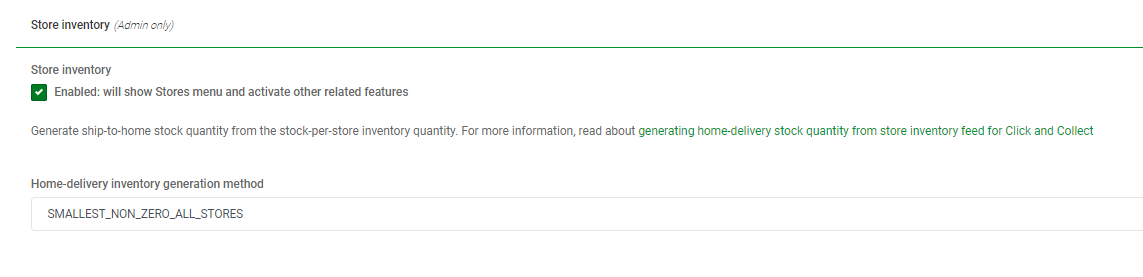
- Make sure Store Adapter is set to Shopify (Administration page)
 Import the Stores into Omnivore from the new Stores Page - use the Import from API button.
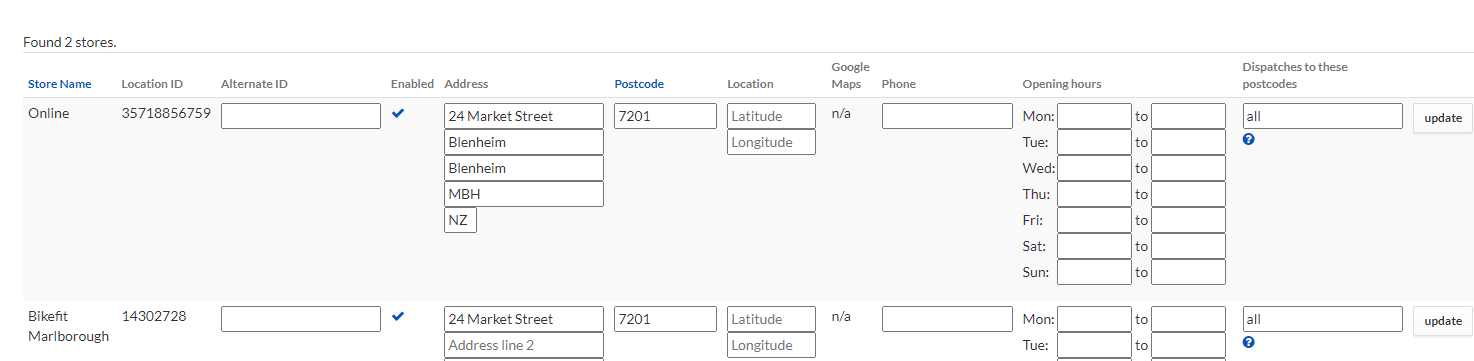
- Add 'all' in dispatches to these postcodes to the stores you want Omnivore to look for inventory. The product inventory total will be comprised of inventory from those stores.
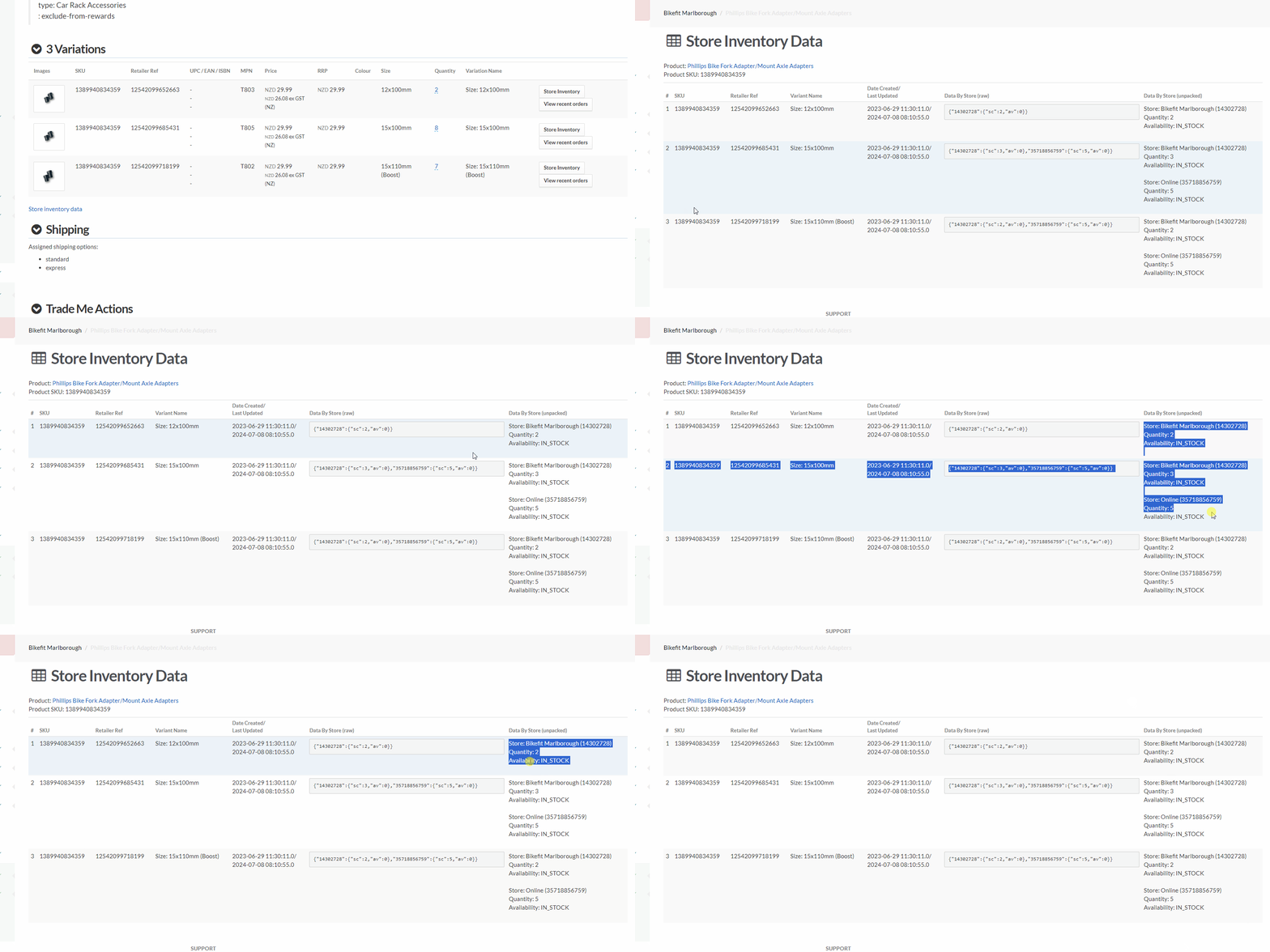
- Find a product and do an update from Shopify to check the inventory change comes in, the product page should show the total inventory, the 'store inventory data' will show you the break down. If a single product update has not reflected the inventory changes, and you want to test one single product first, delete your test product and reimport it, then check. OR do a full red import if you are confident it is working.
Scenario 3: I want to send Omnivore orders to one specific Shopify store/location.
Setup.
- Enable Store inventory on Administration and set Home-delivery inventory generation method to NONE. This will only be NONE if they are only want orders sent to a specific shopify store. If they are also using scenario 1 or 2 AND scenario 3 this will have a value based on 1 or 2.
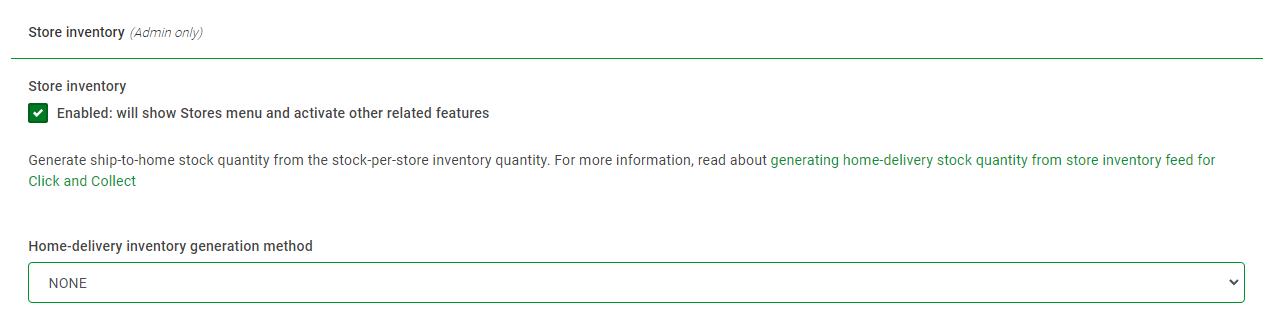
- Go to Administration check the store adapter is set to Shopify.
- Import the Stores into Omnivore from the new Stores Page - use the Import from API button.

- Choose which store you want to assign orders to, Shopify Feed - General - Assign orders to store.

- Location based inventory does not need to be enabled, unless they are also using scenario 1 or 2.

- May or may not be relevant. Test a product by updating from Shopify, if it says no inventory check settings and make changes most likely to the generation method. If the inventory is working as expected and this change has not zeroed the inventory, have the seller monitor the next order to be sure it is sent to the location set in Omnivore.
- See more information below on how this function works.
Scenario 4: eBay Only. Send orders to the buyers closest store using click and collect.
I don't know if this one is possible.
Sending orders to a specific Shopify store/location
Go to Settings - Shopify Feed - General - Assign orders to store
Select your chosen Shopify store from the drop down options and click Update.
How this functions works:
Assigning a new order to a selected Shopify location (location selected in Omnivore) is a 2 step process:
1. Omnivore creates the order in Shopify at the location chosen by the Shopify setup. The api does not allow to specify the location when the order is created. The rules for order location are documented here:
https://help.shopify.com/en/manual/fulfillment/setup/locations/setting-up-location-fulfillments
2. If the order is successfully created in Shopify, then Omnivore will move the order to the selected location, ie what was chosen on the Shopify Feed configuration under 'Assign orders to store'
Consequences of the above:
The order might fail to be created if there is no inventory at the location (or locations) where Shopify will attempt to create the order.
The order might fail to be moved if there is no inventory at the location selected in Omnivore.
Home-delivery inventory generation method Explanation
Ivan's explanation of the drop down choices, this is taken from a conversation on General in August 2024, it is the exact transcript of the conversation:
If a store is inactive, import logic will have set its stock quantity to zero (regardless of what the retailer has set it to. this is a safeguard to make sure shut stores don't sell
Whether a store is a dispatch hub is designated in the Store screen by whether it has "all" or a postcode range in the "Dispatches to these postcodes" column. A hub is treated differently to a normal store by some of the inventory generate strategies below
Strategies and what they mean:
ADD_ALL - sum of all store inventory in all stores
SMALLEST_NON_ZERO_ALL_STORES - smallest of store inventory in all stores with non-zero inventory
SMALLEST_NON_ZERO - smallest of store inventory in all HUBS with non-zero inventory
SMALLEST_IN_ALL_HUBS - smallest of store inventory in all HUBS where ALL hubs must have non-zero inventory otherwise stock=0 if not in all hubs
BY_REGION - takes lowest (including zero) stock quantity in hubs into regional quantity for the product, for eBay regional shipping
ADD_ALL_REGIONS - same as BY_REGION but computed quantity is the sum of all inventory in all hubs
Is https://m1.omnivore.com.au/configuration/ebayShipping/thebrandster-au?marketplaceCode=ebay using ADD_ALL_REGIONS for any particular reason?
It's the only retailer on all clusters using it. Are they using regional shipping exclusions in eBay or are they better off with SMALLEST_NON_ZERO or maybe a new type creating called ADD_ALL_IN_ALL_HUBS?
And following on from discussion we had, majority of Shopify installs with multi-location inv are using SMALLEST_IN_ALL_HUBS, with just the following on BY_REGION, triggering eBay regional shipping:
minimaxau
bikefit-marlborough
one-teaspoon-au
guess-au
of which, only minimaxau has an active eBay connection, so the others??
region based ones were recommended for use previously prior to us knowing about what regional means
Ivan Logan
(and renaming SMALLEST_NON_ZERO policy to SMALLEST_NON_ZERO_IN_ALL_HUBS for clarity)
Radu Vissarion
I would add this: deactivating all stores except one and relying on this for inventory is error prone if/when the retailer adds a store and nobody remembers to deactivate it.