
OnceIt is currently an Omnivore v2 api integration
There is no "old" or "new" Onceit in the Omnivore code.
Everybody having the Onceit marketplace uses the same integration method.
This means that:
1. We do not "push" products, the Onceit integration downloads the products from Omnivore. Because of this, the Listed numbers visible to the retailer in Omnivore on the dashboard and in the "Listed" product tab does not confirm the exact number of products currently live or visible on the Onceit marketplace. It shows the number of listings currently available for Onceit to pull from Omnivore.
If the number visible in Onceit does not match what a retailer expects, the next step is for Onceit to confirm with the retailer what they have pulled from Omnivore and whether any products have been excluded or rejected on their side.
2. There should be no marketplace category attributes. If you see any, these are left from the old integration and must be deleted.
3. There should be no marketplace listings (aka ebay item table). If you see any, these are left from the old integration and must be deleted.
4. We do not download/import orders, the Onceit integration creates the orders in Omnivore.
5. Same for shipping notifications, Onceit uses the Omnivore api to retrieve these.
How to get a new retailer onto Onceit
Currently, this person is the dev that knows how it works on the Onceit side: Youfa Wang youfa@onceit.co.nz
First step is to add the marketplace to the retailer.
Then it depends on:
A. The cluster already has Onceit retailers
This means there's already a marketplace api client, a marketplace admin login and Youfa knows about it
Send Youfa the link to the retailer dashboard.
B. The cluster does not have any Onceit retailers
This means there's no api client and Youfa doesn't have a login.
1. A dev needs to create a marketplace api client and send the info to Youfa.
2. A dev needs to import the Onceit categories (export via Omnivore api from an existing cluster, import via Omnivore api) or they need to upload those using the api.
3. Youfa needs a login as marketplace admin.---
Since 2025 OnceIt is a Omnivore v2 Marketplace integration
None of the below applies. Read the explanation above!
Onceit Seller Manual (June 2021) Attached below
General Setup
The Settings - General - Onceit page in Omnivore has an API Key and Endpoint field.
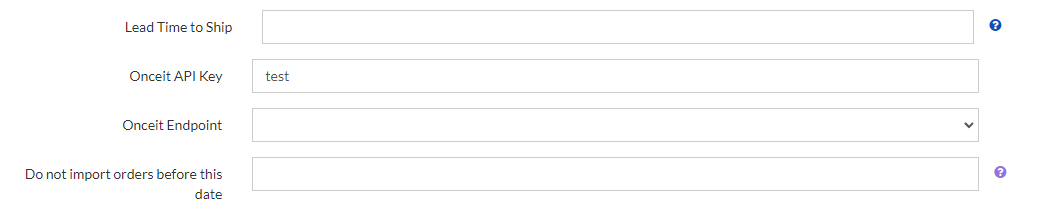
The API key must be filled in.
The Endpoint field if blank is set to Production by Default.
At this stage I am unsure when we would use Pre-Production.
Marketplace Specific
Marketplace Links
Product Data Specific
validation error = 1000|The attribute 'colour' (Colour) is required,1000|The attribute 'colour_group' (Colour Group) is required
Send this article to retailer https://support.omnivore.com.au/add-colour-attributes-to-onceit-listings
Also added to the common listing errors new faq.
Shipping Specific
Existing Listings
These are handled on a case-by-case basis. CC emma.mcdonald@onceit.co.nz and gemma.white@onceit.co.nz
(have added this to our existing listings faq)
Excluded Products (this section including the attachment has its own seller faq)
Cosmetics & Beauty
- Any cosmetic products that require a prescription or a medical professional's supervision or direction for their use
- Any products with tampered packaging
- Expired products
- Products which will expire within 6 months
- Testers
- Syringes, with or without needles
- And product containing needles
- Any Beauty or Salon only products that specify “Professional Use Only”
- Toothpaste with more than 0.25% diethylene glycol (DEG)
- Any consumable products containing Glucomannan or Konjac
Hazardous
- Any chemical substance or compound that is intended for commercial, industrial, or professional use only and is not available for general consumer purchase
- Explosives
- Radioactive or contaminated material
- Any homeware or children’s products containing lead
- Fire Extinguishers
Offensive
- Products that display explicit nudity or vulgar language
- Products that contain obscene material or pornography
- Products that either portray, glorify or promote in an insensitive way:
- animal cruelty
- any historical or news events
- criminal or illegal activity
- derogatory stereotyping based on race, ethnicity, gender, sexual orientation, religion, or nationality
- hatred
- intolerance
- natural or man-made disaster(s)
- tragedy
- violence
- Shows or promotes Drug Use or Promotes Drugs.
- Products marketed to or targeted at kids or teenagers that are age- inappropriate.
- Plants, Plant Products, Seeds
- Illegal plants, plant products, or seeds
- Plants, plant products, or seeds that are considered to be a controlled substance
Restricted
- Any product that is age-restricted by law
- Adult products including but not limited to sex toys and aids
- Gambling products
- Tinted vehicle headlight covers
- Alcohol which is not loaded/mapped against the correct categories
Tobacco
- Cigars
- Cigarettes
- E-cigarettes
- Other tobacco/nicotine products
Weapons
- For example but not limited to Airsoft, air guns, BB guns, pellet guns, paintball guns, replica/imitation guns, or firearms of any type
- Ammunition of any type (including pellet, BB, air gun, paintball, sling shot ammunition, pistol crossbows)
Imported Products
- Any product which will not be accepted by New Zealand customs or flag MPI for inspection which may include (but is not limited to) Food, Wood and hazardous substances. Please see the New Zealand customs website for the full list