
Myer Team:
Jordie: marketplace manager for home
Lena: marketplace manager for tech
Sarah; fashion and beauty
Dee; AM in Marketplace team
Robin: Onboarding Manager
Josh: IT Guru from a mirakl launch perspective
Mirakl One Help
One of the best tools available for help is the Mirakl One Help support hub. We encourage you to use this as a first step as it provides easy and quick access to guidance and assistance within the Mirakl platform.
Customer Service
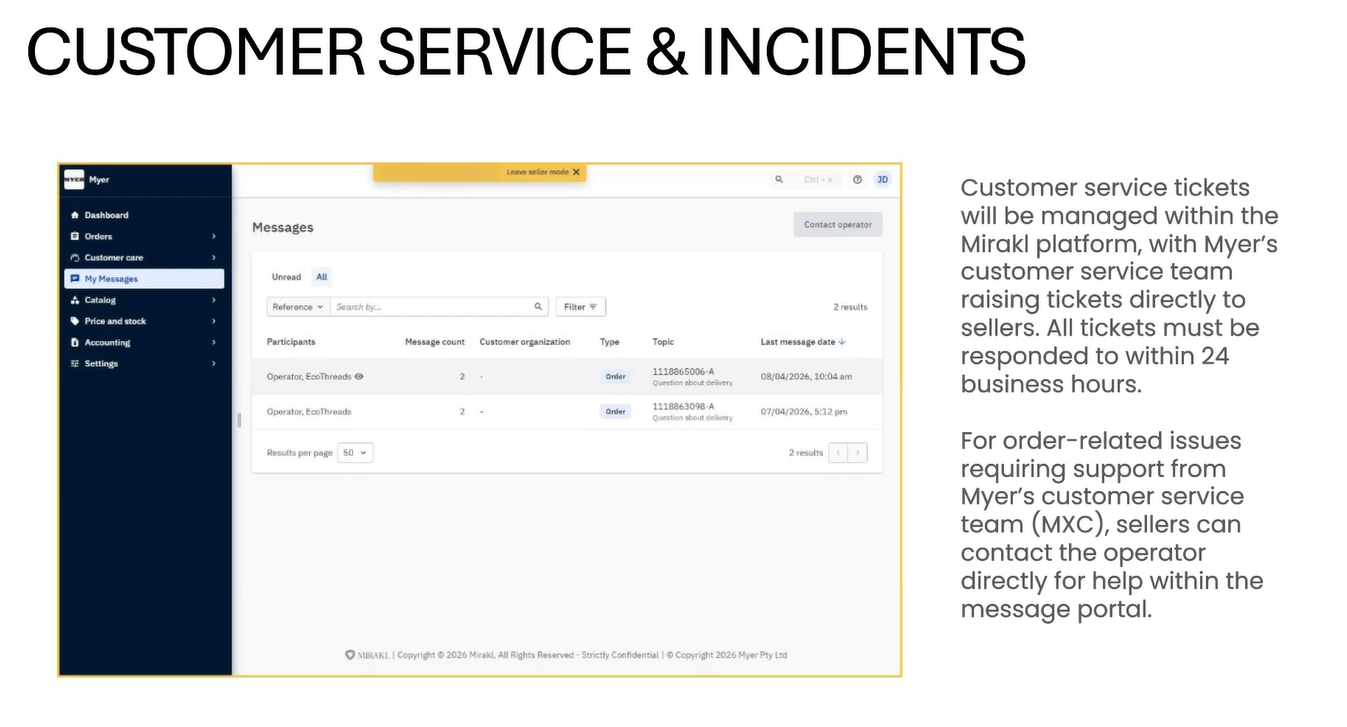
We have a small update to the information shared during the sessions. The first point of contact for all Myer customers is our Customer Service team. They will raise a ticket with you on the customer’s behalf; however, all responses and ongoing communication will take place directly between you and the customer.
Please ensure you meet the following SLAs for all customer service tickets:
- Initial responses must be provided within 24 business hours
- All customer issues must be fully resolved within 3 business days
Please also note that if Myer needs to step in to assist with a resolution, we will rely solely on the ticket history. It is therefore important that all communication is kept within the platform.
Supplier Onboarding Guide
Setting Up Your Store
First, you will need to finish setting up your store if you
have not already done so. Trouble logging in? Visit https://myerau-prod.mirakl.net/login to get started.
If this is your first time logging in, you will be required to complete the 'Onboarding Tasks' from your store
dashboard.
There are 4 Tasks to complete initially:
o Create your seller account (this has been done for you)
o Add your seller account information
o Add your bank account details (this may have already been added for you)
o Review your shipping settings
▪ Click the 'Add' to get started
Shipping Configuration
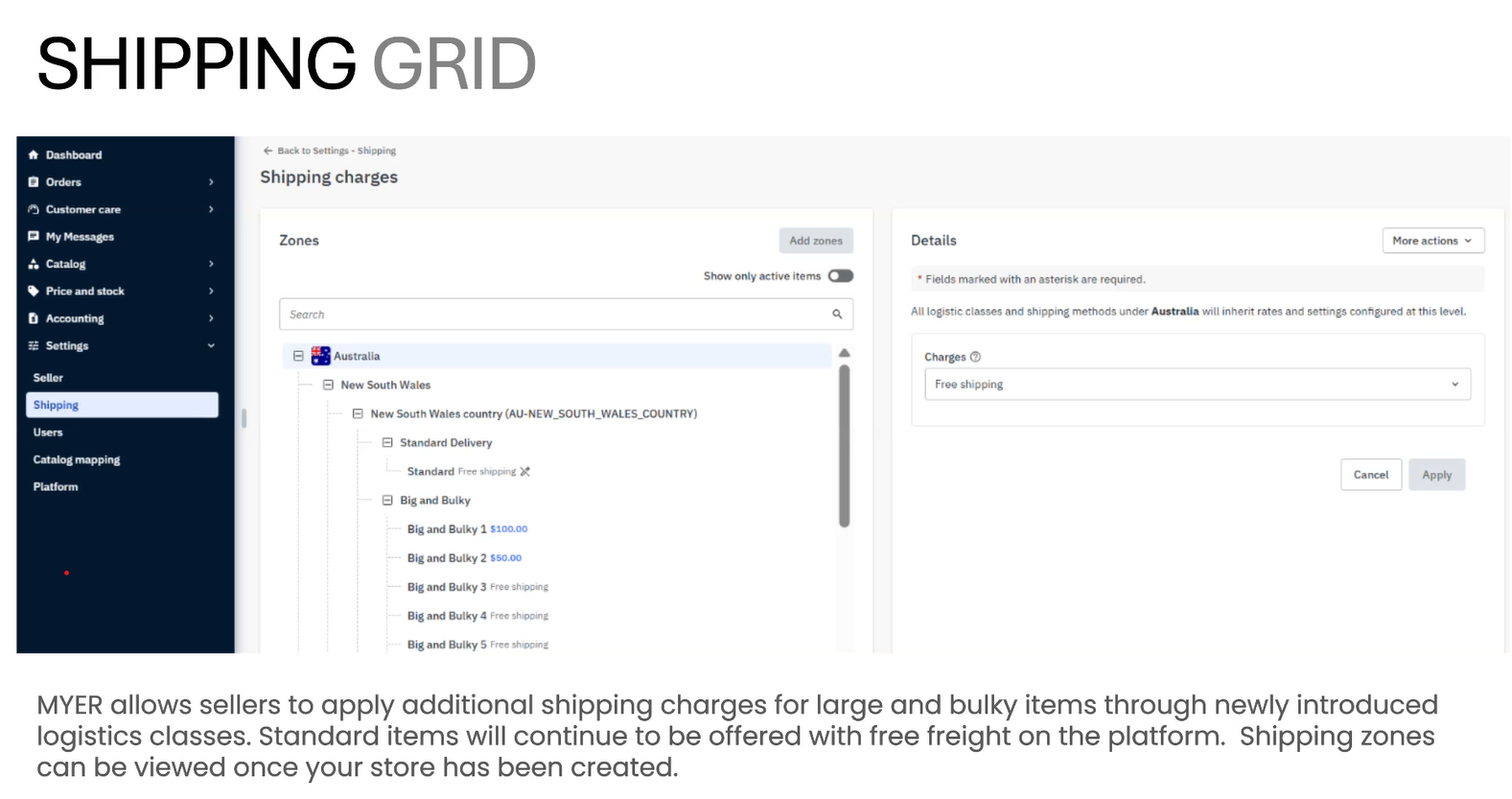
After completing the seller account information section of your set up tasks, you must then review your shipping settings from the dashboard. Please note: All standard items must offer free standard shipping on all products
sold on Myer. For Big & Bulky items, you can apply additional shipping charges using the newly
introduced logistics classes.
- Standard - outside of big and bulky. required to have free shipping.
- Big and Bulky - anything over 1x1m, 25 kg. Aus post rules.
Full shipping table in mirakl with multiple zones. 10 Logistics classes for big and bulky including 2 man and special handling. That is how to charge freight for BnB items.
Variations
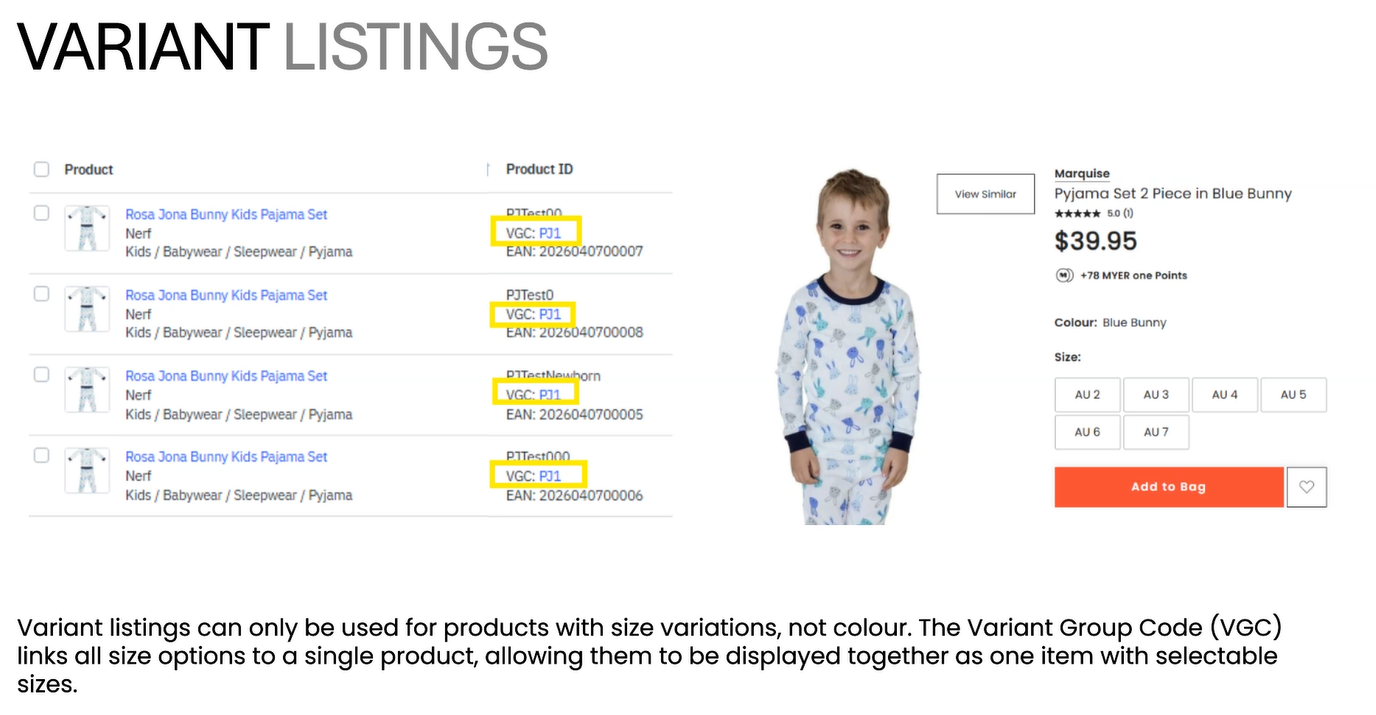
Accept size but not colour
Colours list as single listings, on the PDP page other colours will be shown to click to.
Products will be approved by Myer before going live - strict image requirements.
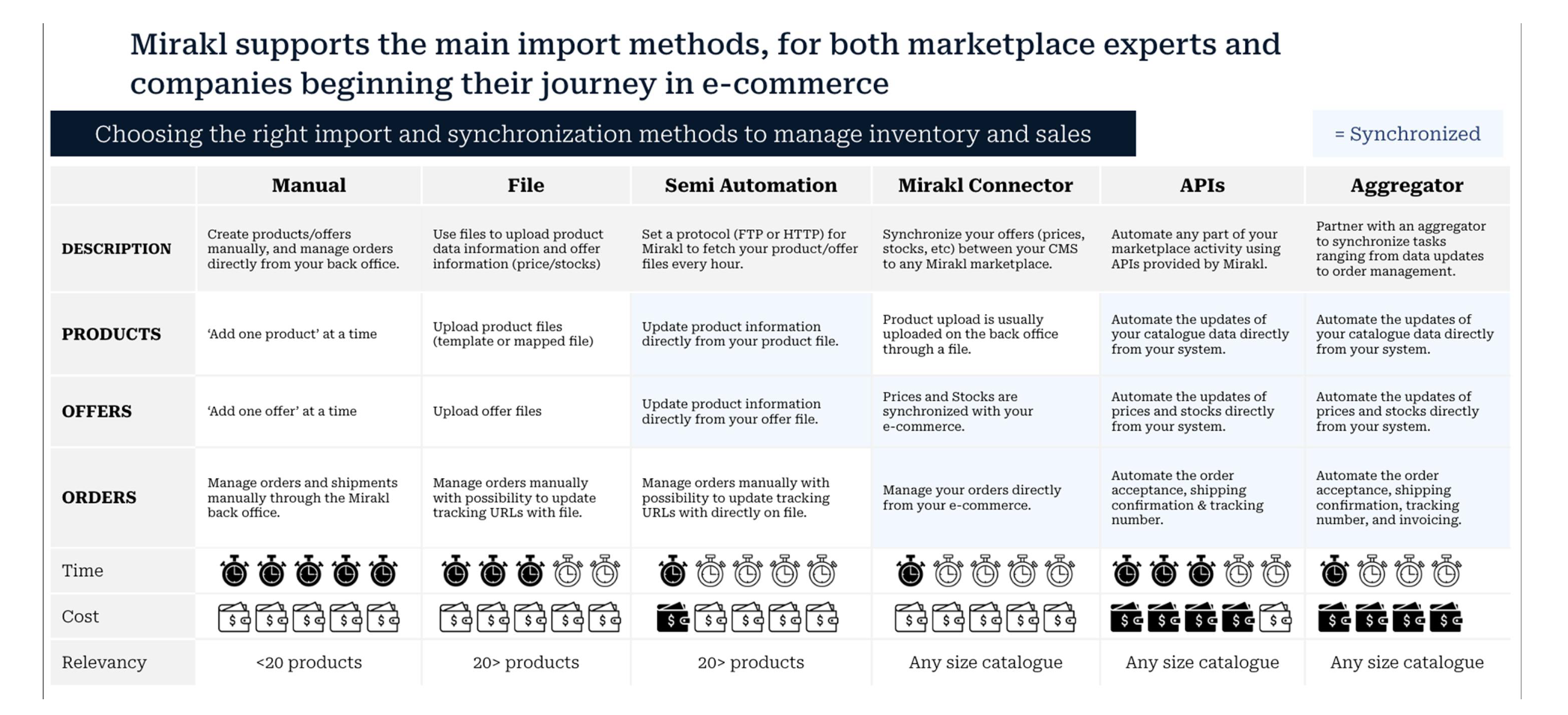
To enable product flow to MYER, products must first be available in your Mirakl account. You can connect to Mirakl in several ways, allowing you to import products and offers, as well as efficiently manage orders within the platform.
What product and offer import method is right for you?
Product and Offer
A PRODUCT is a sellable item and has associated
characteristics and unique references such as:
▪ A title
▪ A description
▪ A category
▪ A brand
▪ An image
▪ A logistic class
6
4
An OFFER is a product sold by a seller. It has:
▪ A condition
▪ A price
▪ A stock quantity
▪ Other characteristics such as discount price,
promotion dates, etc.
An offer is always linked to a product!
Image Requirements
JPEG = .jpeg
Minimum accepted image size*:
1551px(W) x 2000px(H)
Aspect Ratio: 7:9
Product fill: minimum 70% of frame
(either width or height)
Max image file size: 50MB
White Background
RGB: R255 G255 B255
HEX: #FFFFFF
The primary image (image number one) of a product must not have text or graphics in it.
Only actual photos of products will be accepted to ensure an accurate representation of the product to the customer.
Lifestyle images will also be accepted, in some categories as primary images, and in some categories only as supporting images (images 2 to 7).
- Primary lifestyle images accepted for:
- Beds & Mattresses
- Quilts & Pillows
- Quilt Covers
- Sheets & Pillowcases
- Supporting lifestyle images accepted for:
- Homewares
- Bathroom
- Kitchen, Cookware & Dining
- Electrical & Appliances
- Apparel, Footwear & Accessories
- Beauty & Cosmetics
- Toys & Gifts
- Travel & Tech
Image aspect ratio must be 7:9
All other aspect ratios will automatically be rejected by PEP.
Correct crop and aspect ratio with no white padding.
Aspect ratio is 7:9 and the product fills at least 70% of the frame.
Images cannot be surrounded by white padding, i.e. a square ratio image,
with white padding around it to fill in the remaining 7:9 aspect ratio.
G A R M E N T R E T O U C H I N G•
Remove any visible product swing tags.
Remove pant imprints from under tight fitting tops.
Remove any visible bras or bra lines through garment.
Remove any dirt or marks from garments.
Remove any coat hanger bulges at shoulder.
Remove any visible pins or clips.
Remove any dust or lint or loose threads from garments.
Remove any visible hanger straps.
Remove any bunching in crotch or bottom of underwear.
Remove any unstyled creases from garments.
Remove any bunching on side of bra.
Remove visible lines of model’s underwear through garment.
T A L E N T R E T O U C H I N G•
Remove visible nipples and preserve modesty.
Remove any skin imperfections and even out skin tone (scars, tan lines, pimples,
blemishes, band-aids, tattoos).
Remove any imprints on skin – e.g. underwear, bra marks, socks, etc.
Remove any visible razor burn, pubic hair or ingrown pimples.
Clean up stray hairs on back of neck or body.
Ensure skin retains a natural appearance and limit body manipulation where possible.
Check you have all the MANDATORY images, and as many RECOMMENDED images as possible,
as per category guides. See Myer Gold Supplier Style Guide for details.
A maximum of 7 images can be uploaded per product