
Internal Article
Updated March 2025 because of this ticket - https://support.omnivore.com.au/a/tickets/163144
Article for the support team only. Read the entire article first.
Only support can fix this magento 2 order error. The retailers cannot see the Mappings options on the shipping config page as Will has made it not visible to them.
For the most part Will is the only dev who is across any fixes if we need to escalate it.
This information will help when you see a Magento 2 order that cannot be sent to the sellers store because of the following shipping error:
Error = IllegalArgumentException: Cannot find a Magento 2 mapping for shipping method Postage
Overview, things to check as explained below (not necessarily in order):
- Run a status check job and make sure it is successful
- Check what version of the plugin they are using
- Check if they have 'provided default shipping methods' ticked or unticked.
- Refresh shipping methods from Magento
Unlike Magento 1 for Magento 2 in Omnivore we do not create mappings for shipping, Will has built it in such a way that the the site check and install process sets its up automatically. All marketplace shipping methods will default to "citybeachshipping". This can sometimes not work and / or break.
It is also dependent on which version of the plugin they are using. To check which version of the plugin they are using go to Settings, Magento Feed, General. Please read this excerpt from Will 27/11/23. It also pertains to an anomaly now to do with eBay AU Local Pickup. https://m2.omnivore.com.au/magento2ShippingMethod/index?retailerCode=mobileciti
Magento 2 shipping methods are generally handled automatically. All marketplace shipping methods default to "citybeachshipping".
That is assuming "Settings > Magento 2 Feed > General > Provided default shipping methods" is enabled (defaults to enabled) and the plugin version is > 2.2.
However we can still create shipping mappings. Looking at mobile citi and costumes (see ticket above), they have a mapping for ebays AU_PickUp to Store Pickup - Pickup from Lidcombe (NSW).
The danger with other shipping methods in Magento is that the invoice amount can get stuffed up. The Magento shipping methods force the shipping price and re-calculates the totals, these amounts don't always line up with what we have or get from the marketplace
Easy example, marketplace has shipping at $5, Magento has it configured at $10.
We also run into GST rounding problems, totals out but 1c
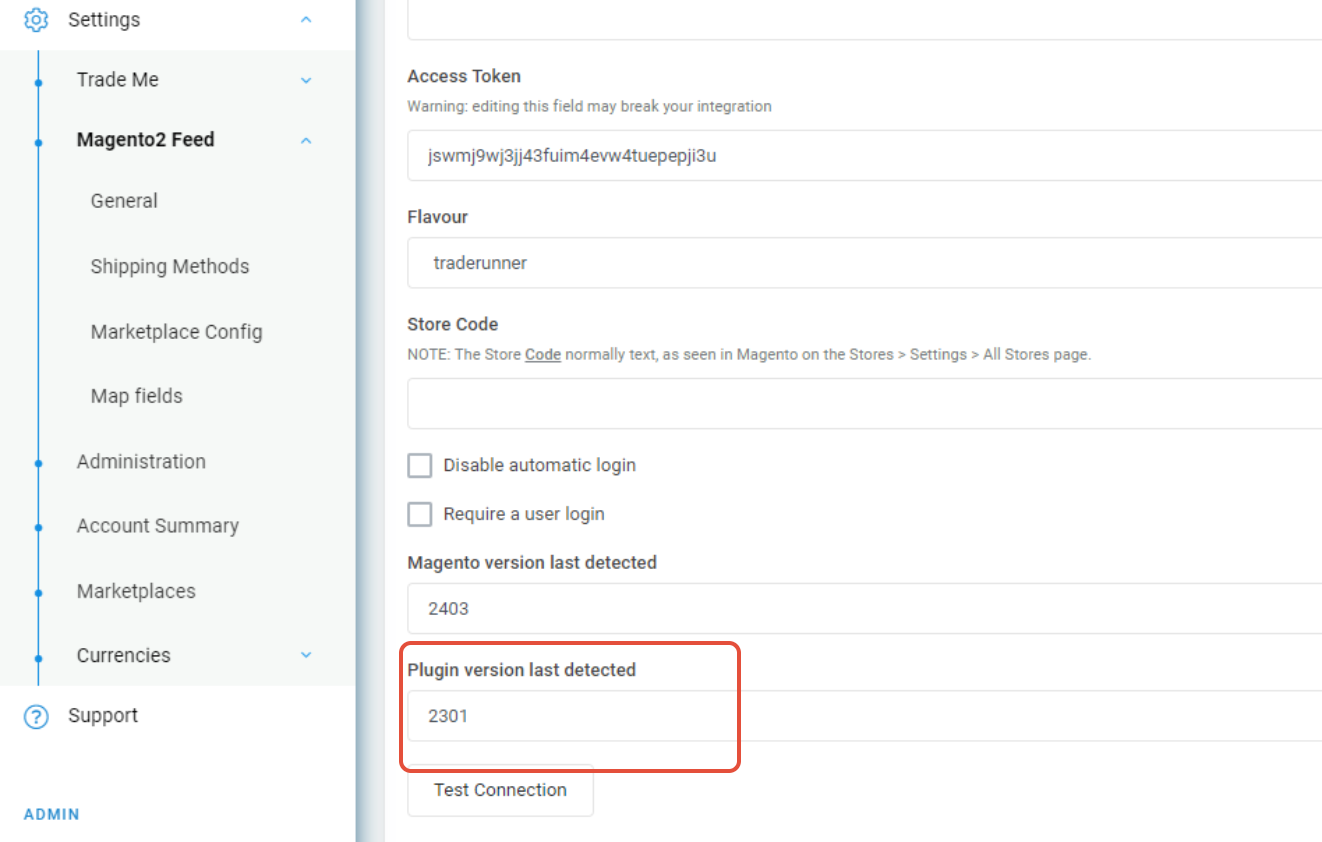
Version 2.20 and earlier
Or
Version 2.3 and later
Each require different troubleshooting and different configuration in Omnivore.
For Omnivore Plugin version 2.3 or later:
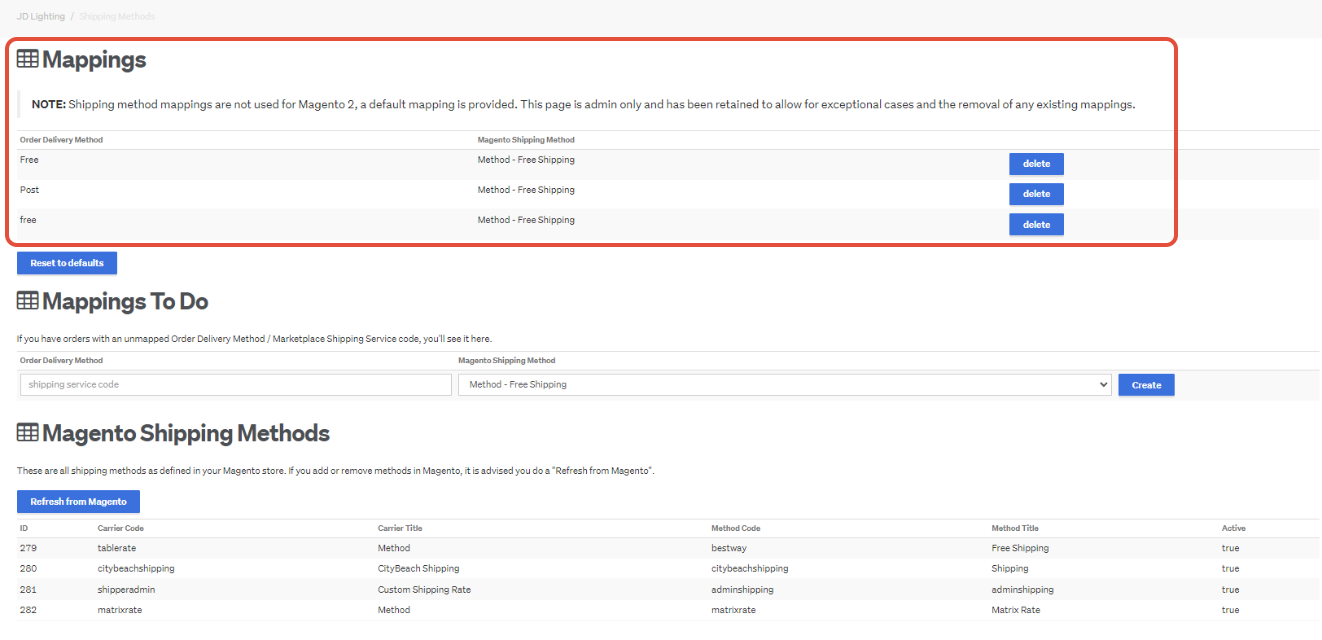
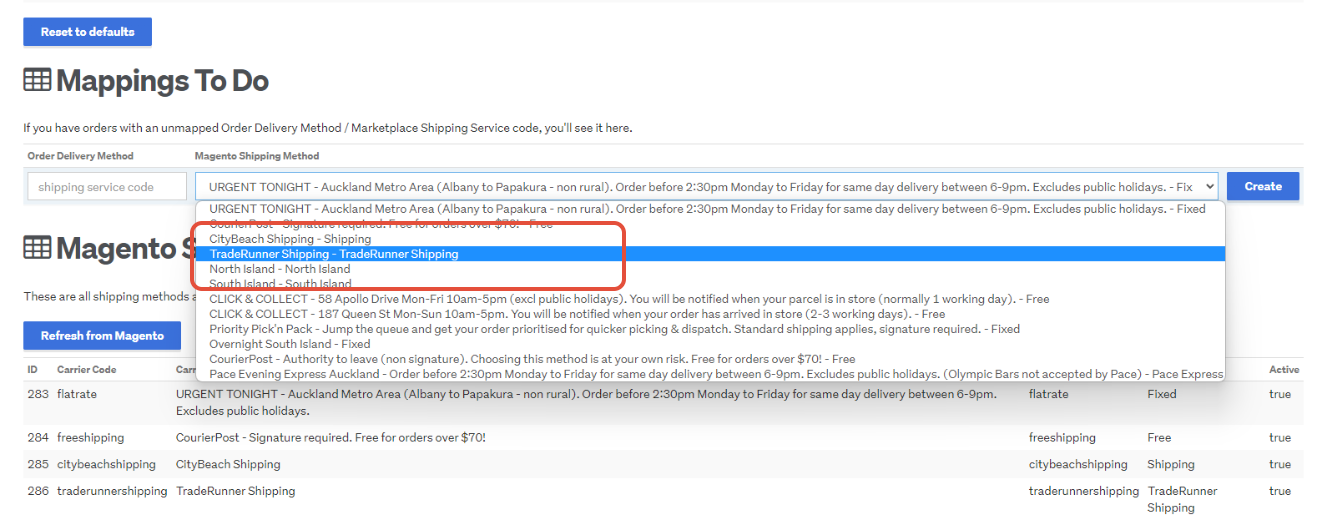
If you see this on the shipping config page in Omnivore it is not setup correctly based on how Will has developed the shipping mappings for magento 2 and that plugin version. The highlighted mappings at the top are not necessary. They will have to be deleted.
After you delete them, check the provided default shipping methods' is ticked and attempt to resend the order to retailer. The Provided default shipping methods tickbox is found at Settings->Magento2 Feed->General in the Shipping section
Other potential scenarios.
It may not work if the app has been installed and something did not quite complete during the install, OR
if they upgrade the plugin version and the site check job has not run to pick up and re-bind the necessary shipping mappings automatically.
In the second case you will see orders where the shipping was working correctly and the orders were able to parse to Magento:
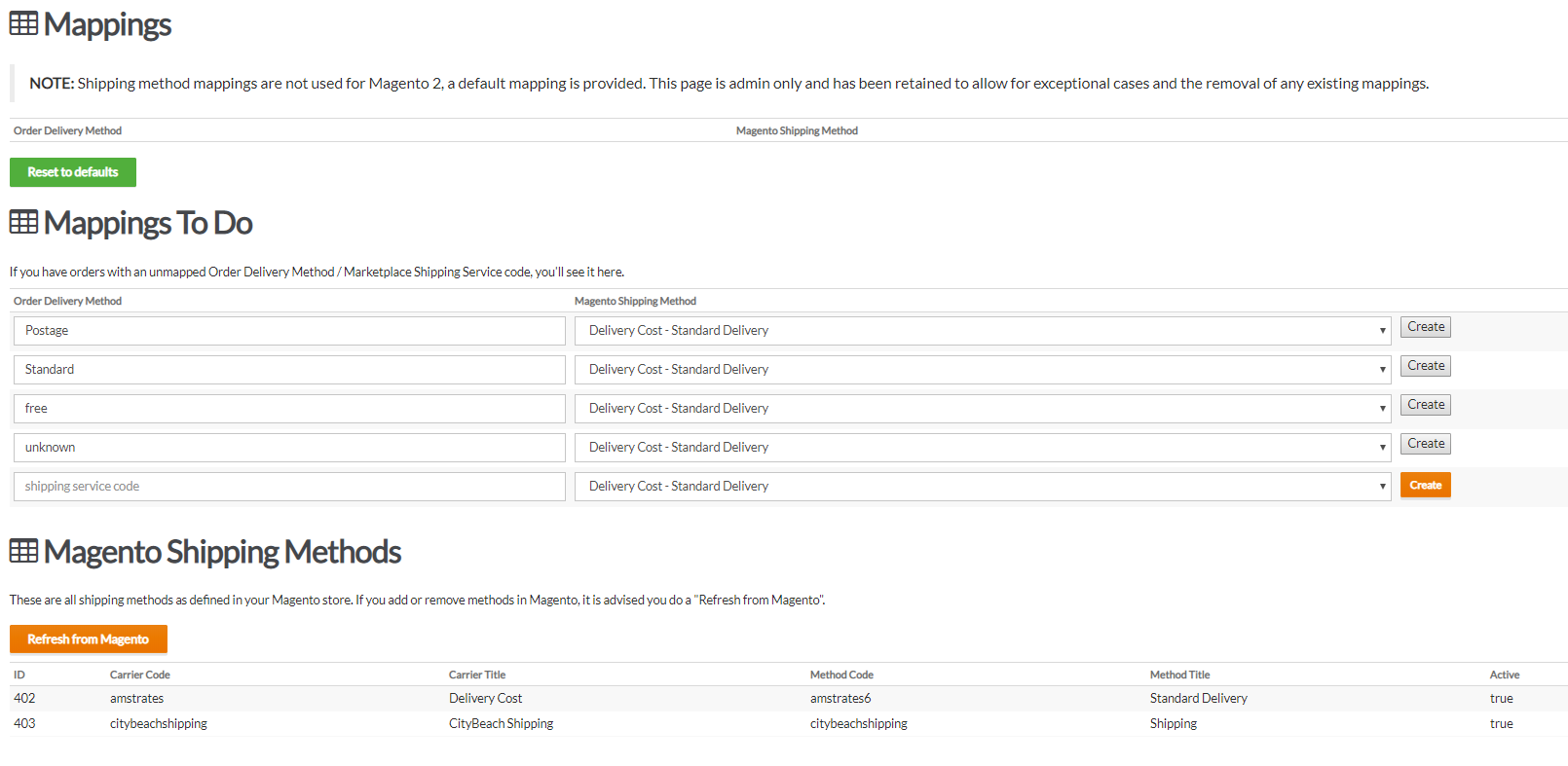
To fix this you can run the Site Check Job under Retailer Admin, New Dashboard, click Status Check. This runs the site check job and fixes anything like broken shipping settings.
You should also click Refresh from Magento as per above, this is on the Shipping Config page.
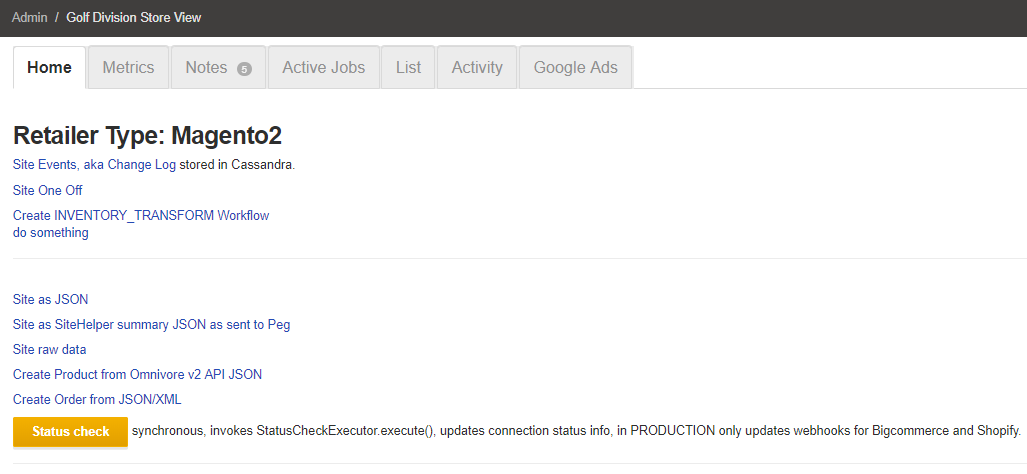
Check the Site Check job has run successfully and click the Send To Retailer Button on the top of the order page to push the order to Magento.
Successful Message: resultStatus = SUCCESS, nextExecutionContext = [Magento 2 connection ok:true, TheMarket status check ok:true], delay = null, message = null
If you still see the error after this, check with the team or ask Will to confirm.
Older Plugin Versions
If they have a plugin version that is older that 2.20 they WILL need to have shipping mappings in Omnivore but they will have to be set to specifically be what Will has configured for each plugin. This is visible in the drop down.
In this case if you see there are existing mappings delete them, create them again and select the citybeach/omniovre/traderunner/catchfeeder corresponding option in the drop down before you re-create them.
Using this example capture you would select the Trade Runner option in blue.
After those steps have been completed you can attempt to resend order to retailer.
If you still get the error, update the ticket with your steps and escalate to Will.
Shipping Method button (added Dec 2022)
When you see this error:
The order cannot be created in Magento2 due to these errors:
Magento 2 failure:The shipping method is missing. Select the shipping method and try again.
Settings, Magento 2 Feed, Shipping Method, Magento Raw Shipping Method button
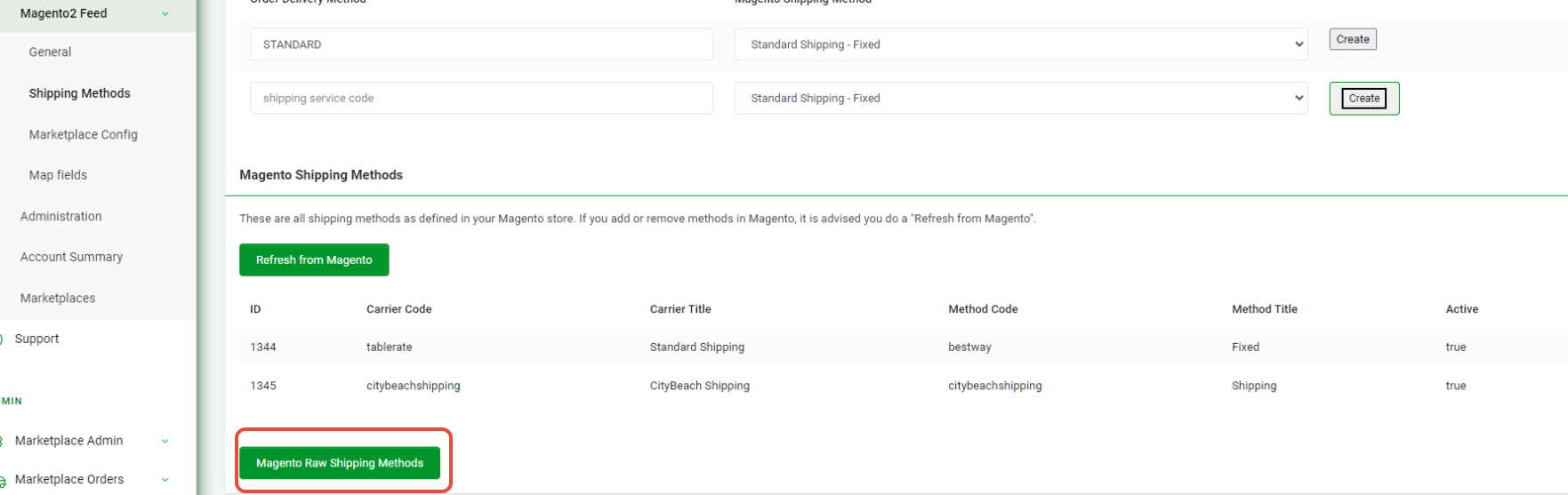
Exmaple -
If one of the Method Title fields is Null that can cause an issue. Have them add a value to Method Title in Magento.