
Before submitting products to Kmart Marketplace, make sure each product is mapped to the category Kmart has requested the product be listed in and that all mandatory Marketplace Attributes are completed.
If you have not already done so, refer to Prepare Your Approved Kmart Product Range before continuing.
Map products to the categories specified by Kmart
Kmart determines which categories your products should be listed in. You must map each product in Omnivore to the category specified by Kmart.
Mapping a product to a different category, even if it appears to be more suitable for the product, can result in listing errors or product rejections.
When mapping your products:
- Use the category specified by Kmart.
- Do not select an alternative category because it appears more suitable.
- Do not change categories to avoid mandatory attribute requirements.
- If you are unsure which category to use, confirm this with your Kmart Marketplace contact before proceeding.
You can manage your category mappings in Omnivore. See Category Mapping for instructions.
Product Variants
Not all Kmart Marketplace categories support products with variations such as size or colour.
If your product is mapped to a category that does not support grouped variants, Omnivore will submit each variant as a separate product.
For more information, see Kmart Marketplace Categories That Support Variant Products.
Check the required Marketplace Attributes
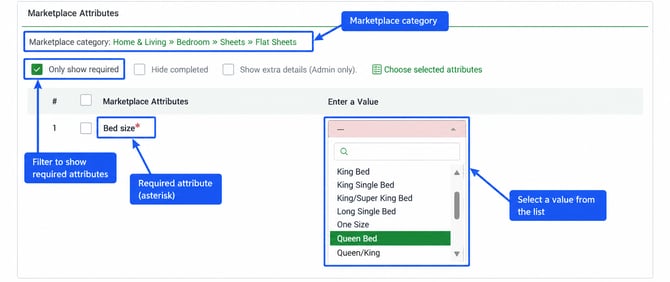
Once your product is mapped to the category specified by Kmart, open the product in Omnivore, select the Kmart tab and locate the Marketplace Attributes section.
- Check that the Marketplace category matches the category specified by Kmart.
- Mandatory attributes are identified with an asterisk (*).
- Select Only show required to display the mandatory attributes.
For example, a product mapped to Home & Living › Bedroom › Sheets › Flat Sheets requires the Bed size attribute to be completed.
Different Kmart categories may have different mandatory attributes. Do not assume that the same attributes are required across your entire product range.
Populate Marketplace Attributes
You can populate Marketplace Attributes using product data from your ecommerce store or by setting values directly in Omnivore.
Use product data from your ecommerce store
If the required product information is already maintained in your ecommerce store, you can map this data to the corresponding Marketplace Attribute in Omnivore.
Depending on your ecommerce platform, this may include:
- Shopify metafields
- BigCommerce custom fields
- WooCommerce product attributes
- Magento product attributes
When you map a store attribute to a Marketplace Attribute, Omnivore automatically applies that mapping to other products within the same marketplace category. You do not need to repeat the mapping for every product in that category.
This is particularly useful when managing a large product range, as you can maintain the attribute values in your ecommerce store rather than manually entering them against individual products in Omnivore.
See Add Product Attributes in Omnivore Includes Using Metafields for instructions on importing and mapping store attribute data.
Set attribute values directly in Omnivore
You can also set attribute values directly in the Marketplace Attributes section in Omnivore.
Where Kmart provides a predefined list of accepted values, select the value that accurately describes your product.
Whether you are mapping data from your ecommerce store or setting values directly in Omnivore, the values supplied must meet Kmart's attribute requirements.
If none of the available values accurately describes your product, contact Omnivore Support for assistance.
Category-specific product content requirements
Kmart also has category-specific requirements for product content, including product details, specifications, warnings, and other product information.
These requirements are separate from the mandatory Marketplace Attributes displayed in Omnivore.
Completing all mandatory Marketplace Attributes does not necessarily mean that your product meets all of Kmart's product content requirements.
Refer to Prepare Product Content for Kmart Marketplace for further information.
Before submitting your products
Check that:
- Each product is mapped to the category specified by Kmart.
- All mandatory Marketplace Attributes are populated.
- Attribute values mapped from your ecommerce store meet Kmart's requirements.
- Values set directly in Omnivore accurately describe the product.
- Additional product content requirements specified by Kmart have been met.
Save your changes and select UPLOAD TO MARKETPLACE to send the updated product information to Kmart.
If Kmart returns a category or attribute error, refer to Kmart Marketplace Product Listing Errors for assistance.