
Please read the entire FAQ first.
Some products on Amazon have specific data requirements. An example of this in in the Shoes and Clothing category. For Shoes, Amazon Australia requires shoes to be in the US sizing (7,8,9,10 etc). If a retailer has sizing in their data that differs then we can override this by importing a csv file with the attributes at a variant level.
When doing the csv import you will need to include the field 'variantSku'. For Shoes the size field is called 'sizeName' .
Example of how csv file should look when ready to import:
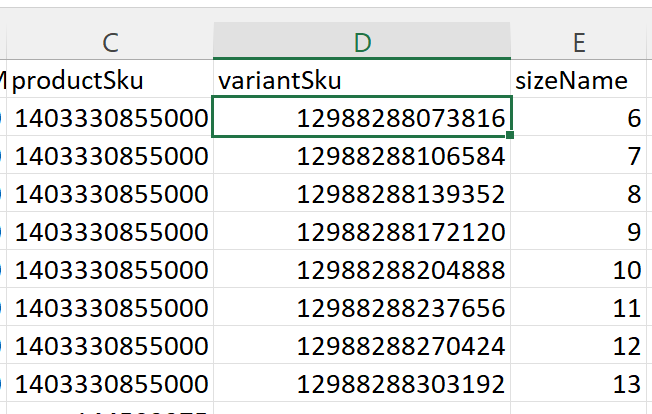
The variantSku and attribute to apply at the variant level must be at the end of the csv file.
An alternative to using a CSV is to use JSON Mapping to map Amazon Shoe Size.
This complementary FAQ here covers the method, an example and some do's and don'ts.
https://support.omnivore.com.au/adding-attributes-in-omnivore-all-methods