
From ticket 181024
Now it should always work, but it needs a "validate" for the product. The data flows like so:
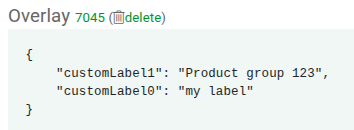
- the product action during validate will create the custom label as a product attribute visible in the overlay
- the product codec takes the key and value from the overlay and populates the xml element
-
This feature has a couple of issue I will list here and potentially should turned into a FAQ.
1. First issue is that there's no FAQ and the help link on the page goes to the list of all possible actions, but that list doesn't have "custom labels"
2. Custom labels only make sense for Google feed, and I see in the code also AffiliateAdapterService, Ivan knows what that means and how it's used.
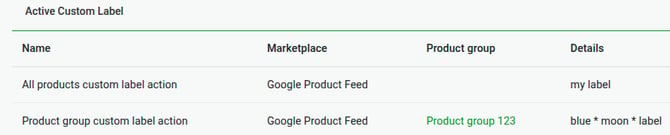
3. The way the actual value for the custom label is calculated is confusing, for me at least. I'll explain it with 2 examples from my localhost:
my label

Product group 123
It works like this:
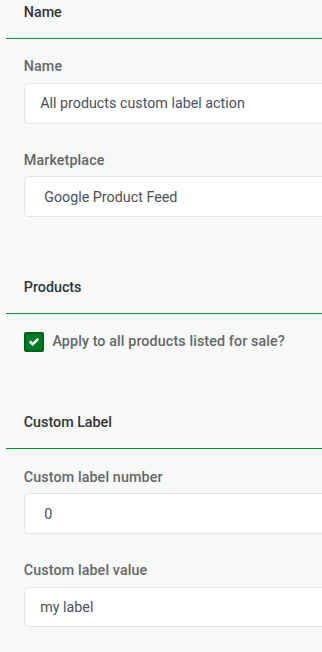
If the product action applies to all products (ie no product group is selected), then the value you enter in the Custom label value field is what becomes the value of the label, with the extra complication that it can be a "template" ie you can use $stuff.
In the above example, "my label" becomes customLabel0.
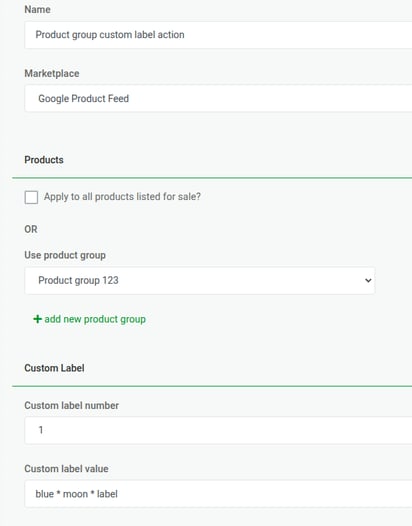
If the product action applies to a group of products only, then the value of the label is actually the product group name, "Product group 123" in the example.
What you enter in the action form doesn't matter at all, in the example "blue * moon * label" is ignored.