This article outlines common TEMU listing errors, explains the cause, and provides guidance on how to resolve each issue.
TEMU Global Validation Error - Attribute or Specification Error: Please reset the variants template and enter the required variants: Size.
Error or Warning
TEMU Global Validation Error
Attribute or Specification Error: Please reset the variants template and enter the required variants: Size.
Suggested Fix
This error occurs when the Sellers Size Value, e.g. Small, Medum, Large does not match with what Temu expects.
Marketplace attribute mappings have to configured to map the sellers size with the Temu size option.
E.g 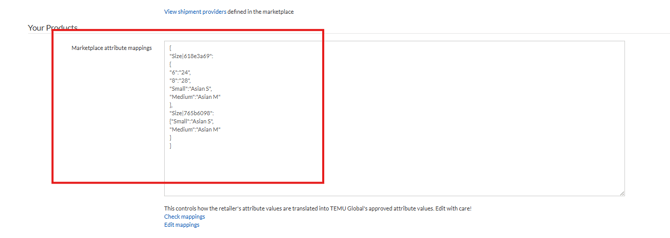
If you can see this error please our Support Team to apply the required mappings for you.
The input base Price: null is incorrect, please modify it
Error or Warning
The input base Price: null is incorrect, please modify it
Suggested Fix
This error means that a new variant has been added to the original product / listing and because of this TEMU have delisted it. The product will have to be deleted and re-uploaded to TEMU.
If you can see this error contact our Support Team to delete this product from the TEMU feed.
TEMU Global Validation Error The number of SKUs and the product of specifications do not match
Error or Warning
TEMU Global Validation Error The number of SKUs and the product of specifications do not match
Suggested Fix
See the first error. Follow the same fix to apply the attribute mapping configuration in Omnivore.
TEMU Global Validation Error - Invalid Request Parameters
Error or Warning
TEMU Global Validation Error - Invalid Request Parameters
What it means
TEMU Global has rejected one or more product attributes because the value sent from Omnivore does not match a value TEMU accepts.
This error can have several causes, including:
- A variant option value does not match TEMU’s accepted value.
- A required TEMU attribute is missing.
- A grouped attribute has not been fully completed.
- A required attribute is not currently displayed on the product page.
- An attribute value requires mapping before TEMU will accept it.
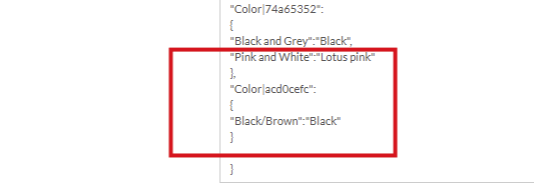
A common example is a colour variant. The product may contain Black/Brown, while TEMU only accepts Black.
Suggested Fix
- Open the affected product in Omnivore.
- Scroll to Marketplace Attributes.
- Complete any required fields that are empty or highlighted in red.
- Check that the selected attribute values accurately describe the product.
- Complete every required field within grouped attributes.
- Check whether the error clears after uploading to TEMU.
Contact our Support Team if:
- All visible required attributes have been completed.
- The product still returns Invalid Request Parameters.
- A suitable attribute value is not available.
- Your variant value does not match a value accepted by TEMU.
- A required attribute does not appear on the product page.
Include the SKU and Omnivore product link when contacting Support. Our team can review the TEMU requirements and apply the correct attribute mapping where required.
A potential example is a colour variant as seen here, the product has Black/Brown but TEMU require Black.
Temu Error - The size chart parameters are abnormal
Error or Warning
Temu Error - The size chart parameters are abnormal
Suggested Fix
The error means that the product listing needs a
Size Chart based on the TEMU requirements. Within Omnivore you can add a Size Chart using a Product Action.
Follow this FAQ to add your Size Chart - any changes you make to products in Omnivore require an upload to the Marketplace.
The error will persist until the product has a size chart image attached to it.
TEMU Global Validation Error - The mall and goods not match.
Error or Warning
TEMU Global Validation Error - The mall and goods not match.
Suggested Fix
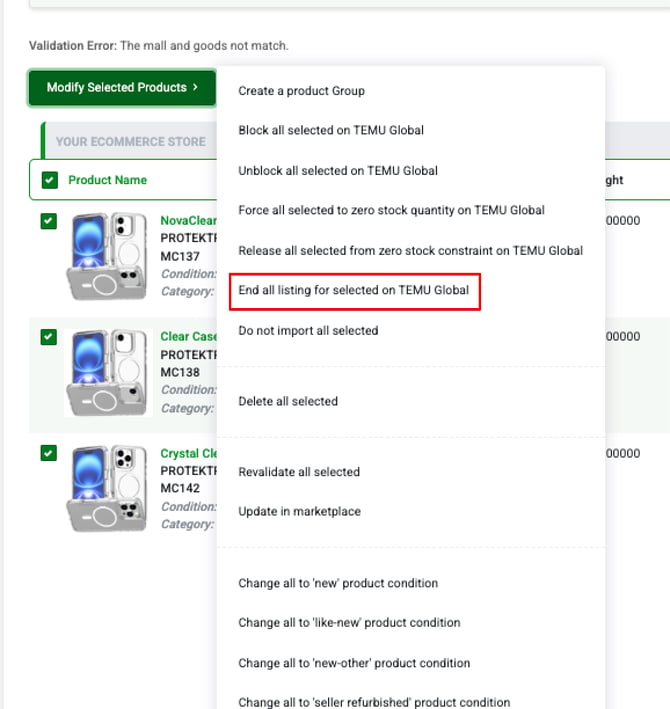
This will happen when a product has been deleted directly in Temu. You will need to select "End all listing for selected on TEMU Global" on the listing errors page so the products can be pushed back up to TEMU as new listing