
This FAQ will help you set up shipping where the products weight determines the cost of shipping. To do this you need to create product groups. A product group is a group of products based on a criteria, in this case the criteria is weight. Once you have created a product group, you then attach the product group to a shipping Template.
Important to Note
Please note the following scenarios around weight based shipping and how charges are applied using this example:
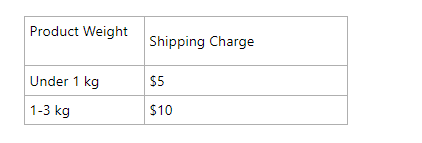
- Weight based shipping is based on the product. If Product X weighs 400g, the customer is charged $5.
- You can choose to charge for additional items of product X or not, if you do charge for additional items the customer will be charged $5 for each item, if they buy 3 of Product X, they will pay $15 for postage.
- You cannot have one shipping cost based on the total weight of all products. If a customer purchases multiple products, shipping costs are determined by each product. For example, if a customer purchases Product X which is 500g and Product Y which is 2kg, they will be charged $5 + $10 =$15.
- If you have products with different sized variations e.g small 1 litre or large 5 litre, the same shipping charge is applied to all variations. You can get around this by doing Shipping at the cart level. Please email trade me to set this up.
How to setup weight based shipping
-
To create a product group:
-
Go to 'Products' then 'Product Groups'
-
Click 'Add a product group'
-
Follow this how to guide to set up your product group based on weight.
-
Now go to Settings - Trade Me - Shipping
-
Click 'Add new shipping template'
-
Add a name for the shipping policy e.g Nationwide Courier - this is what the shipping option will be called on Trade Me.
-
Use the product group you just created, our example uses a Product Group called Tshirts which is a group based on weight.
-
Enter the amount you want to charge for shipping in $NZD e.g $10
-
Click Update
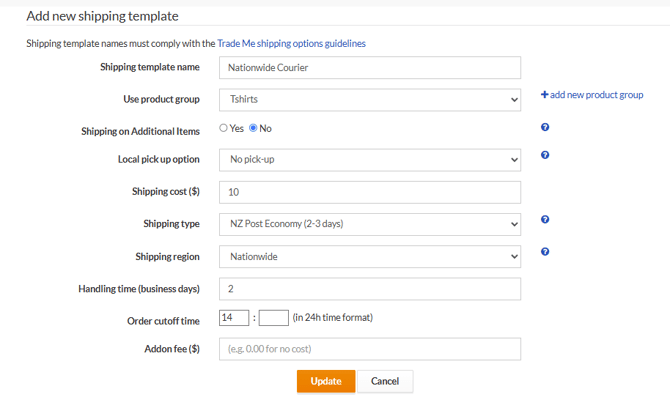
You're finished. Now, all products in the group you created bases on Weight will have $10 shipping on Trade Me.
If you would like to offer multiple shipping options for these products, e.g add an Express option, you can then click the green plus and 'add shipping template' in the Product Group column:

Repeat the steps above but add the word Express in the policy name to define the second template.
You will now see two shipping options attached to the weight based group.
