
This article is for retailers who already have products listed on Kmart Marketplace before they start selling through Omnivore.
Before enabling Start Selling, check the SKU used on your existing Kmart Marketplace listings against the corresponding product or variant in Omnivore.
If the SKU matches one of the supported values in Omnivore, the existing listing will link automatically. If you cannot find a match, contact Omnivore Support before continuing.
If you do not already have products listed on Kmart Marketplace, you can skip this article and continue with Prepare Your Approved Kmart Product Range.
Why You Need to Check Existing Listings
Products that are already listed on Kmart Marketplace need to be checked before Omnivore begins sending product data.
This allows Omnivore to identify an existing Kmart Marketplace listing where its SKU matches the corresponding product information in Omnivore.
Complete this check before enabling Start Selling.
Check the Existing Kmart Marketplace SKU
For each product that is already listed on Kmart Marketplace:
- Find the SKU used on the existing Kmart Marketplace listing.
- In Omnivore, open the corresponding product and select the Marketplace tab.
- Find the corresponding product or variant.
- Compare the Kmart Marketplace SKU against the values shown in Omnivore:
- Marketplace SKU
- ID under References
- MPN under References
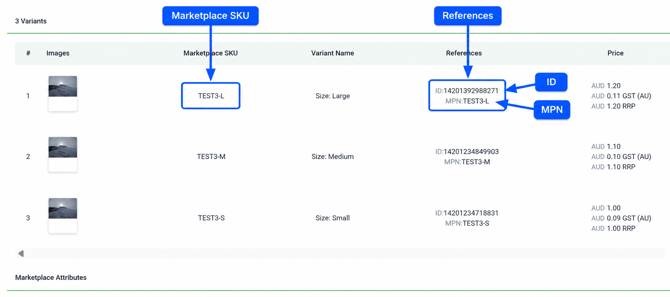
Only one value needs to match.
For example:
| Existing Kmart Marketplace SKU | Omnivore Value | Result |
|---|---|---|
| TEST3-L | Marketplace SKU: TEST3-L | Match |
| TEST3-L | MPN: TEST3-L | Match |
| 14201392988271 | ID: 14201392988271 | Match |
| TEST3-L | No matching value | Contact Support |
Checking Variant Products
If the product has variants, check the values for the individual variant.
On the Omnivore Marketplace tab, each variant is displayed on its own row with its own:
- Marketplace SKU
- ID
- MPN
For example, a product may have separate rows for Small, Medium and Large. Check the existing Kmart Marketplace SKU against the values shown on the corresponding variant row.
If a Match Is Found
If the existing Kmart Marketplace SKU matches the Marketplace SKU shown for the corresponding product or variant in Omnivore, no action is required. Omnivore will link the product to the existing listing automatically.
If the Kmart Marketplace SKU does not match Marketplace SKU, but does match either the ID or MPN shown under References, create a ticket with Omnivore Support.
Include an example product or variant where this occurs. Omnivore Support will use the example to update the Marketplace SKU mapping before you continue.
Do not enable Start Selling until the Marketplace SKU mapping has been updated.
If You Cannot Find a Match
If the existing Kmart Marketplace SKU does not match the Marketplace SKU, ID or MPN in Omnivore, contact Omnivore Support before enabling Start Selling.
Create a ticket and include:
- the SKU used on the existing Kmart Marketplace listing;
- the product or variant you are checking; and
- the Marketplace SKU, ID and MPN currently shown in Omnivore.
Omnivore Support will review the mismatch and advise you what to do next.
Check All Existing Listings Before Start Selling
Before enabling Start Selling, check the products and variants you already have listed on Kmart Marketplace.
Make sure:
- each existing Kmart Marketplace SKU matches the corresponding Marketplace SKU, ID or MPN in Omnivore; or
- you have contacted Omnivore Support for any listing where you cannot find a match.
Where a matching value exists, linking is automatic. There is no separate manual linking step in Omnivore.
What to Do Next
Once you have checked your existing Kmart Marketplace listings, continue with Prepare Your Approved Kmart Product Range.
Then follow the remaining steps in Get Started With Kmart Marketplace in Omnivore before enabling Start Selling.
If you still need to complete the Kmart Marketplace connection in Omnivore, see Set Up Kmart Marketplace in Omnivore.