
Kmart approves the range of products you can sell on Kmart Marketplace before products are submitted from Omnivore.
When Kmart Marketplace is set up in Omnivore, products are blocked by default. This helps prevent your full product catalogue from being unintentionally sent to Kmart.
Kmart will usually provide you with an approved product list or range. Use this list to identify the matching products in Omnivore and unblock them for Kmart Marketplace. Products outside the Kmart approved range should remain blocked.
For an overview of the complete onboarding process, see Get Started With Kmart Marketplace in Omnivore.
If you already have products listed on Kmart Marketplace before connecting Omnivore, complete Using Omnivore With Existing Kmart Marketplace Listings before preparing your approved range.
Check Your Kmart-Approved Range
Before unblocking products, have the approved product list or range provided by Kmart available.
- Match the approved products to the corresponding products in Omnivore, using the SKU or other product information provided in Kmart's approved range.
- Check the matches carefully, particularly where you have similar products or variants.
- Leave any product that is not part of the approved Kmart range blocked.
Once you have identified the correct products, you can unblock them individually or use the bulk tool for a larger range.
Unblock Approved Products in Omnivore
For a small number of approved products:
-
In Omnivore, go to Products->Kmart and go to the "All Products" tab.
-
Search for an approved product using its SKU or a keyword.
-
Select the product or products you want to unblock.
-
Repeat this only for products included in Kmart's approved range.
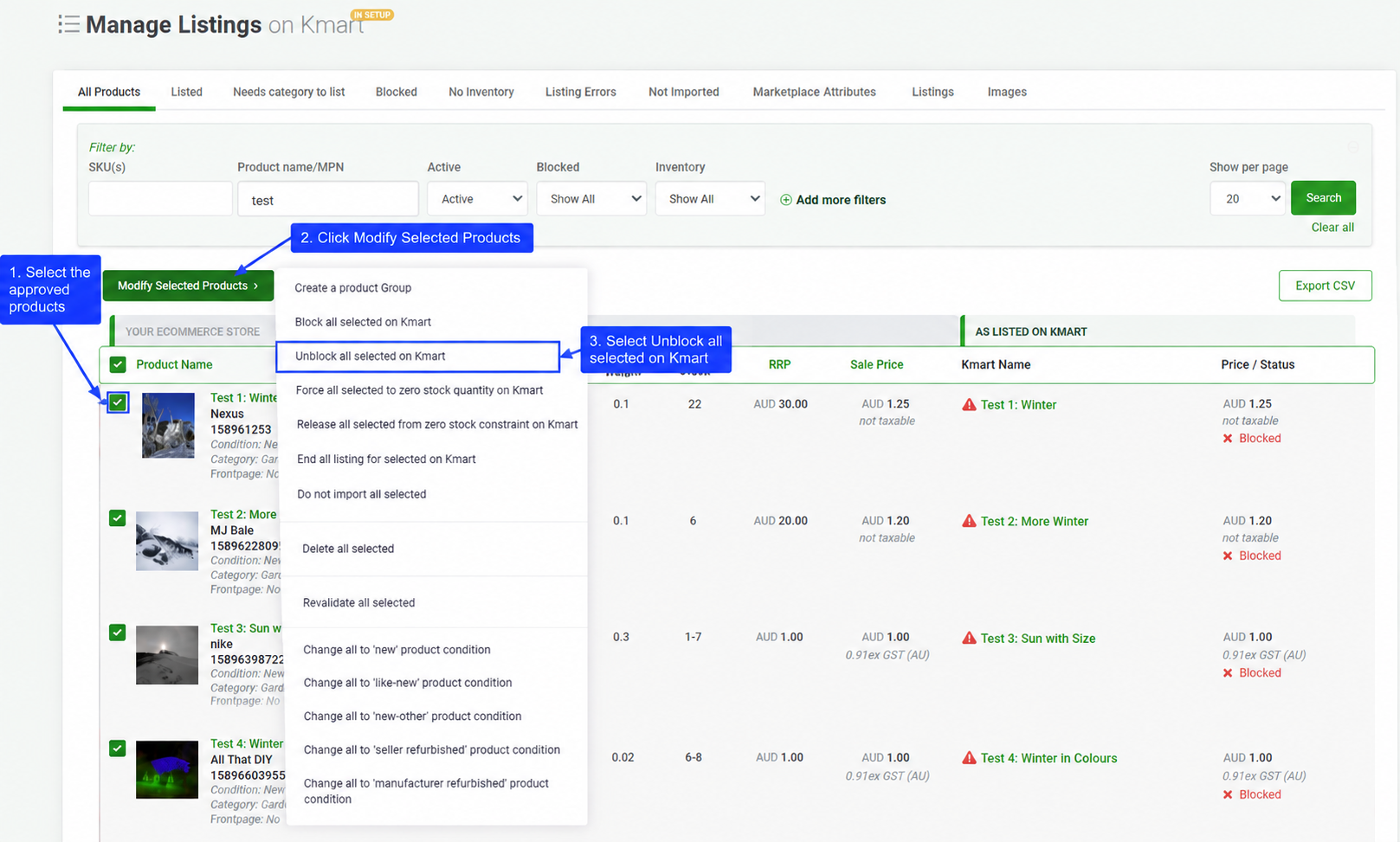
See Block a Single Product from Listing on a Marketplace
Unblocking is marketplace-specific. Unblocking a product for Kmart Marketplace does not mean you need to make the same change for your other marketplaces.
Unblock a Larger Approved Range
If Kmart has approved a larger number of products, you can use Omnivore's bulk blocking tool.
- Prepare a list of the Omnivore SKUs that match Kmart's approved range.
- In Omnivore, go to Products > Bulk Block.
- Either:
- paste the approved SKUs into the SKU field, one SKU per line; or
- import a CSV containing the SKUs.
- Select Kmart Marketplace as the marketplace.
- Select Unblock as the action.
- Click Apply.
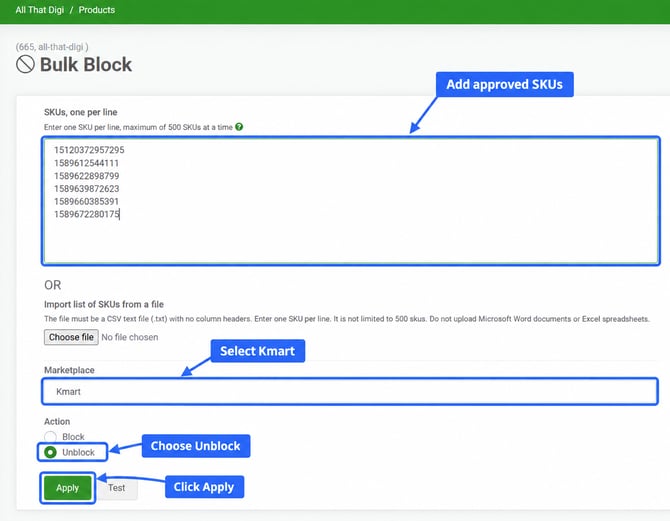
See Block/Exclude/Bulk Block Products & Variants from Listing
Check the SKU list carefully before applying the change. Products that Kmart has not approved should not be included.
What Unblocking a Product Means
Unblocking controls which products are eligible to be sent from Omnivore to Kmart Marketplace.
It does not mean that:
- the product automatically meets Kmart's listing requirements;
- the product has been submitted to Kmart;
- the product will automatically be approved as a Kmart Marketplace listing; or
- no further product preparation is required.
Your approved products still need to meet the relevant Kmart Marketplace requirements before submission, including the correct category mapping and required product attributes, as well as compliant product content and images.
Prepare Your Product Data
After unblocking your approved range, the products still need to meet Kmart Marketplace requirements, including:
- the correct Kmart Marketplace category;
- required category attributes;
- compliant product content; and
- compliant product image
- Check that your brand name in Omnivore is an exact match for the brand/s approved by Kmart.
- Preparing titles to fit Kmart requirements
Once the correct Kmart-approved products have been unblocked, continue with Kmart Marketplace Category and Attribute Requirements.
This is the next stage of preparing the approved products before they are submitted to Kmart Marketplace.