
eBay allows you to restrict how many units of a product a single buyer can purchase in one transaction. This can help prevent bulk buying, protect stock levels, or support promotional limits. You can apply limits directly in eBay or via Omnivore/eBay LINK.
There are two ways to limit a buyer's purchasing ability.
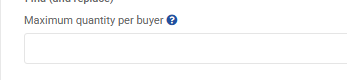
Apply a Maximum Quantity per Buyer in Omnivore
Firstly you can set a hard limit across all products which means that a buyer can only buy so many for the lifetime of that product.
-
Go to Settings -> eBay -> Manage Listing Options.
-
Find the Maximum Quantity Per Buyer field.
-
Enter the limit (for example, 1 to restrict buyers to a single unit).
-
Save your settings.
-
Perform an Upload to eBay for the changes to go live.
Note that this setting is applied across ALL products in your feed.
Set a Purchase Limit in eBay
-
Log in to your eBay Seller Hub.
-
Go to Account Settings -> Site Preferences -> Buyer Requirements.
-
Enable the rule that restricts buyers from purchasing more than a set number of items within 10 days.
-
Enter the maximum quantity a buyer can purchase.
-
Save your changes.