
Overview & Key Points
The following categories now require a Classification Rating based on the Kmart listing policies.
- TECHNOLOGY > GAMING > GAMES > CONSOLE GAMES
- TECHNOLOGY > GAMING > GAMES > PC GAMES
- TECHNOLOGY > MUSIC & ENTERTAINMENT > DVDS
This requirement applies to products that have an Australian Classification Rating, including console games, PC games, and DVDs.
When importing applicable products, sellers must select the correct Classification Rating from the approved value list.
|
Classification Rating |
Description |
|---|---|
|
G |
General |
|
PG |
Parental Guidance |
|
M |
Mature |
|
MA15+ |
Mature Accompanied |
Apply the Attributes in Omnivore
To add this data as an Attribute Value for Kmart use either of the following methods:
-
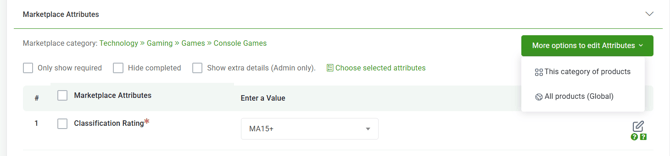
Go to a product page in Omnivore, click to the Kmart Tab, scroll down under Marketplace Attributes, see Classifcation Rating and Enter a Value from the dropdown.
-
Also on the product page you may set the attribute at the Category and Global level, this is under More Options to edit Attributes on the right, see image below.
- To use your own store metafield data make sure you use the Category option, on that screen look for the field called Retailer product attribute name. Your imported attribute data will be accessible when you click into that field to. See second screen capture.

-
Please consider this FAQ for a full outline of how to add attributes in Omnivore.
-
Any values you set will be pushed up to Kmart in the next Product Upload. You can do this manually by click Upload to Kmart from the Dashboard.