
Overview of Support
The fastest and most effective way to receive support is through our email and chat channels. We are committed to providing timely and helpful assistance, with all support requests reviewed within 24 hours and prioritised based on urgency.
You can submit a support request through our Support Portal.
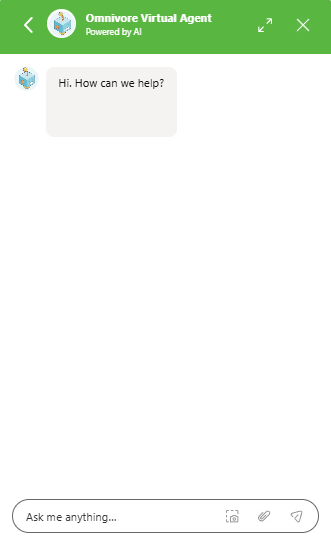
For live assistance, use the chat widget located in the bottom-right corner of the Support Portal. Our AI assistant can help with common questions and troubleshooting, while more complex enquiries can be escalated to a member of our Support team.
Tips to speed up the process
To help us resolve your issue as quickly as possible, please include:
- A detailed description of the issue you're experiencing
- Direct links to the affected orders, products, or listings
- Screenshots of any error messages or unexpected behaviour
- Details of any recent changes made to your store, marketplace, or system configuration
The more information you provide, the faster we can investigate and assist.
Self-Service Support and Resources
Omnivore is designed to be user-friendly and supports self-service onboarding for most retailers.
If you need guidance during setup or encounter technical issues, our Support Portal contains a wide range of help articles, setup guides, FAQs, and checklists to assist you. If you still require assistance after reviewing these resources, you can submit a support request and our team will be happy to help.
Support Hours
Our support hours are Monday to Friday, 8am - 6pm for tickets and 8am - 5pm for chat. We are closed on weekends.
We monitor for emergency tickets over the weekend.
General Support Including Additional Costs
Support-related requests or issues typically stem from Omnivore, the Marketplace, or your own eCommerce platform.
Here's how we handle each:
- Omnivore: If the issue is on our end, we will do our best to resolve it.
- The marketplace (e.g., eBay): We will make our best effort to resolve the issue through our integration or collaborate with the marketplace to find a solution.
- Your eCommerce platform/backend systems: You are responsible for your platform and systems. If the issue originates from your end, you'll need to address it. If resolving the issue requires more than 3 hours of technical support from us, we may charge an hourly rate. Examples of issues include:
- Your data doesn't meet marketplace requirements.
- Supporting customisations that you have made to your platform(s).
- Connectivity to your eCommerce platform.
- Issues caused by other apps/plugins/systems that connect to your eCommerce platform.
- The number of SKUs/products exceeds 30,000
We try to keep our rates to a minimum to cover costs - if a Developer is required the hourly rate is $250, and Technical or Onboarding Support is $120/hour. Please note:
- We are unable to make changes to your eCommerce platforms or marketplace accounts but will use online meetings with screen-sharing to assist you where appropriate.
- We'll get your approval before proceeding with any paid work.
- All prices are ex GST.
Specialised & Assisted Integration Setup
Please note: This applies to Retailers using our apps/extensions for Shopify, Magento 1, Magento 2, WooCommerce, BigCommerce and Manual CSV Upload. Any Enterprise or Custom Integration Retailers are supported and quoted separately.
Assisted Integration and Onboarding Specialist Support Package (optional)
Learning new Marketplaces can be tricky but ultimately rewarding when you increase your sales. If you are time-poor, find new systems overwhelming, or just want specialist help we can provide an assisted setup.
This service includes:
- A dedicated Marketplace Specialist to assist you through the initial setup, starting to sell, and through to the end of the first month of trading. Support is provided via email, and online meetings using Zoom to screen-share.
- Assist with connecting your eCommerce platform to Omnivore
- Set up key marketplace settings such as shipping
- Linking existing listings (eBay) where possible
- Product Optimisation: we guide and support you in tailoring your product data to Marketplace best practice (e.g., Product Titles).
- Listing or blocking products - assigning marketplace categories, blocking products, 2 hours of effort is provided as part of your onboarding package, and additional category mapping is charged at $50/hour (ex GST).
- How to use/set up promotional and merchandising features e.g. promotions or promoted listings
- End-to-end order testing
- Implement a product listing template (provided the template code meets Omnivore requirements) - eBay only.
- A 30-minute training session on how to use Omnivore
Cost
- Shopify: USD$450 for the first marketplace, USD$200 for each additional marketplace
- BigCommerce, WooCommerce, Magento, Maropost AUD$600 for the first marketplace, AUD$300 for each additional marketplace
- If you use WooCommerce or Magento and we identify an issue that requires a Developer (e.g connection or data issues) and the cause is your eCommerce platform then there is an additional charge of $250/hour.
- Note all prices are ex GST
- Note that you will also be charged an ongoing monthly according to the respective e-commerce platform Omnivore plan - https://www.omnivore.com.au/index.php/pricing/
You will need
- A Marketplace Seller account for each marketplace you want to sell on. If you don't have an account we can either introduce you (depending on the marketplace) or direct you to where to apply
- To set up your Marketplace storefront i.e eBay Store
Please note the following conditions before starting
- A successful integration still requires commitment from you. No guarantee is made on how long it will take to get your Marketplace set up completed since several steps still rely on you. If you have everything ready, it can usually be done in a few days
- You know your products better than anyone can so if there are set-up related actions that require knowledge of your products you will need to complete them
- We do not get involved with your eCommerce platform so any changes required here are your responsibility. We can provide recommendations e.g. how to structure your data for best results but we will not login to or make changes to your eCommerce platform configuration
- As part of the onboarding process, we may ask you to liaise with the marketplace for extra information regarding approved sku's, rejection reports and other setup processes that need to be done directly with the advice of the marketplace in relation to your account with them.
- We can screen-share with you to make changes to your marketplace admin if required (e.g. to set up eBay business policies)
- For multi-marketplace integrations, we focus on setting up one marketplace first before moving on to the next