
This FAQ instructs you on how to set up free shipping for all products or a group of products on Trade Me.
Free Shipping On All Products
- Go to Settings - Trade Me - Shipping
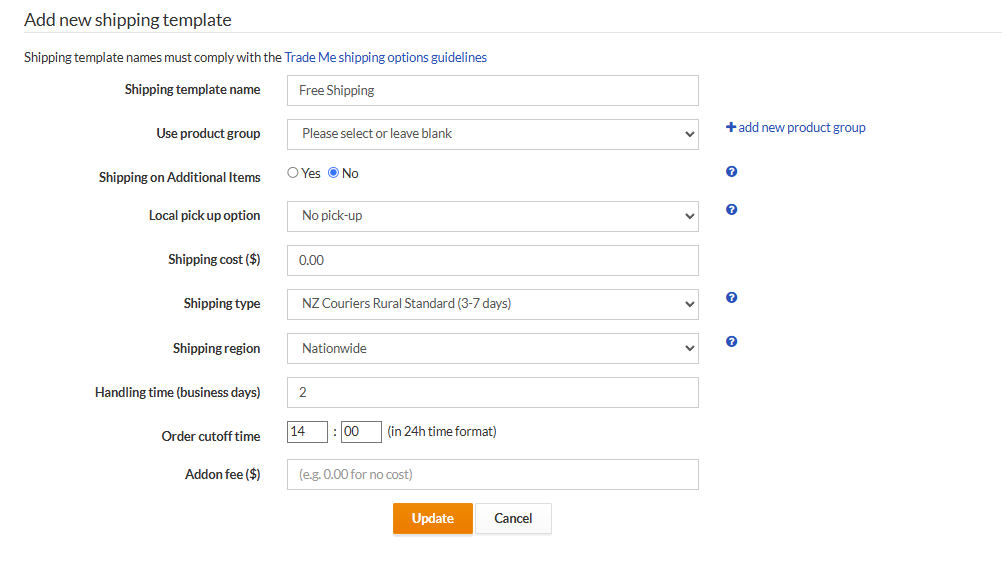
- Add a new Shipping Template.
- Call it Free Shipping and do not apply it to a product group.
- Make the cost of shipping 0.00
- Complete the necessary fields in the template setup.
- Hit Update
- Click Upload to Trade Me
Free Shipping On A Group Of Products
- Go to 'Products - Product Groups'
- Click 'Add a product group'
- Enter a name e.g Free shipping
- Choose which products should get free shipping by using the criteria available (price, weight, retailer or marketplace categories, brand etc). Follow this FAQ for the guide to product group setup guidance.
- Now go to 'Settings - Trade Me - Shipping' and click 'Add new shipping policy'
- Choose the product group you created e.g Free shipping then enter $0 in the price field.
- Complete the other shipping template fields as per your requirement. Click Update to save the template.
- Go to the dashboard and click 'Upload to Trade Me' so that the settings are updated on Trade Me.
All products with a price over $100 will now have free shipping.
Important points on Shipping Template Naming
-
Max length of policy name is 50 characters
-
Must not contain $ symbol