
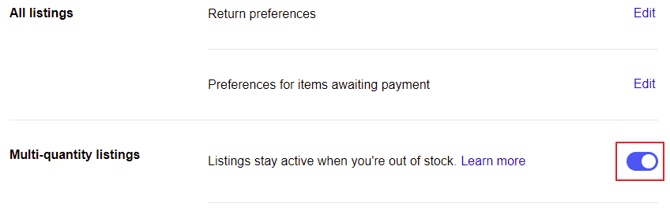
eBay’s Multi-quantity listings setting must be enabled when using Omnivore.
This setting was previously commonly referred to as eBay’s Out of Stock Preference, so you may still see that name used in older documentation or support information.
When Multi-quantity listings is enabled, Omnivore can set a listing’s inventory to 0 if a product has an error or another issue, rather than ending the listing.
If the setting is not enabled, the same issue will often cause the eBay listing to end instead. An ended listing cannot simply recover when the issue is resolved or inventory becomes available again.
For this reason, Multi-quantity listings must remain enabled when using Omnivore.
Why Multi-Quantity Listings Must Be Enabled
When a product has an error or another issue that prevents Omnivore from updating the listing normally, Omnivore may set the inventory to 0.
With Multi-quantity listings enabled:
- The listing remains active on eBay.
- The listing is hidden from search results while the quantity is zero.
- Buyers cannot purchase the product while inventory is zero.
- The listing can become available again once the issue is resolved and inventory is restored.
If Multi-quantity listings is not enabled, the listing may be ended instead of temporarily being set to zero inventory.
This is why the setting needs to remain enabled when using Omnivore.
Enable Multi-Quantity Listings in eBay
This setting must be enabled when using Omnivore.
- Log in to your eBay Seller Account.
- Open eBay Selling Preferences.
- Find Multi-quantity listings.
- Set Multi-quantity listings to Yes.
What Happens When Inventory Reaches Zero
A listing may reach zero inventory because:
- The product has sold out.
- Inventory has been manually changed to zero.
- Omnivore has set the inventory to zero because of a product error or another issue.
When Multi-quantity listings is enabled and the quantity reaches zero:
- The listing remains active.
- It is hidden from eBay search results.
- Buyers cannot purchase the item.
- The listing can become visible again when inventory is increased.
eBay may end a listing if its quantity remains at zero for 180 consecutive days.
Updating a Listing While Inventory Is Zero
While an eBay listing has zero inventory, it is inactive for purchasing.
Updates made in Omnivore while the listing has zero inventory may not be applied to eBay until inventory is restored and the listing becomes active again.
This can include changes to:
- Images
- Shipping
- Descriptions
- Titles
- Prices
- Item specifics
Once inventory is available again and the listing becomes active, Omnivore can resume updating the listing.